CGI Art 提示词分类

CGI Art AI 图像提示词

浏览 CGI Art 相关示例与可复用的 AI 图像提示词方向,用于规划主体、构图、灯光、色彩、材质和视觉风格。

该合集依据 PromptPlum 的 CGI Art 分类整理。可将这些参考方向改写为适合自身主体、尺寸与视觉目标的提示词。
视觉参考组
cgi art
内容规模
4 个公开提示词
视觉参考组04 / REF
CGI Art AI 图像提示词 reference 101
CGI Art AI 图像提示词 reference 202
CGI Art AI 图像提示词 reference 303
CGI Art AI 图像提示词 reference 404
VEYVIA / CGI-ART已整理
提示词画廊

选择一个最接近的画面。

打开任意样片查看完整提示词,或直接带着参考图与画面比例进入生成器。

4 个公开提示词
CGI Art AI 图像提示词 prompt 101
cgi-artgaming3d-render

3D render of [SUBJECT] as a stylized hand-painted game asset. Use chunky simplified geometry, broad readable shapes, softly beveled edges, matte painted wood and metal, and subtle hand-painted surface variation. Palette: deep plum and burgundy wood, dark teal and navy hardware, selective crimson and muted warm accents. Soft diffuse lighting, gentle ambient occlusion, simple directional shadow, solid black background, elevated isometric three-quarter view, centered compact game-ready silhouette, no dramatic effects or clutter.

CGI Art AI 图像提示词 prompt 202
cgi-artpaper-cut-artminiature-diorama

GPT Image 2.0 on ChatGPT Prompt: A whimsical 3D paper-cut family portrait scene in a traditional Japanese village during cherry blossom season. Family of five smiling together near water canals and wooden homes, surrounded by tulips, butterflies, and lush greenery. Mount Fuji towering in the background beneath soft paper clouds and blue skies. Handmade craft aesthetic, layered cardstock textures, soft ambient lighting, miniature diorama composition, cute cartoon proportions, highly detailed, vertical poster format.

CGI Art AI 图像提示词 prompt 303
cgi-artcgi artai image prompts

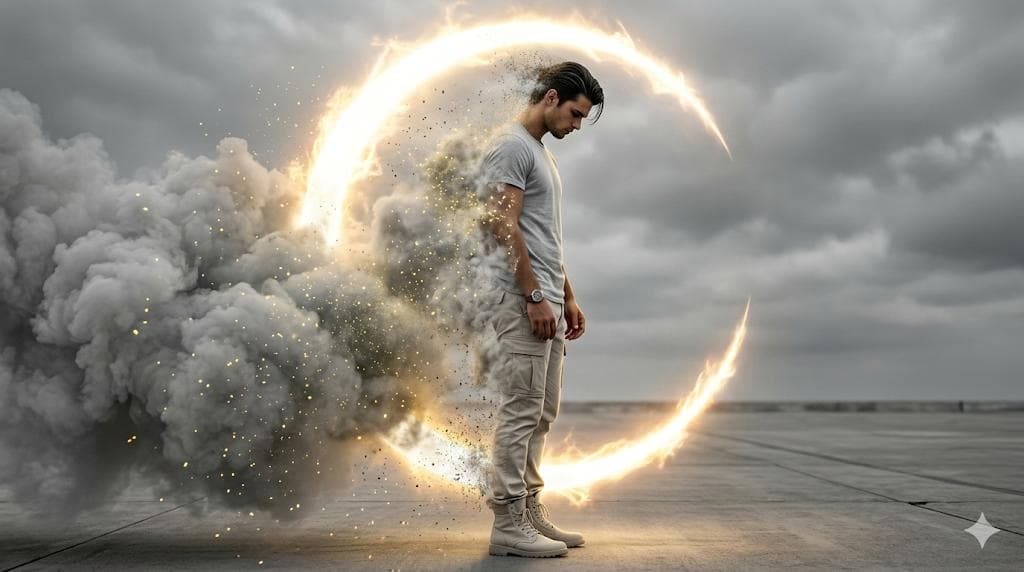
Create an ultra-realistic, cinematic 8K image with high-contrast dramatic lighting and a photo-real digital painting aesthetic-use face reference exactly. The man is shown in a full-body side profile facing right, his face and hairstyle copied perfectly with no alterations He wears modern casual streetwear; a light grey crewneck t-shirt, light neutral cargo pants, light-colored high-top boots, and a watch on his left wrist. His posture is slightly slumped, head bowed, eyes looking downward, hands relaxed at his sides, conveying deep introspection and sorrow. Nearly half of his body is dissolving into extremely thick, cloud-like grey smoke filled with glowing yellow dust particles. His left arm, shoulder, torso, legs, and part of his hair become transparent as they break into luminous particles, suggesting active disintegration Behind and partially surrounding him is a massive glowing crescent (C-shaped) energy aura, emitting fiery golden-white plasma light. This aura acts as a powerful rim and backlight, highlighting the smoke, dust, and silhouette. The setting is minimal and stark: a concrete or desolate paved surface meeting a heavily overcast sky. The color palette is nearly monochrome greys and whites, contrasted by intense amber-gold glow, Shallow depth of field, glow/bloom lighting, particle dispersion, cinematic composition, emotional and dramatic atmosphere.

CGI Art AI 图像提示词 prompt 404
twittermacro-close-upcgi-art

I asked Nano Banana to give insects a copper wire makeover Prompt: Input = Garden Insect (e.g., Ladybug, Praying Mantis, Butterfly, Bee)Act as an electrician. For every insect, identify a wire type (e.g., Stranded Copper, Coaxial, Romex, Fiber Optic).Function Draw ($Insect, $ Wire) Anchor: [$Insect] :: [$Wire Type]::4Morphology: Conductive biology, [$Insect] constructed entirely from twisted wire, wings formed from fine mesh screens or fiber optic strands, joints soldered together, metallic shine::3Material Physics: Physical properties of Wire (rigid strands, metallic reflection, color coding of insulation) applied to exoskeletons, industrial sharpness::3Illumination: Workbench lighting, vise grips holding the bug, blueprints in background::2Render Stack: Industrial macro photography, metallic reflections, sharp focus, 8k::1Negative: [Chitin, wings, fuzz, green, natural, organic]:: -1Output: 2x2 grid, for each panel execute Draw Function the insect plus the wire type. Name of the insect underneath.

从参考到成图

三步开始,不必从空白画布想起。

  1. 01

    选择参考

    先按构图、色彩和用途选择最接近目标的样片。

  2. 02

    调整细节

    进入生成器后修改主题、文案、风格和画面比例。

  3. 03

    生成成图

    保留预填参考图,一键生成,再针对结果继续微调。

没有完全合适的样片?

从空白提示词开始,自由定义主题、构图、文字和画面比例。

从零创作
使用说明

让第一次生成更接近成品。

01

CGI Art 提示词适合做什么

CGI Art 提示词用于围绕特定风格、主体、媒介或摄影用途组织视觉创意,公开示例会随内容发布持续更新。

02

怎样写好 CGI Art 提示词

先写明主要主体,再补充构图、环境、灯光、配色、材质、镜头或渲染方式、画面比例与最终用途。

03

如何继续优化生成结果

删除互相冲突的风格要求,保持一个清晰的视觉方向,并在发布前检查结构、文字、标志、透视和分类相关细节。

常见问题

开始前,你可能还想知道。

CGI Art AI 图像提示词是什么?

这是归入 CGI Art 分类的可复用视觉简报,可根据不同主体、参考图、构图和输出尺寸进行修改。

CGI Art 示例是如何加入这个合集的?

当已发布提示词的主体、风格或用途与 CGI Art 分类匹配时,它们会被归入这个合集。

这些 CGI Art 提示词可以修改吗?

可以。替换主体和场景后,再根据项目调整灯光、配色、材质、镜头或渲染方式、画面比例和细节程度。