General 提示词分类

General AI 图像提示词

浏览 General 相关示例与可复用的 AI 图像提示词方向,用于规划主体、构图、灯光、色彩、材质和视觉风格。

该合集依据 PromptPlum 的 General 分类整理。可将这些参考方向改写为适合自身主体、尺寸与视觉目标的提示词。
视觉参考组
general
内容规模
2 个公开提示词
视觉参考组02 / REF
General AI 图像提示词 reference 101
General AI 图像提示词 reference 202
VEYVIA / GENERAL已整理
提示词画廊

选择一个最接近的画面。

打开任意样片查看完整提示词,或直接带着参考图与画面比例进入生成器。

2 个公开提示词
General AI 图像提示词 prompt 101
generalbranding-advertisingluxury-branding

UNIVERSAL LOGO IDENTITY MASTER PROMPT Use the uploaded logo EXACTLY as provided. Do NOT redesign, redraw, recolor, crop, distort, recreate, or modify it in any way. ASPECT RATIO: 5:7 Vertical LOGO PRESENTATION Remove any supporting surface completely. There must be: • No podium • No pedestal • No platform • No stage • No table • No floor stand • No display block • No base of any kind The logo must float naturally in mid-air as the single hero object with elegant cinematic depth. BACKGROUND Create a premium Apple-style luxury environment using the brand colors extracted from the uploaded logo. Include: • Soft brand-color to light grey gradient • Warm ivory highlights • Soft charcoal transitions • Golden hour lighting • Volumetric light rays • Atmospheric haze • HDR reflections • Cinematic glow • Soft bloom • Refined vignette • Elegant depth • Apple keynote minimalism The environment should feel clean, premium, bright, and sophisticated without becoming too dark. LOGO HERO Place the uploaded logo perfectly centered. The logo should float naturally with: • Soft rim lighting • Elegant glow • Glass reflections • Premium shadows • Cinematic depth • Balanced composition • No supporting surface underneath The uploaded logo remains completely untouched and is the unmistakable focal point. FLOATING BRAND ELEMENTS Automatically identify the brand's industry from the uploaded logo and generate premium floating elements that naturally represent that category. Examples include products, tools, materials, interface elements, symbols, packaging, abstract forms, or signature objects relevant to the brand. Arrange them naturally around the logo with generous spacing. Keep the composition elegant, balanced, and uncluttered. MATERIALS • Crystal Glass • Frosted Glass • Brushed Aluminium • Matte Metal • Chrome • Premium Acrylic • Ceramic • Transparent Glass • Luxury Polished Surfaces LIGHTING • Hollywood Commercial Lighting • Warm Key Light • Golden Hour Ambient Light • Luxury Rim Lighting • Soft Bounce Lighting • HDR Reflections • Ray Tracing • Global Illumination • Natural Highlights • Photorealistic Shadows COLOR PALETTE Extract the complete color palette directly from the uploaded logo. Extend it naturally into: • Premium gradients • Ambient glow • Reflections • Floating particles • Soft highlights Maintain perfect brand consistency throughout the composition. COMPOSITION • Swiss Grid • Golden Ratio • Apple-level Negative Space • Editorial Layout • Balanced Visual Hierarchy • Luxury Presentation • Minimal Yet Visually Rich TYPOGRAPHY PANEL Create a refined Swiss editorial information panel featuring: • Brand Name • Industry • Brand Personality • Brand Values • Primary Colors (HEX) • Typography Style • Target Audience • Brand Positioning • Brand Keywords • Visual Language Use clean white typography with premium spacing and alignment. CAMERA • 50mm Hero Lens • Eye-Level Perspective • Luxury Product Photography • Shallow Depth of Field • Ultra-Sharp Focus QUALITY • Apple Keynote • Pentagram • Landor • Luxury FMCG • Hollywood Commercial • IMAX • Octane Render • Unreal Engine 5 • Redshift • V-Ray • HDR • Ray Tracing • Global Illumination • 8K Ultra HD • Hyper-Realistic • Behance Featured • Red Dot Award • Awwwards • Cannes Lions FINAL OUTPUT Create a museum-quality luxury brand identity poster where: • The uploaded logo remains completely untouched. • The logo floats naturally in mid-air. • No podium, pedestal, platform, stage, table, display block, or base appears anywhere. • Premium floating elements intelligently reflect the brand's industry. • The background is clean, cinematic, luxurious, and Apple-inspired. • The composition is minimal, elegant, balanced, and award-winning.

General AI 图像提示词 prompt 202
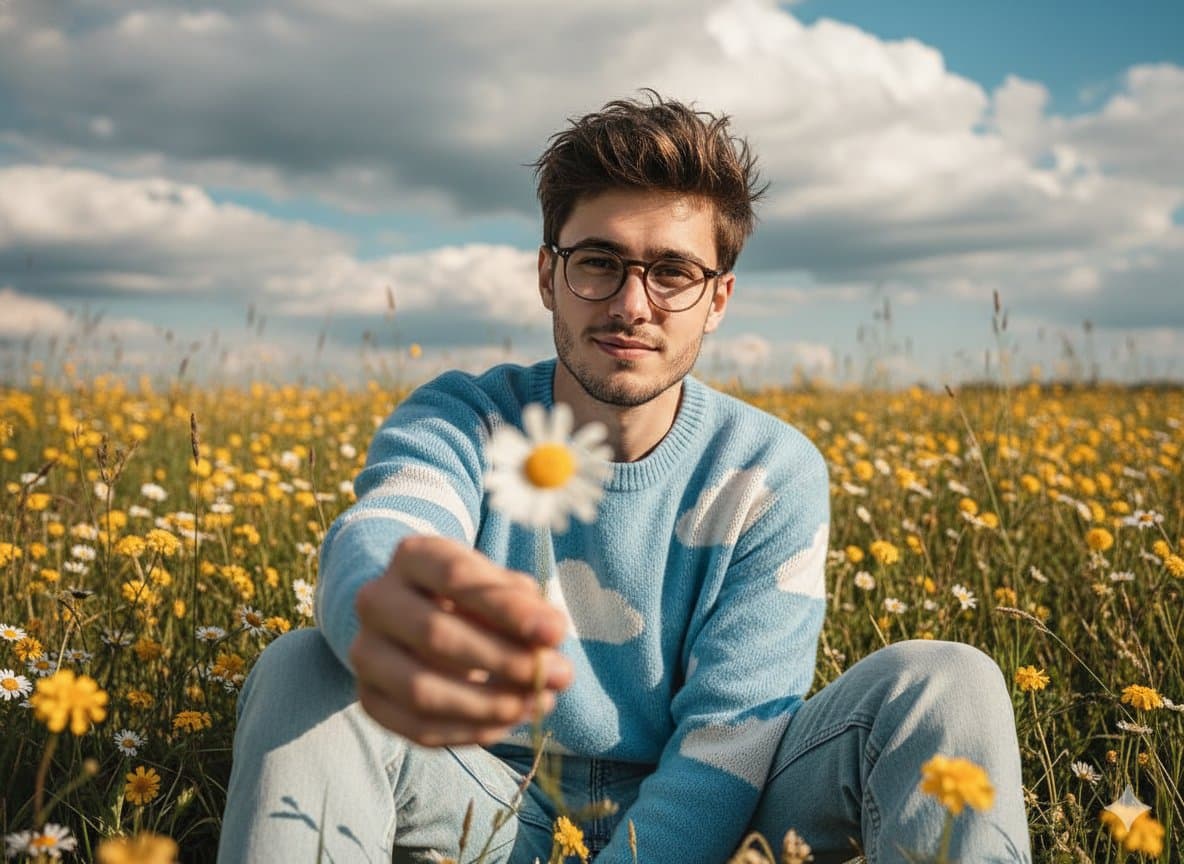
generalai image promptsprompt library

Gemini 2.5 Nano Banana on Google AI Studio. { "Objective": "Create a cinematic, wide-angle portrait prompt for an image generation model.", "Scene": { "Setting": "Wildflower field during the day", "Environment_Details": { "Flora": ["yellow wildflowers", "daisies"], "Sky": "dramatic, partly cloudy sky", "Lighting": "natural, soft lighting with warm, vibrant tones" } }, "Subject": { "Description": "Young man sitting in the wildflower field", "Pose": { "Body": "Sitting, leaning slightly forward", "Gesture": "Extending one arm to hold a daisy toward the camera", "Foreground_Effect": "Daisy held close to the lens, softly blurred" }, "Appearance": { "Expression": "Soft and charming", "Hair": "Messy, relaxed style", "Clothing": { "Top": "Sky-blue sweater with white cloud patterns", "Bottom": "Light-wash denim jeans" } } }, "Style": { "Aesthetic": "Cinematic, editorial, nostalgic, dreamy", "Color_Grade": "Warm, vibrant with vintage film tones", "Camera": { "Composition": "Wide-angle, editorial-style", "Depth_of_Field": "Shallow", "Mood": "Timeless, cinematic mood with dreamy atmosphere" } }, "Response_Format": "Image generation prompt" }

从参考到成图

三步开始,不必从空白画布想起。

  1. 01

    选择参考

    先按构图、色彩和用途选择最接近目标的样片。

  2. 02

    调整细节

    进入生成器后修改主题、文案、风格和画面比例。

  3. 03

    生成成图

    保留预填参考图,一键生成,再针对结果继续微调。

没有完全合适的样片?

从空白提示词开始,自由定义主题、构图、文字和画面比例。

从零创作
使用说明

让第一次生成更接近成品。

01

General 提示词适合做什么

General 提示词用于围绕特定风格、主体、媒介或摄影用途组织视觉创意,公开示例会随内容发布持续更新。

02

怎样写好 General 提示词

先写明主要主体,再补充构图、环境、灯光、配色、材质、镜头或渲染方式、画面比例与最终用途。

03

如何继续优化生成结果

删除互相冲突的风格要求,保持一个清晰的视觉方向,并在发布前检查结构、文字、标志、透视和分类相关细节。

常见问题

开始前,你可能还想知道。

General AI 图像提示词是什么?

这是归入 General 分类的可复用视觉简报,可根据不同主体、参考图、构图和输出尺寸进行修改。

General 示例是如何加入这个合集的?

当已发布提示词的主体、风格或用途与 General 分类匹配时,它们会被归入这个合集。

这些 General 提示词可以修改吗?

可以。替换主体和场景后,再根据项目调整灯光、配色、材质、镜头或渲染方式、画面比例和细节程度。