Illusion 提示词分类

Illusion AI 图像提示词

浏览 Illusion 相关示例与可复用的 AI 图像提示词方向,用于规划主体、构图、灯光、色彩、材质和视觉风格。

该合集依据 PromptPlum 的 Illusion 分类整理。可将这些参考方向改写为适合自身主体、尺寸与视觉目标的提示词。

视觉参考组
illusion
内容规模
3 个公开提示词
视觉参考组03 / REF
Illusion AI 图像提示词 reference 101
Illusion AI 图像提示词 reference 202
Illusion AI 图像提示词 reference 303
VEYVIA / ILLUSION已整理
提示词画廊

选择一个最接近的画面。

打开任意样片查看完整提示词,或直接带着参考图与画面比例进入生成器。

3 个公开提示词
Illusion AI 图像提示词 prompt 101
illusionentertainment-musicstreetwear

Ultra-realistic top-down street-fashion composition showing an adult woman standing on a giant smartphone music-player interface embedded in a city sidewalk. Use convincing forced perspective so she appears tiny on the oversized album artwork. Style her in edgy Y2K streetwear with braids, bandana, round glasses, layered silver jewelry, dark cargo shorts, socks, and suede shoes; place a burgundy shoulder bag nearby. Include the photographer's shoes at the bottom edge to reinforce the illusion. Realistic concrete, soft overcast light, subtle shadows, crisp interface geometry without real app logos, editorial urban photography.

Illusion AI 图像提示词 prompt 202
illusiondigital-manipulationsurrealism-photorealism

Surreal out-of-bounds scale-manipulation photograph, vertical 4:5, casual streetwear aesthetic, hyper-realistic composite, shot from a HIGH ANGLE looking down. **BASE LAYER:** The torso of a woman seen from above, wearing an oversized cropped brown-taupe washed cotton work jacket with a full-length zipper, a flap chest pocket and boxy sleeves, worn open over a white ribbed tank top, with wide-leg BLACK trousers filling the lower third of the frame and chunky black leather lug-sole loafers — only her torso, hands and legs are visible in foreshortening, her head out of frame. A black belt with a large oval polished silver buckle, and a small carabiner with keys clipped to the belt loop hanging over the black trousers. **MIDDLE LAYER:** She holds a smartphone in both open hands, fingers extended, palms relaxed as if presenting an offering; large hands in the foreground wearing several chunky silver rings. The phone screen displays the LIVE CAMERA APP interface — visible mode selector reading CINEMATIC / VIDEO / PHOTO / PORTRAIT / PANO, a circular shutter button and the bottom home bar — the fact that it is the live camera rather than a saved photo is what makes the illusion unsettling. **TOP LAYER — THE OUT-OF-BOUNDS EFFECT:** A MINIATURE version of the same woman (face of the reference person), about 1/4 scale, whose legs and black loafers are INSIDE the phone screen while the rest of her body emerges from the top edge of the phone and stands upright in real space above it. She stands smiling broadly, right hand raised touching her temple and sunglasses. Her outfit is IDENTICAL to the large subject’s — a black baseball cap worn backwards, black rectangular sunglasses with thick frames, the same brown-taupe cropped work jacket open over a white ribbed tank top, a thin silver chain necklace with a small red stone pendant, chunky silver rings, the same black belt with oval silver buckle, wide-leg black trousers and black lug-sole loafers — this exact garment continuity between the two scales is the key to the composite. **BACKGROUND:** Essentially absent; the large subject’s own body fills the entire frame with only a sliver of gray concrete ground visible in the upper right corner; this lack of spatial reference is deliberate and prevents the montage from being exposed. **LIGHTING:** Natural outdoor daylight from above, clear or lightly overcast, soft shadows, with excellent lighting consistency between the hands, the phone and the miniature figure — the single element holding the composite together. **Palette:** Restrained warm neutrals — dominant black trousers and cap against the brown-taupe jacket, with the white tank top as the brightest tonal separator and silver hardware as the only metallic accent; the brown jacket anchors the upper two thirds and keeps the frame from flattening into pure black. Shot on 28-35mm from a high angle, exaggerating the size of the hands in the foreground, deep depth of field with everything sharp.

Illusion AI 图像提示词 prompt 303
ai image promptsprompt libraryillusion

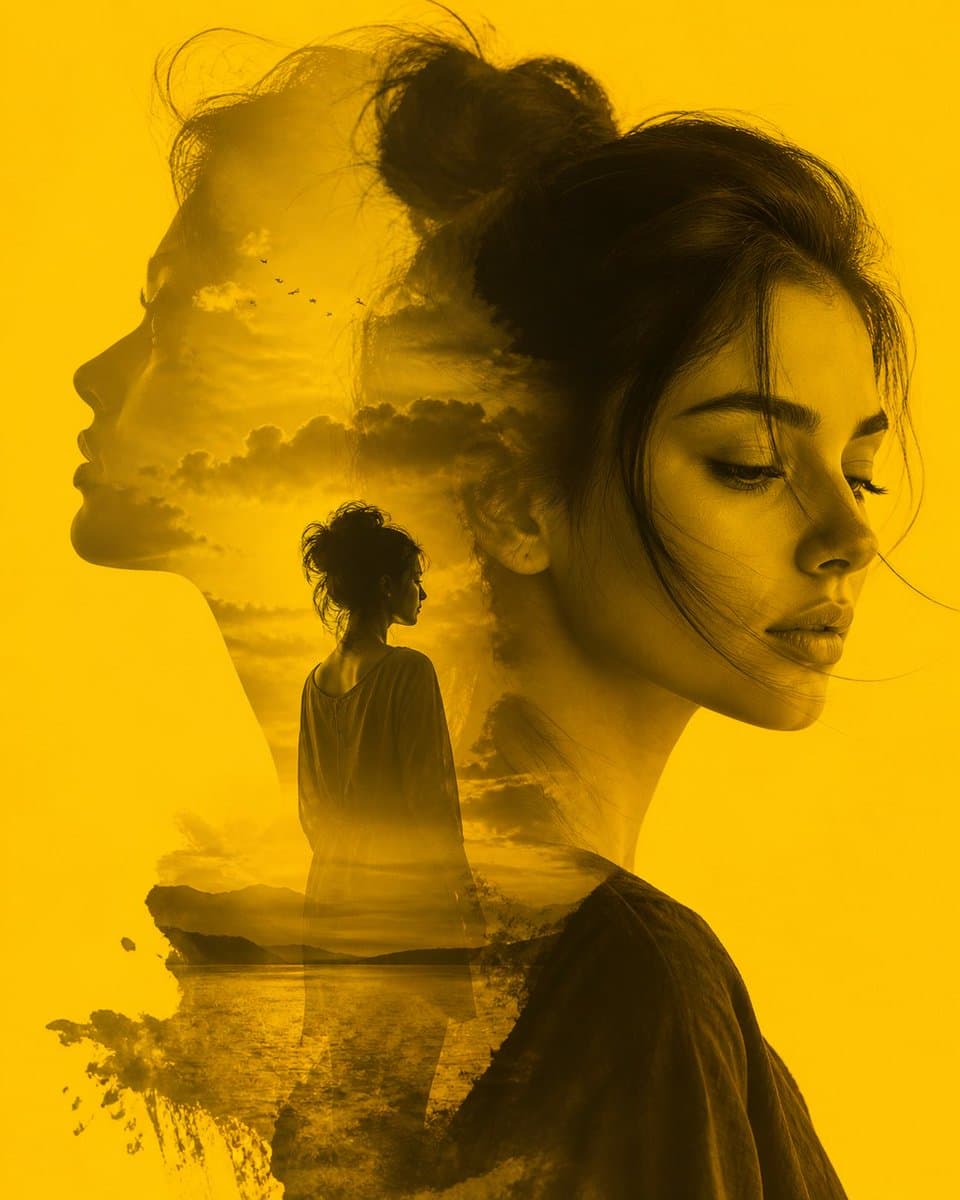
A striking double exposure composition in a monochromatic golden-yellow hue, blending the profiles of a woman with a serene landscape. The primary subject features a soft, detailed close-up of a woman's face in three-quarter view, her eyes downcast in a pensive or melancholic expression. Within her silhouette, a second profile gazes toward the horizon, revealing a dreamlike scene of a distant figure standing by a calm lake at sunset. The image is characterized by smooth transitions, atmospheric clouds, and a flock of birds, evoking a deep sense of introspection, memory, and longing.

从参考到成图

三步开始,不必从空白画布想起。

  1. 01

    选择参考

    先按构图、色彩和用途选择最接近目标的样片。

  2. 02

    调整细节

    进入生成器后修改主题、文案、风格和画面比例。

  3. 03

    生成成图

    保留预填参考图,一键生成,再针对结果继续微调。

没有完全合适的样片?

从空白提示词开始,自由定义主题、构图、文字和画面比例。

从零创作
使用说明

让第一次生成更接近成品。

01

Illusion 提示词适合做什么

Illusion 提示词用于围绕特定风格、主体、媒介或摄影用途组织视觉创意,公开示例会随内容发布持续更新。

02

怎样写好 Illusion 提示词

先写明主要主体,再补充构图、环境、灯光、配色、材质、镜头或渲染方式、画面比例与最终用途。

03

如何继续优化生成结果

删除互相冲突的风格要求,保持一个清晰的视觉方向,并在发布前检查结构、文字、标志、透视和分类相关细节。

常见问题

开始前,你可能还想知道。

Illusion AI 图像提示词是什么?

这是归入 Illusion 分类的可复用视觉简报,可根据不同主体、参考图、构图和输出尺寸进行修改。

Illusion 示例是如何加入这个合集的?

当已发布提示词的主体、风格或用途与 Illusion 分类匹配时,它们会被归入这个合集。

这些 Illusion 提示词可以修改吗?

可以。替换主体和场景后,再根据项目调整灯光、配色、材质、镜头或渲染方式、画面比例和细节程度。