Image Filters 提示词分类

Image Filters AI 图像提示词

浏览 Image Filters 相关示例与可复用的 AI 图像提示词方向,用于规划主体、构图、灯光、色彩、材质和视觉风格。

该合集依据 PromptPlum 的 Image Filters 分类整理。可将这些参考方向改写为适合自身主体、尺寸与视觉目标的提示词。
视觉参考组
image filters
内容规模
2 个公开提示词
视觉参考组02 / REF
Image Filters AI 图像提示词 reference 101
Image Filters AI 图像提示词 reference 202
VEYVIA / IMAGE-FILTERS已整理
提示词画廊

选择一个最接近的画面。

打开任意样片查看完整提示词,或直接带着参考图与画面比例进入生成器。

2 个公开提示词
Image Filters AI 图像提示词 prompt 101
image filtersimage-filtersautomotive

Don’t change your face! Don’t change your facial features! Don’t change the proportions of your body, your eyes are brown-green! Her black hair was pulled back in a low bun with an even parting and with individual strands near her face Size 9:16 vogue style Make-up with an emphasis on the eyes, cat arrows on the upper eyelid, nude matte lipstick dusty rose outlined with a lip pencil a shade darker than lipstick wet highlighter. A film filter. The grain size of the film. A small nebula. A little noise in the photo. portrait of beautiful women visible eye capillaries, natural skin texture with pores and micro-imperfections, shot on, Fujifilm GFX 100, 100mm lens, depth of field, subsurface scattering, soft morning light, Tyndall effect, hyper-detailed iris, unedited RAW photo 8k resolution Portrait of a stylish woman driving a car, mid-shot through the windshield, a woman in a black sleeveless turtleneck and thin rectangular sunglasses, slightly lowering her glasses with her fingers with neatly painted nails, looking in a semi-profile in the rearview mirror with large gold hoop earrings and thin rings on her fingers, a confident tense expression and gaze at the camera; the interior of the car is blurred, the steering wheel in the foreground is slightly blurred, light glare and reflections on the glass create a smoky atmosphere, soft diffused light with a faint contour rim along the contour of the face; the mood is cinematic, cold-warm palette with muted tones, vignetting, film grain, high contrast, fashion-edited style, realistic skin texture; camera: full-frame lens 50 mm, f/1.8, shallow depth of field, shutter speed ~1/125, ISO ~800, bokeh, eye focus, light soft focus and retro processing in the style of Kodak Portra.

Image Filters AI 图像提示词 prompt 202
image filtersai image promptsprompt library

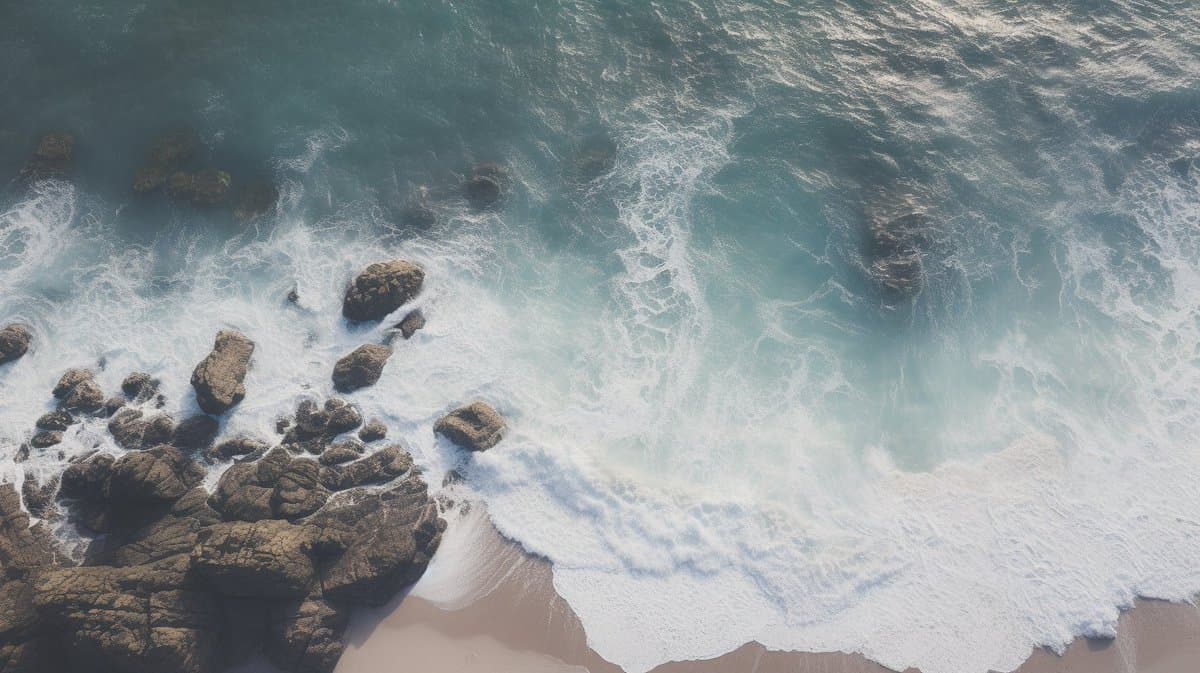
an aerial shot of a rocky beach with waves crashing over rocks, in the style of minimalist, creative commons attribution, multiple filter effect, marble --ar 16:9 --style BpJsIOYiA8sAkGbsnKfMBNNdOZHTUNy9uTmULkX-qUFOTLR7h-qUFOTLR7h

从参考到成图

三步开始,不必从空白画布想起。

  1. 01

    选择参考

    先按构图、色彩和用途选择最接近目标的样片。

  2. 02

    调整细节

    进入生成器后修改主题、文案、风格和画面比例。

  3. 03

    生成成图

    保留预填参考图,一键生成,再针对结果继续微调。

没有完全合适的样片?

从空白提示词开始,自由定义主题、构图、文字和画面比例。

从零创作
使用说明

让第一次生成更接近成品。

01

Image Filters 提示词适合做什么

Image Filters 提示词用于围绕特定风格、主体、媒介或摄影用途组织视觉创意,公开示例会随内容发布持续更新。

02

怎样写好 Image Filters 提示词

先写明主要主体,再补充构图、环境、灯光、配色、材质、镜头或渲染方式、画面比例与最终用途。

03

如何继续优化生成结果

删除互相冲突的风格要求,保持一个清晰的视觉方向,并在发布前检查结构、文字、标志、透视和分类相关细节。

常见问题

开始前,你可能还想知道。

Image Filters AI 图像提示词是什么?

这是归入 Image Filters 分类的可复用视觉简报,可根据不同主体、参考图、构图和输出尺寸进行修改。

Image Filters 示例是如何加入这个合集的?

当已发布提示词的主体、风格或用途与 Image Filters 分类匹配时,它们会被归入这个合集。

这些 Image Filters 提示词可以修改吗?

可以。替换主体和场景后,再根据项目调整灯光、配色、材质、镜头或渲染方式、画面比例和细节程度。