Movies 提示词分类

Movies AI 图像提示词

浏览 Movies 相关示例与可复用的 AI 图像提示词方向,用于规划主体、构图、灯光、色彩、材质和视觉风格。

该合集依据 PromptPlum 的 Movies 分类整理。可将这些参考方向改写为适合自身主体、尺寸与视觉目标的提示词。
视觉参考组
movies
内容规模
3 个公开提示词
视觉参考组03 / REF
Movies AI 图像提示词 reference 101
Movies AI 图像提示词 reference 202
Movies AI 图像提示词 reference 303
VEYVIA / MOVIES已整理
提示词画廊

选择一个最接近的画面。

打开任意样片查看完整提示词,或直接带着参考图与画面比例进入生成器。

3 个公开提示词
Movies AI 图像提示词 prompt 101
media & entertainmentmedia-entertainmentmovies

Prompt Studio: Cinema Ticket with Nano Banana Pro in Firefly Boards Epic 3D macro scene: a torn cinema ticket filling the entire frame, shot from a low dramatic angle just centimeters above the surface. The ticket occupies 80% of the composition, every fiber of aged paper visible, every ink groove tactile. [FILM TITLE] erupts upward from the printed text in massive scale relative to the stub. [KEY SCENE] frozen at its most cinematic moment dominates the upper half of the frame. [CHARACTER] towering mid-action, their silhouette breaking above the ticket's top edge into the cinema darkness. [LOCATION FROM FILM] sprawls across the full width of the stub's surface in extraordinary miniature relief, each building and landmark rendered in obsessive detail, close enough to read street signs. The seat number is carved deep into the paper, visible in the ghost-cinema behind, one amber light among dark rows, bokeh-soft but unmistakable. The date stamp radiates weather directly, moisture in the air, cold breath, summer haze rising off the surface. The perforated tear edge, now monumental, becomes a cliff face / shoreline / fault line running the full right side of frame. The barcode looms large, each bar a skyscraper in silhouette. The projector beam enters hard from upper left, raking across the ticket surface and sculpting every texture. Extreme macro tilt-shift, f/1.4 depth of field, front edge sharp / back edge dissolving into cinema black. 8K. The ticket is not a world in miniature, it IS the world, seen from inside it. Check ALTs for ideas 👇 @AdobeFirefly

Movies AI 图像提示词 prompt 202
ai image promptsprompt librarymovies

in ALT - shorter - below: [Create a professional Hollywood blockbuster movie poster design featuring all 8 superheroes from the provided images. Design requirements: MAIN COMPOSITION: - Arrange all 8 characters in a dynamic, heroic group composition with depth and hierarchy - Central hero(es) in foreground, others positioned at various depths creating layered effect - Dramatic upward-looking angle (worm’s eye view) to emphasize power and scale - Epic sky or dramatic background (stormy clouds, city skyline, or cosmic space) - Cinematic lighting with strong highlights and shadows, rim lighting on characters]

Movies AI 图像提示词 prompt 303
ai image promptsprompt librarymovies

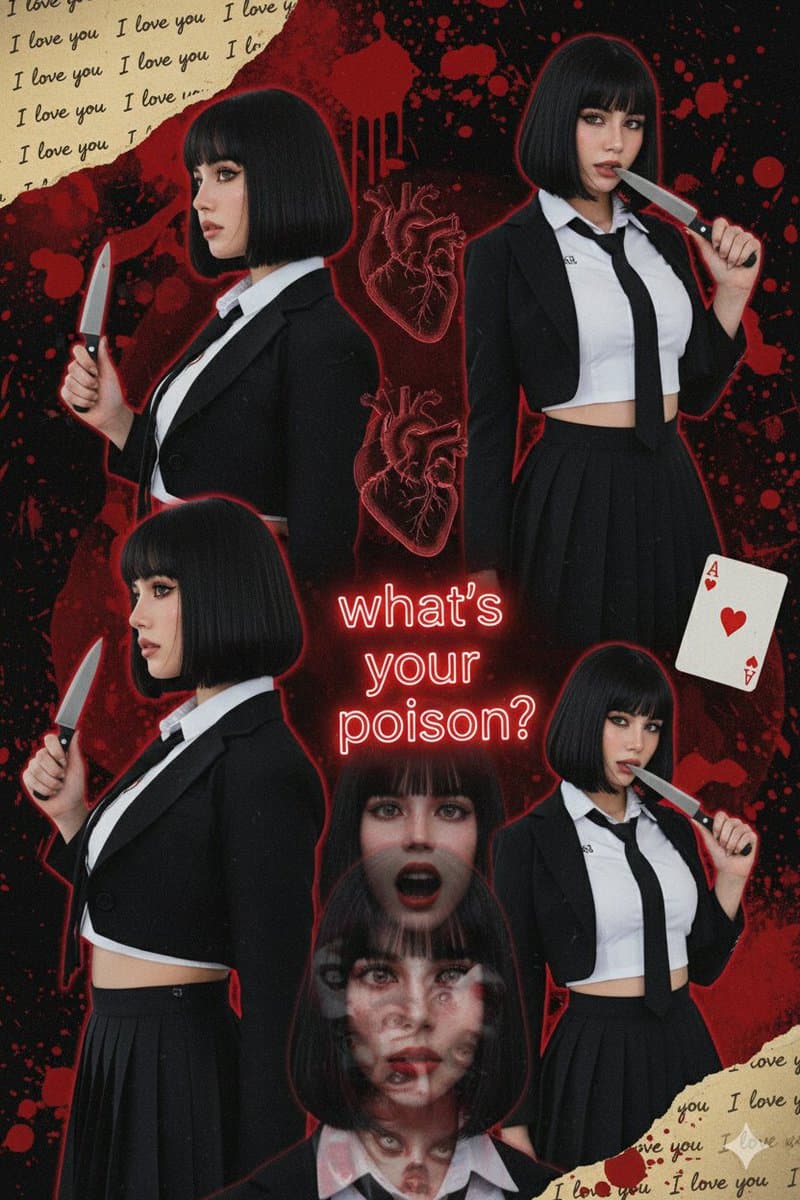
What are your two favorite horror movies? 🎥 { "prompt": { "face_requirement": "Use the attached reference face with 100% accuracy, no changes at all", "style": [ "fan art poster", "collage", "dark", "thriller", "psychological horror" ], "concept": "A dark collage-style fan art poster expressing mystery, revenge, madness, and psychological chaos", "composition": { "type": "multi-pose montage", "poses": [ { "position": "top right", "description": "Front-facing pose, holding a knife touching the lips, seductive yet defiant gaze", "face": "unchanged reference face" }, { "position": "middle left", "description": "Profile view, holding a knife upright, cold and determined expression", "face": "unchanged reference face" }, { "position": "bottom right", "description": "Head slightly tilted, knife pressed against the cheek", "face": "unchanged reference face" }, { "position": "bottom", "description": "Overlapping faces in a horror style inspired by Tomie, eerie and supernatural", "face": "unchanged reference face" } ] }, "makeup": { "skin": "pale porcelain, smooth and flawless", "eyes": "sharp winged eyeliner, long lashes", "lips": "natural tone or soft reddish tint" }, "lighting": "low-key dramatic lighting with high contrast", "mood": "dark, unsettling, seductive, psychological horror", "quality": [ "ultra-detailed", "cinematic", "high resolution", "poster-grade artwork" ] } }

从参考到成图

三步开始,不必从空白画布想起。

  1. 01

    选择参考

    先按构图、色彩和用途选择最接近目标的样片。

  2. 02

    调整细节

    进入生成器后修改主题、文案、风格和画面比例。

  3. 03

    生成成图

    保留预填参考图,一键生成,再针对结果继续微调。

没有完全合适的样片?

从空白提示词开始,自由定义主题、构图、文字和画面比例。

从零创作
使用说明

让第一次生成更接近成品。

01

Movies 提示词适合做什么

Movies 提示词用于围绕特定风格、主体、媒介或摄影用途组织视觉创意,公开示例会随内容发布持续更新。

02

怎样写好 Movies 提示词

先写明主要主体,再补充构图、环境、灯光、配色、材质、镜头或渲染方式、画面比例与最终用途。

03

如何继续优化生成结果

删除互相冲突的风格要求,保持一个清晰的视觉方向,并在发布前检查结构、文字、标志、透视和分类相关细节。

常见问题

开始前,你可能还想知道。

Movies AI 图像提示词是什么?

这是归入 Movies 分类的可复用视觉简报,可根据不同主体、参考图、构图和输出尺寸进行修改。

Movies 示例是如何加入这个合集的?

当已发布提示词的主体、风格或用途与 Movies 分类匹配时,它们会被归入这个合集。

这些 Movies 提示词可以修改吗?

可以。替换主体和场景后,再根据项目调整灯光、配色、材质、镜头或渲染方式、画面比例和细节程度。