Concept Art prompt library

Concept Art AI Image Prompts

Browse concept art examples and reusable AI image prompts for composition, lighting, color, materials, and style.

Browse a focused concept art category based on the PromptPlum taxonomy. Use the references as starting points, then rewrite each prompt for your own subject, format, and visual goal.

Visual reference set
concept art
Library size
9 public prompts
Visual reference set04 / REF
Concept Art AI Image Prompts reference 101
Concept Art AI Image Prompts reference 202
Concept Art AI Image Prompts reference 303
Concept Art AI Image Prompts reference 404
VEYVIA / CONCEPT-ARTCURATED
Prompt library

Choose the closest frame to begin.

Open any reference to inspect the full prompt, or take its image and aspect ratio straight into the generator.

9 public prompts
Concept Art AI Image Prompts prompt 101
twittergamingdigital-illustration

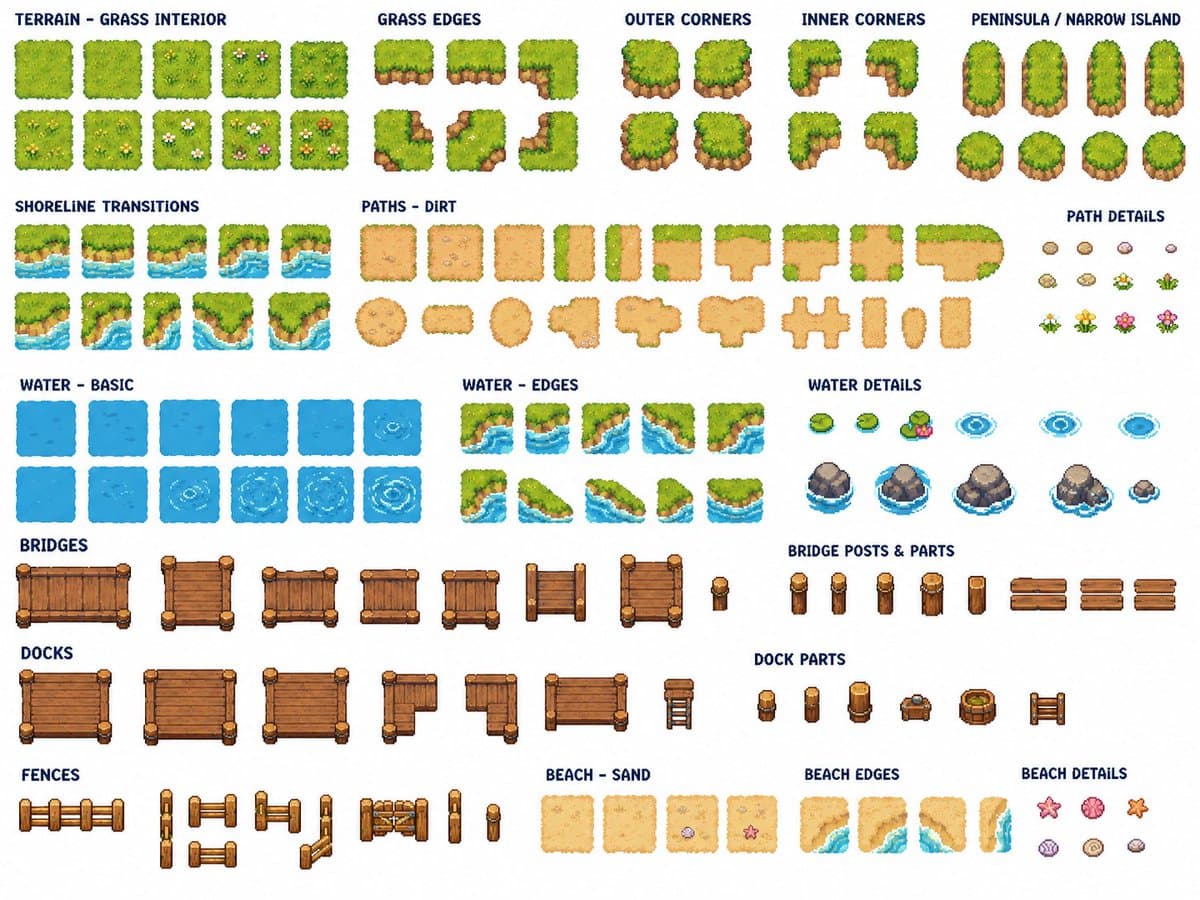
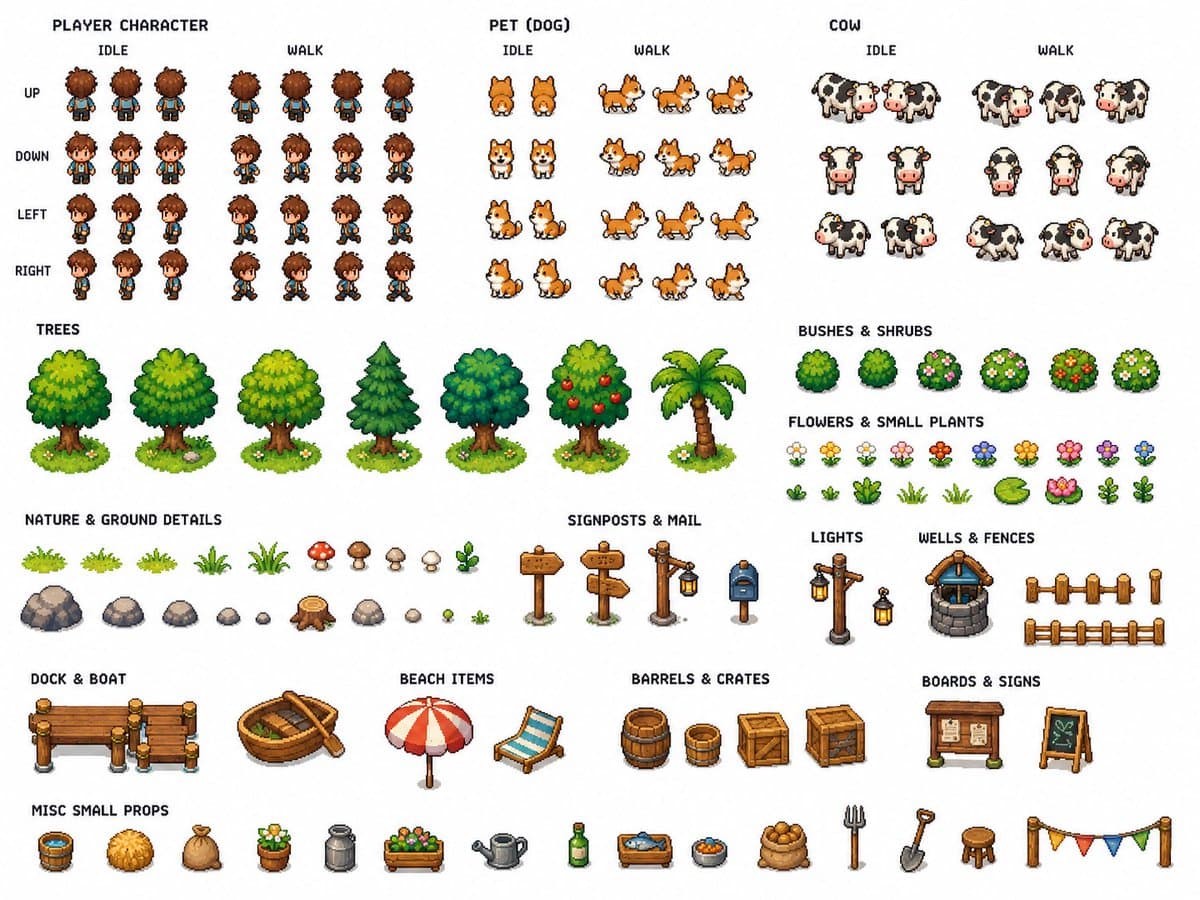
for create Tilesets: Use the provided reference image as Image A. Create 3 separate technical pixel art tileset sheets based on this cozy top-down island farming RPG scene. Keep the exact same art direction, soft pastel palette, cute farming village mood, clean readable top-down pixel art style, and handcrafted retro RPG aesthetic. This is not a scene illustration. This must be a production-ready technical asset sheet set for building the full game environment. Global requirements for all 3 sheets: - pure white background - all assets fully separated - enough spacing between every asset for easy cropping and reuse - consistent scale - high readability - clean organization by category - optimized quality for each asset - no overlapping objects - no mockup presentation - no UI - no extra scene composition - no realistic rendering - clean top-down 2D pixel art only Sheet 1: Terrain / Water / Paths / Bridges Include: - grass tiles - island edge tiles - cliff / dirt edge variants - sand tiles - sand to grass transition tiles - water tiles - shoreline tiles - water corner tiles - animated-looking water variants - dirt path tiles: horizontal, vertical, corners, T junctions, crossroads, end caps - wooden bridge tiles: horizontal, vertical, entrances, ends - dock tiles: straight segments, corners, ends, posts - fence tiles: horizontal, vertical, corners, gates - small terrain decorations: flowers, bushes, stones, grass tufts, lily pads Sheet 2: Buildings / Props / Nature Include: - cute houses with colorful roofs - one small shop - one barn - farm plot pieces - crop field soil tiles - watered soil - dry soil - several trees - one palm tree - bushes - flowers - logs - stumps - beach props: umbrella, towel or beach chair, shells, starfish - village props: signpost, mailbox, crate, barrel, sack, flower pot, bench, lantern, well, basket, market props - farm props: hay bale, trough, barn accessories Sheet 3: Characters / Animals / Crops Include: - one small player character - 4-direction idle sprites: front, back, left, right - 4-direction walking sprites with multiple frames - one tiny pet companion with idle and walking sprites - one cow with idle and simple movement frames - optional small extra farm animal - crop growth stages: - empty soil - planted seed - small sprout - medium growth - mature crop - harvested version Make the result look like a clean professional technical tileset pack for a cozy pixel art farming RPG, fully reusable for game production.
Concept Art AI Image Prompts prompt 202
twitter3d-rendercgi-3d-modeling

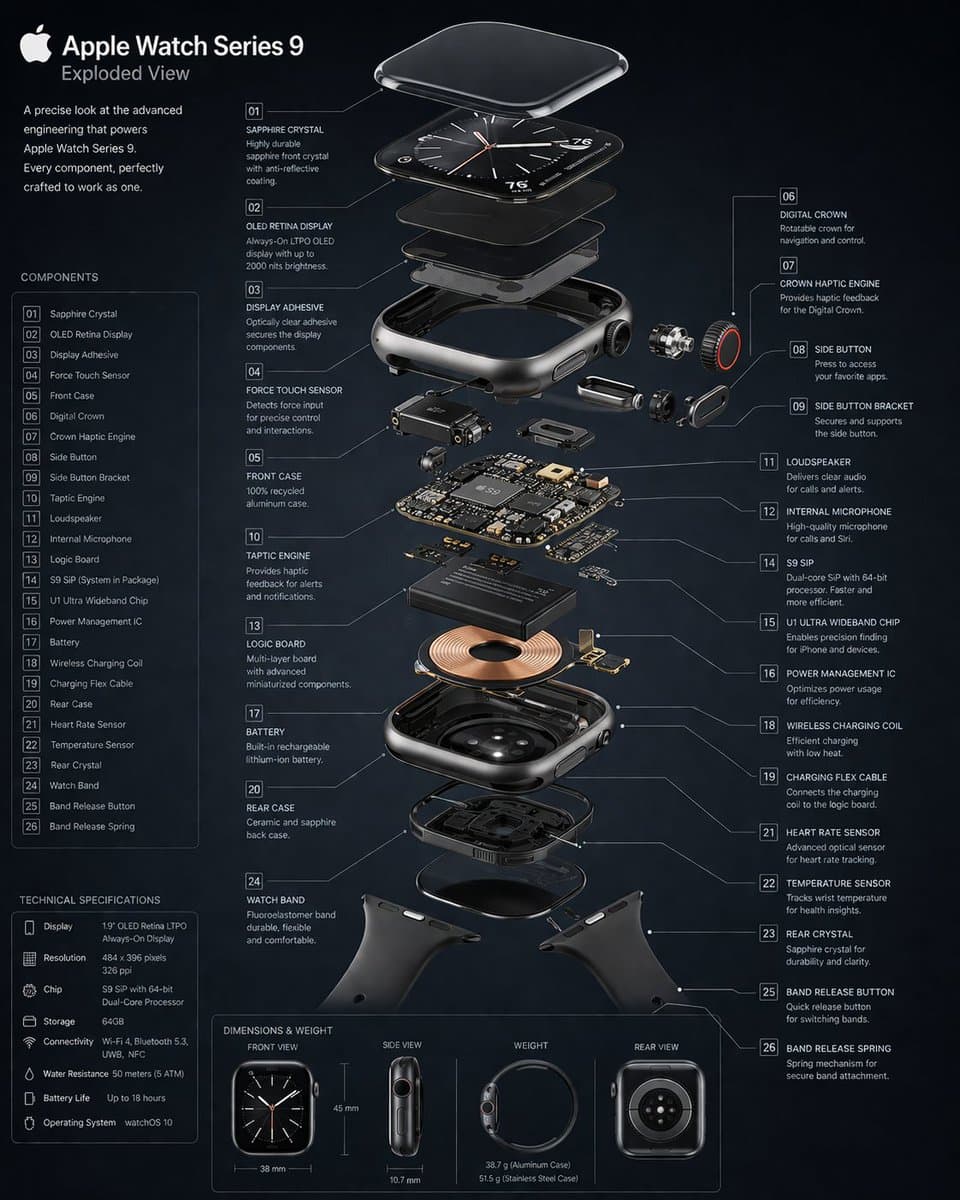
GPT Image 2 on ChatGPT Prompt : Create a 3D Insane detailed exploded assembly drawing of [subject or object]

Concept Art AI Image Prompts prompt 303
twitterbranding-advertisingeditorial-photography

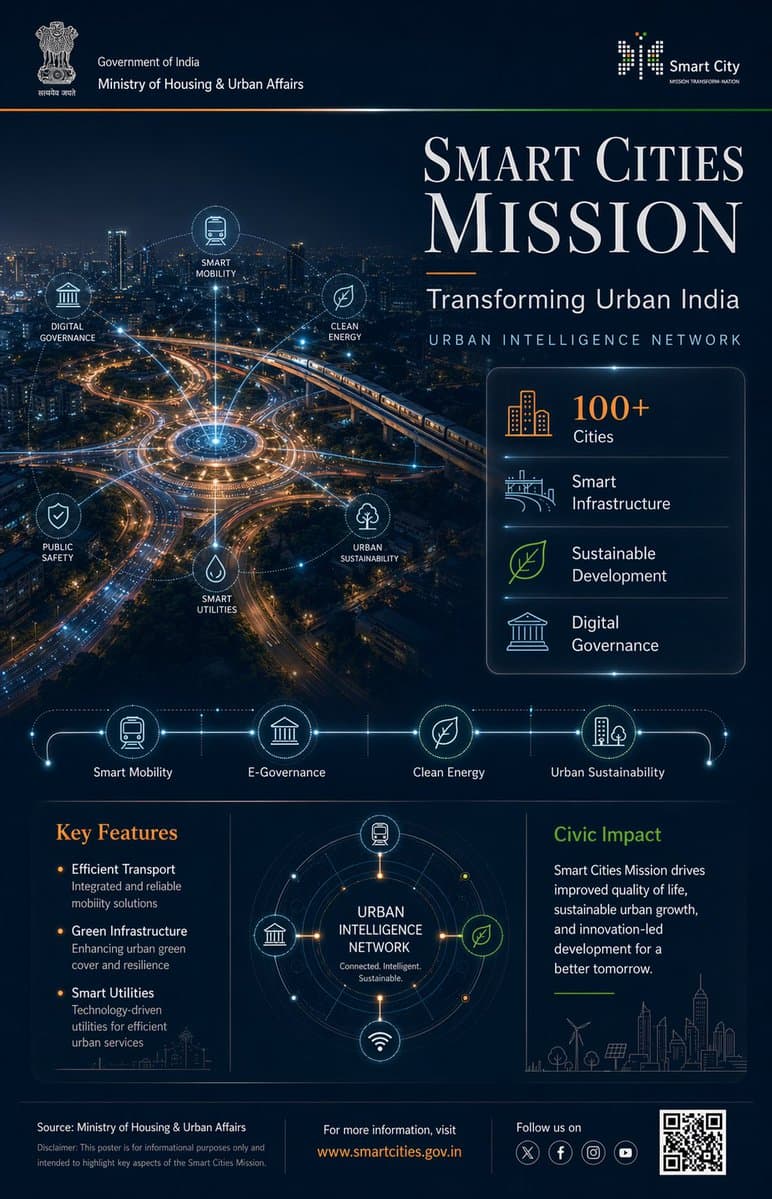
Prompt : Ultra-premium Indian Government infographic poster, 4:5 vertical format, concept-driven design titled "PRADHAN MANTRI FASAL BIMA YOJANA – Securing Farmers, Securing Future", designed in high-end editorial government communication style --- CORE CONCEPT: "PROTECTION FROM ABOVE" Agriculture visualized as being safeguarded by an invisible environmental protection system The entire layout follows a TOP → DOWN visual narrative: Protection originates from above and flows downward to farmers and crops --- LAYOUT STRUCTURE (CINEMATIC TOP-DOWN COMPOSITION): TOP 40% (DOMINANT VISUAL ZONE): Cinematic aerial view of Indian farmland - patchwork agricultural fields (green crops, golden harvest tones) - subtle rural elements (narrow pathways, irrigation lines, small huts) - realistic Indian geography (NOT western farmland) Above farmland: A semi-transparent protective dome (very subtle, premium execution) - dome edge defined by faint glowing contour lines - slight refraction effect (like glass/energy shield) - extremely controlled glow (no sci-fi exaggeration) ENVIRONMENTAL ELEMENTS interacting with dome: - rain clouds releasing water → diffused across dome surface - sunlight rays hitting dome → softly scattered - wind flow visualized using soft directional streaks These elements visually communicate: "risks are present but controlled" --- MID TRANSITION ZONE (SOFT BLEND): Gradient transition from farmland into information layer Add: - faint data lines emerging from farmland - small glowing nodes connecting different plots This creates subtle connection between agriculture and insurance system --- BOTTOM 60% (INFORMATION ARCHITECTURE): Structured like "support layers" --- TITLE BLOCK (UPPER BOTTOM SECTION): PRADHAN MANTRI FASAL BIMA YOJANA Subheading: Crop Protection for Every Farmer Typography: - Serif headline (Playfair Display style), tight kerning, high contrast - Subheading in clean sans-serif (Lato/Open Sans) --- DATA STRIP (HORIZONTAL): Minimal stat highlights: - Crop Insurance Coverage - Protection Against Natural Calamities - Affordable Premiums - Nationwide Reach Each separated with thin dividers, no heavy boxes --- FEATURE SYSTEM (ICON GRID): 4–6 minimal monoline icons: - crop - rain/weather - insurance shield - farmer - financial support Icons connected subtly with thin organic lines (not rigid tech lines) --- CENTER VISUAL (INFOGRAPHIC ELEMENT): Circular diagram inspired by crop cycle + protection - inner circle: crops - outer ring: risk factors (rain, drought, storm) - outermost layer: protection boundary Very clean, minimal, high breathing space --- IMPACT SECTION (BOTTOM RIGHT / FINAL BLOCK): Short refined text: "Ensuring financial stability for farmers, reducing crop loss risks, and enabling sustainable agricultural growth across India" --- FOOTER: Source: Ministry of Agriculture & Farmers Welfare Minimal disclaimer Optional QR placeholder --- COLOR SYSTEM (NATURE-LED PREMIUM): Primary: Deep Earth Green (#2E7D32) Secondary: Soil Brown (#6D4C41) Golden Harvest (#D4A373) Accents: Saffron (#FF9933) Soft Sky Blue (for climate elements) Background: Muted dark green / deep navy blend --- MATERIAL & FINISH: - matte textured background (paper grain subtle) - soft light gradients - minimal glow (only for dome + nodes) - no harsh contrast - realistic lighting balance --- DESIGN PRINCIPLES: - no clutter - no heavy UI boxes - organic flow, not rigid grid - emotional + informative balance - everything visually connected to farmland --- QUALITY: 8K resolution photorealistic + vector hybrid ultra sharp typography award-winning infographic aesthetic Behance feature-level quality --- NEGATIVE PROMPT: no futuristic city elements no neon glow no western farms no clutter no overdesigned UI no heavy gradients no unrealistic sci-fi shield --ar 4:5 --v 6 --style raw --q 2

Concept Art AI Image Prompts prompt 404
twitterillustrationgraphic-design

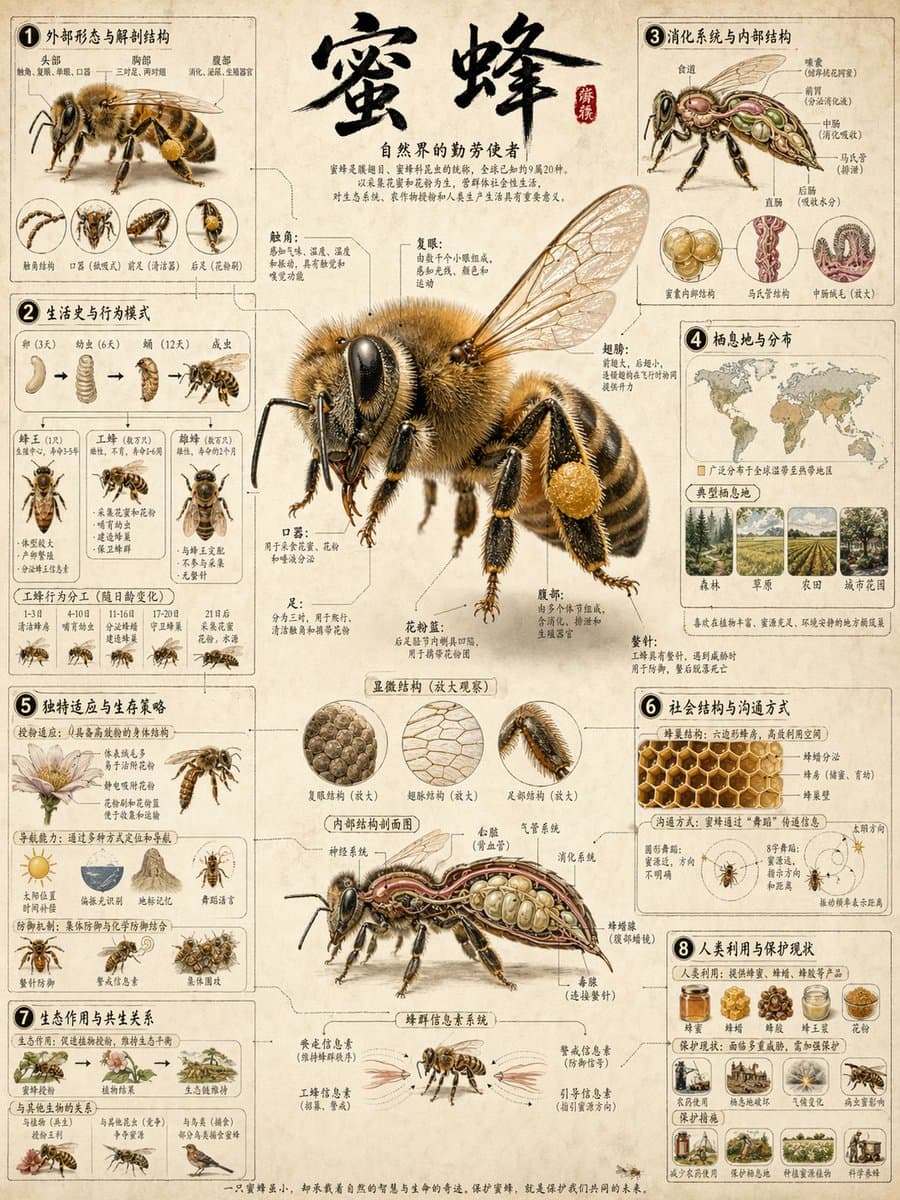
提示词如下 Role: World-class Scientific Encyclopedia Illustrator & Knowledge Graph Architect. Task: Generate a highly detailed, extremely intricate, and visually stunning "Universal Illustrated Encyclopedia Science Infographic" in a classic, unbranded (NO logos) scientific encyclopedia style. Subject Matter: Choose one from [People, Plants, or Animals]. Specific Subject: [e.g., The Giant Squid / Leonardo da Vinci / The Sequoia Tree]. Style: Fine, detailed scientific illustration on a retro, aged beige paper background. Delicate linework. Intricately complex and professional. Key Visual Requirements: 1. Lifelike 3D Effect (The Central Subject): The central subject in the "C position" must be rendered with extraordinary realism and dynamism. Create a dramatic sense of depth where the character, plant, or animal appears to break the frame, leaping or bursting out of the flat paper towards the viewer (an effect similar to anamorphic 3D or dynamic pop-out, with high-precision realism). 2. Layout & Strategic White Space: * Central Subject: Dominates the center, with intentional "strategic white space" around it to enhance the popping-out effect and make the figure the clear focal point. * Surrounding Modules: The surrounding area (left, right, top, bottom, and corners) must be filled with 6-8 distinct, highly organized knowledge modules, depending on the subject. There should be a sense of organized density, not random clutter. The modules themselves must have clear borders, headers, and extensive, detailed content. 3. Connections: Use a complex, logical network of fine leader lines, arrows, brackets, dotted lines, and small connection points to link the central figure to all surrounding modules, and interconnect the modules themselves into a cohesive knowledge web. 4. Text & Annotation (Hard Requirement - Must be CLEAR Chinese): * Main Title: A large, prominent, beautifully executed **Chinese calligraphy** (书法体) of the specific subject's name [e.g., "大王乌贼"]. * Calligraphic Accents: Scattered throughout the main content and module titles, use beautiful, clear Chinese calligraphy for important terms. * Standard Chinese Text: All other descriptive text, handwritten notes (大量清晰中文手写注释), module content, and annotations must be clear, legible Chinese characters (简体中文), not gibberish or unreadable symbols. Ensure text clarity is prioritized. * Leader Line Annotations: Every single small component, detail, submodule, diagram, or illustration within the modules must have detailed leader line annotations (拟解剖图) pointing directly to it for maximum professionalism and educational value. Every part should be labeled. Subject-Specific Module Structure (Example for general reference): A. For Humans [People]: - Module 1: Anatomy & Skeletal Structure (w/ magnified cross-sections) - Module 2: Physiological Processes (e.g., Circulatory/Nervous System) - Module 3: Historical Context & Timeline (Key Achievements) - Module 4: Major Contribution Diagram (Detailed breakdown) - Module 5: Cognitive Process / Psychological Insight - Module 6: Genetic Profile / Evolution - Module 7: Global Influence & Cultural Impact - Module 8: Cultural Representations / Legacy B. For Animals: - Module 1: Full External Sketch & Anatomy (w/ microscope magnified detail circular windows) - Module 2: Behavioral Patterns & Lifecycle (e.g., Mating/Migration, Flowchart style) - Module 3: Digestive & Skeletal System - Module 4: Habitats & Distribution Map (with environmental details) - Module 5: Unique Adaptations (e.g., camouflage, hunting tools) - Module 6: Evolutionary History & Relatives - Module 7: Symbiotic Relationships / Ecosystem Role - Module 8: Conservation Status & Human Interaction C. For Plants: - Module 1: Full Plant Sketch & Anatomy (w/ magnified leaf/root details) - Module 2: Photosynthesis & Lifecycle Flow (w/ icons for environment) - Module 3: Cellular Structure (Magnified circular views) - Module 4: Medicinal Properties / Practical Applications (as in original original prompt) - Module 5: Environmental Adaptations / Unique Features - Module 6: Distribution Map & Environmental Context - Module 7: Genetic Variations & Cultivation - Module 8: Historical Usage & Folklore Overall Composition: Extremely dense with information, organized into 6-8 structured modules, but balanced with strategic empty space around the center to allow the main, hyper-realistic figure to pop. Hard-core, professional, academic, but visually engaging due to the dynamic 3D central figure. No branding from any specific encyclopedia (e.g., no "DK" logos). All annotations must be legible. All handwritten notes must be clear. Main titles in Chinese calligraphy. Aspect Ratio: 3:4. 主题内容:蜜蜂

Concept Art AI Image Prompts prompt 505
twittermacro-close-upcgi-art

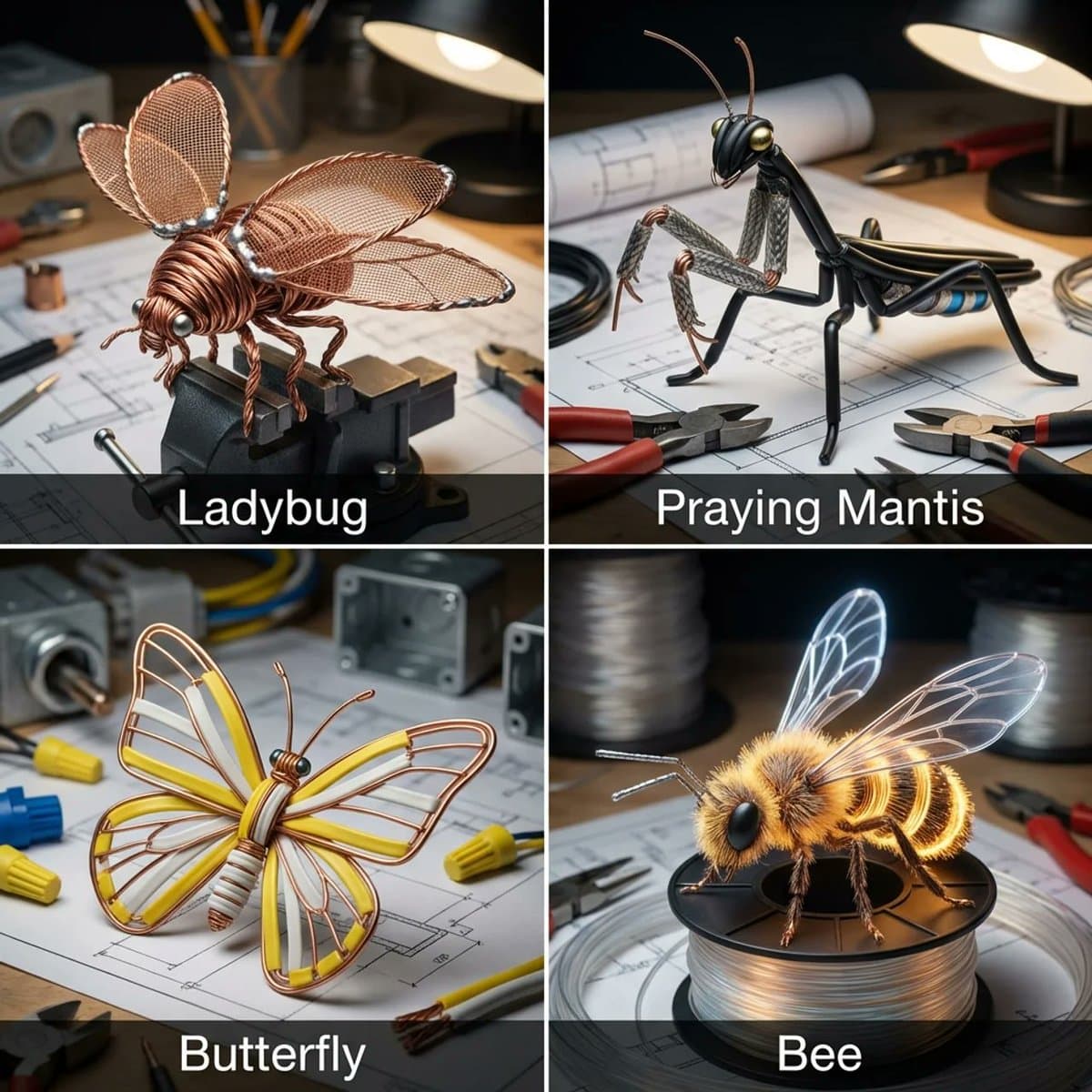
I asked Nano Banana to give insects a copper wire makeover Prompt: Input = Garden Insect (e.g., Ladybug, Praying Mantis, Butterfly, Bee)Act as an electrician. For every insect, identify a wire type (e.g., Stranded Copper, Coaxial, Romex, Fiber Optic).Function Draw ($Insect, $ Wire) Anchor: [$Insect] :: [$Wire Type]::4Morphology: Conductive biology, [$Insect] constructed entirely from twisted wire, wings formed from fine mesh screens or fiber optic strands, joints soldered together, metallic shine::3Material Physics: Physical properties of Wire (rigid strands, metallic reflection, color coding of insulation) applied to exoskeletons, industrial sharpness::3Illumination: Workbench lighting, vise grips holding the bug, blueprints in background::2Render Stack: Industrial macro photography, metallic reflections, sharp focus, 8k::1Negative: [Chitin, wings, fuzz, green, natural, organic]:: -1Output: 2x2 grid, for each panel execute Draw Function the insect plus the wire type. Name of the insect underneath.

Concept Art AI Image Prompts prompt 606
twitterconcept-artsci-fi

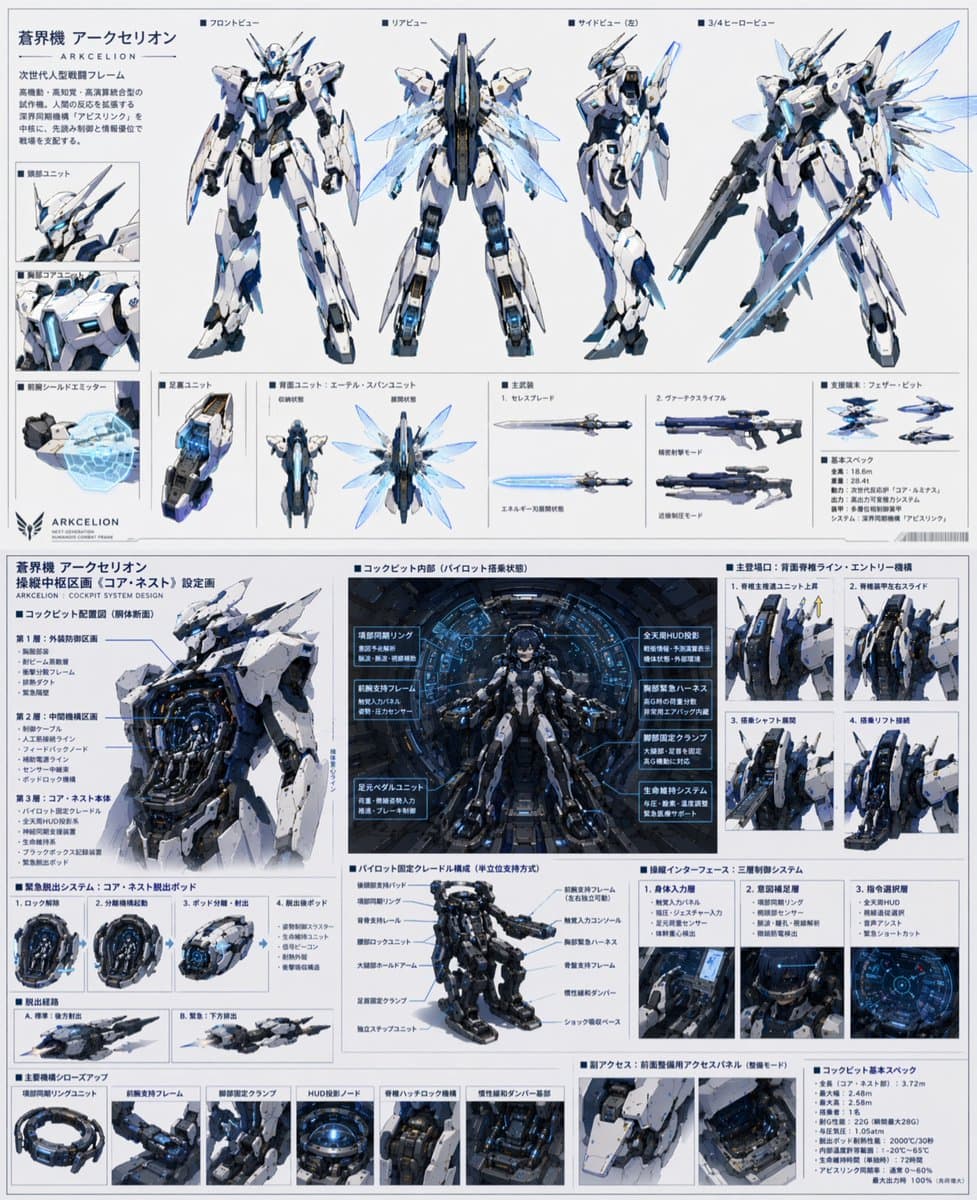
GPT-5.4 Thinkingに 「ロボットアニメの主人公が乗る最先端のデザインを設計して」 という一言を伝えて数回壁打ちしてから、GPT-Image-2 で生成させてみた ヤバすぎんだろこのクオリティ

Concept Art AI Image Prompts prompt 707
twitter3d-renderconcept-art

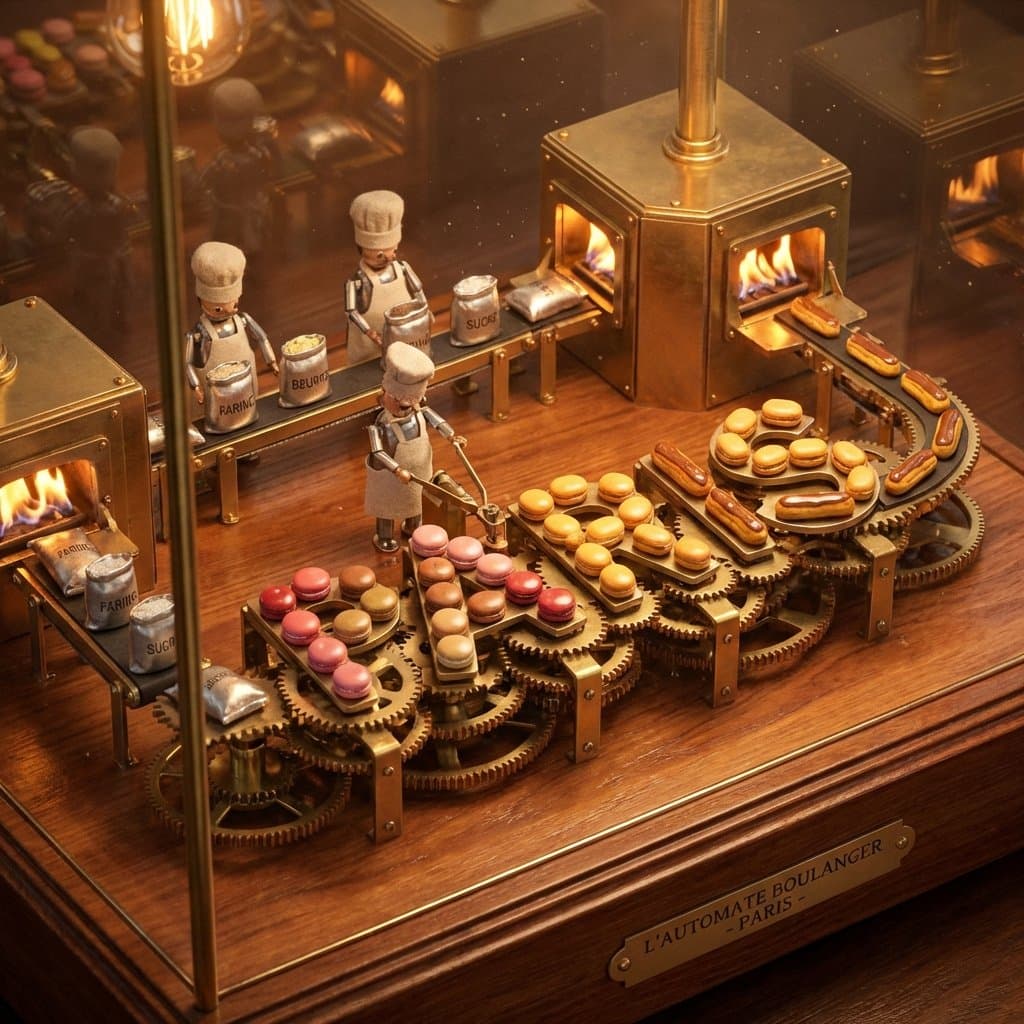
Pastry city concept. Fun experiment inspired by a food infographic I made a while back. do this for paris: kinetic baking automaton display concept: a mechanical wind-up diorama where the pastry city name assembles itself in perpetual motion through visible baking stages. input variables: [insert city name] [insert signature baked goods] [insert essential ingredients] [insert process steps] workflow: base setup: ornate brass-and-glass automaton on a wooden base with visible gears. core action/composition: tiny chef automata move [insert essential ingredients] through [insert process steps], gradually forming the rotating [insert city name] letters from [insert signature baked goods]. variants and details: pendulum ovens and conveyor belts delivering fresh pastries to complete each letter. narrative/interactive elements: endless cycle of creation turning raw ingredients into cultural icon. god-level details: warm tungsten lighting with motion blur on gears, polished metal and fresh pastry gloss, macro angled view, 8k hyper-realistic kinetic render with satisfying rhythm. </instructions>

Concept Art AI Image Prompts prompt 808
twitterconcept-artfine-art

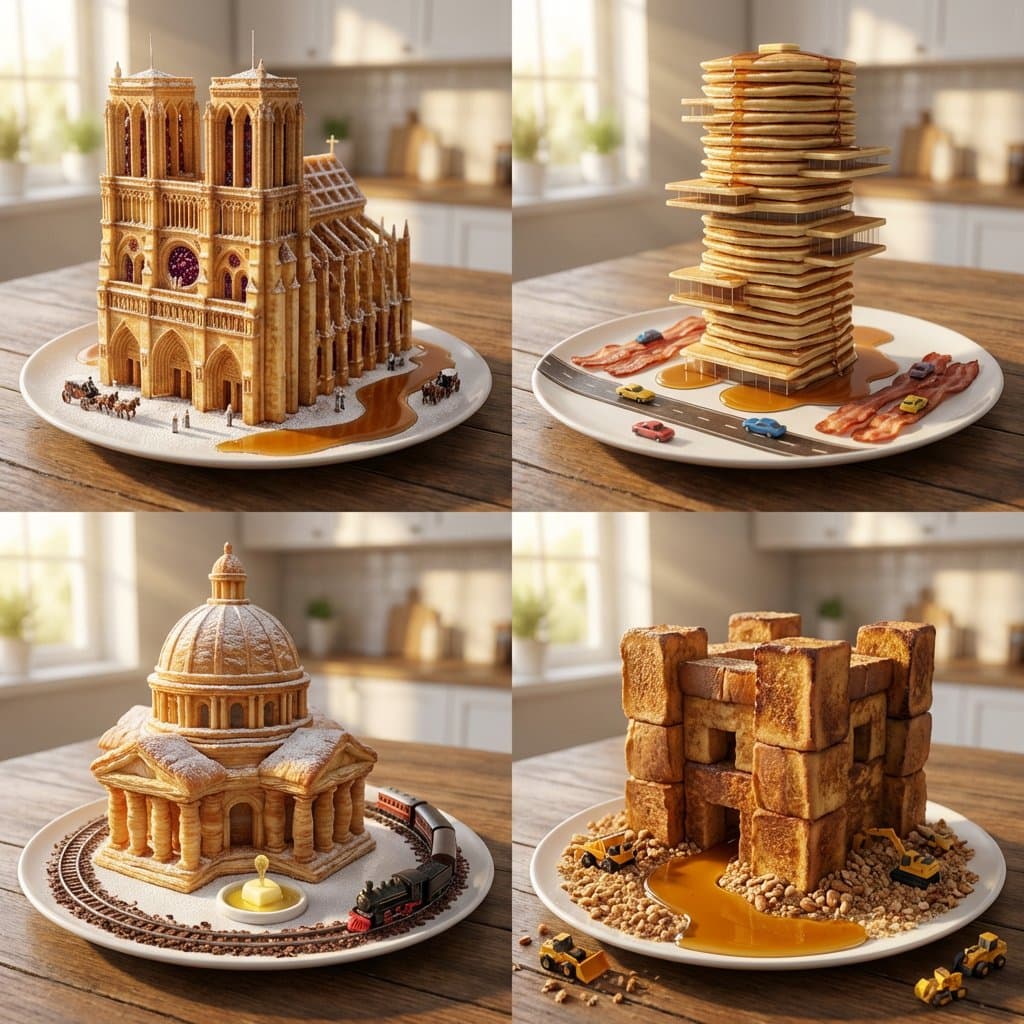
I don't like playing with my breakfast but if I did, I'd probably try these :) Nano banana prompt: <instructions> Role: Michelin Pastry Chef & Master Architect Input: [Architectural Era] + [Breakfast Item] Phase 1: Structural Logic Pick 4 defining elements of the architectural era (e.g., Gothic = flying buttresses, stained glass). Translate these elements into the physical properties of the breakfast food (e.g., a waffle grid becoming a skyscraper facade). Phase 2: Visual Execution Goal: 2x2 Grid of "Breakfast Foods Sculpted as Buildings." Rules per Panel: Subject: A single plate of the breakfast food, but it is architecturally structured as a monumental building from the chosen era. Set: Syrup acts as rivers, powdered sugar as snow, or steam as low-hanging fog. Scale: Tiny vehicles or people at the base to establish massive scale. Camera : Golden hour morning sunlight slicing through a window, photorealistic food textures (crispy, buttery, glistening), 85mm portrait lens, blurred kitchen background. </instructions>

Concept Art AI Image Prompts prompt 909
twitter3d-illustrationcharacter-design

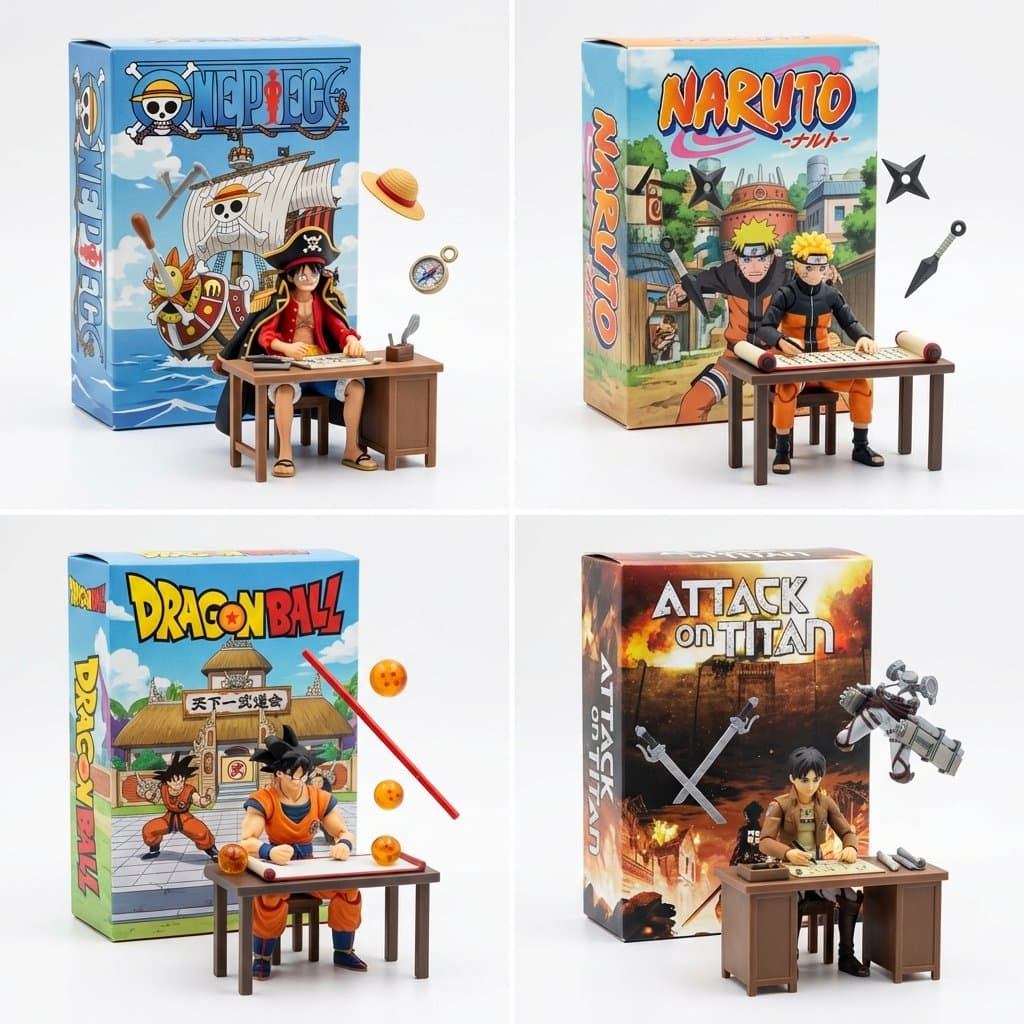
Still working on fun ways to visualize manga and anime. This works pretty well 2x2 grid, do this for famous manga <spatial_topology> [ seamless studio backdrop (pure white) ] [ product box (upright) ] ( 2d graphic art of [the_creation] ) ( bold typography: "ai inferred title" ) \ | / \ [box] / <-- floating [tools] crossing the \ [lid] / boundary of the box into reality \ / [ foreground: 3d action figure of [profession] ] ( sitting at [workstation], intensely focused ) ( suspended [tools] frozen in mid-air around them ) </spatial_topology> instruction: render macro toy photography. create a sharp material contrast: the background box is flat printed cardboard. the foreground figure and floating tools are tangible injection-molded plastic.

Reference to result

Three steps forward, without starting from a blank canvas.

  1. 01

    Pick a reference

    Choose the frame closest to your goal in composition, color, and purpose.

  2. 02

    Adjust the details

    Change the subject, copy, style, and image ratio in the generator.

  3. 03

    Generate the image

    Keep the prefilled reference, generate, then refine from the result.

Nothing quite fits?

Start with a blank prompt and define the subject, composition, typography, and aspect ratio yourself.

Create from scratch
Working notes

Get closer to a finished image on the first pass.

01

About Concept Art prompts

Concept Art prompts help organize visual ideas around a specific style, subject, medium, or photography use case. Published examples may change as the collection grows.

02

How to write a stronger Concept Art prompt

Name the main subject first, then define composition, environment, lighting, palette, materials, camera or rendering technique, aspect ratio, and the intended output.

03

How to refine the generated result

Remove conflicting style instructions, keep one clear visual direction, and review anatomy, text, logos, perspective, and important category-specific details before publishing.

Common questions

A few things to know before you begin.

What are Concept Art AI image prompts?

They are reusable visual briefs grouped under the Concept Art category. Each brief can be adapted to a different subject, reference image, composition, or output size.

How are Concept Art examples selected for this collection?

Published prompts are assigned to this collection when their subject, style, or intended use matches the Concept Art category.

Can I customize these Concept Art prompts?

Yes. Replace the subject and context, then adjust the lighting, palette, materials, lens or rendering method, aspect ratio, and detail level for your project.