Expression prompt library

Expression AI Image Prompts

Browse expression examples and reusable AI image prompts for composition, lighting, color, materials, and style.

Browse a focused expression category based on the PromptPlum taxonomy. Use the references as starting points, then rewrite each prompt for your own subject, format, and visual goal.

Visual reference set
expression
Library size
2 public prompts
Visual reference set02 / REF
Expression AI Image Prompts reference 101
Expression AI Image Prompts reference 202
VEYVIA / EXPRESSIONCURATED
Prompt library

Choose the closest frame to begin.

Open any reference to inspect the full prompt, or take its image and aspect ratio straight into the generator.

2 public prompts
Expression AI Image Prompts prompt 101
expressionai image promptsprompt library

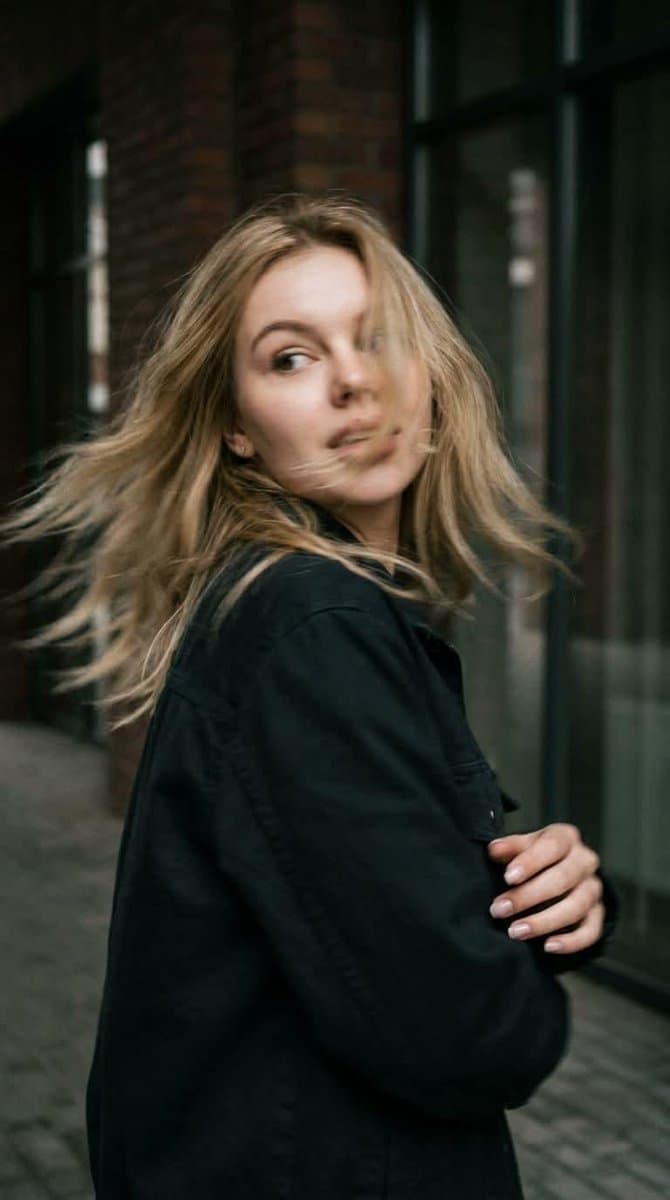
GPT Image 2 — Refined Prompt Preserve the subject’s identity and appearance with maximum accuracy. Do not change or reinterpret her facial features, facial proportions, eye shape, nose, lips, jawline, bone structure, skin texture, hair color, hair length, hair density, or natural hair texture. Maintain a highly faithful resemblance to the reference image throughout the scene. Create a photorealistic candid photograph captured in the middle of natural movement. Use a close-up, waist-up composition. The woman is standing with her back partially toward the camera at the exact moment she quickly turns her head over her shoulder. Her gaze is directed naturally toward something off to the side, as if she has just noticed something behind her. Her expression should feel spontaneous and authentic, not posed or intentionally modeled for the camera. Natural Motion & Sharpness The sudden head movement creates realistic, subtle motion blur. Apply gentle blur across the moving face, hair, and individual curls, with slightly softened silhouette edges caused by the speed of the movement. Keep the face sufficiently recognizable and preserve the subject’s defining facial characteristics. Her curls naturally sweep outward with the movement, creating a believable dynamic trail. The motion should feel like a genuine photograph captured by a real camera with a slightly slower shutter speed—not an artificial blur effect. Body Language & Composition Maintain a relaxed, natural posture with subtle asymmetry. The shoulders, neck, and upper body should show believable movement caused by the quick head turn. Avoid fashion-model posing, exaggerated gestures, or stiff studio positioning. Lighting & Environment Use cinematic directional lighting with soft, realistic shadows and atmospheric depth. Place the subject in a textured, believable environment with natural visual details. Preserve realistic skin with visible pores, fine texture, and subtle natural imperfections rather than overly smooth or plastic-looking skin. Camera & Film Aesthetic Make the image feel as though it was captured on a real 35mm film camera. Include pronounced but natural film grain, subtle optical imperfections, gentle lens characteristics, realistic depth of field, and authentic photographic texture. Use a muted, low-saturation cinematic color palette with natural tones and restrained contrast. The final image should look like a genuine candid photograph taken in real life—organic, imperfect, cinematic, and completely photorealistic.

Expression AI Image Prompts prompt 202
ai image promptsprompt libraryexpression

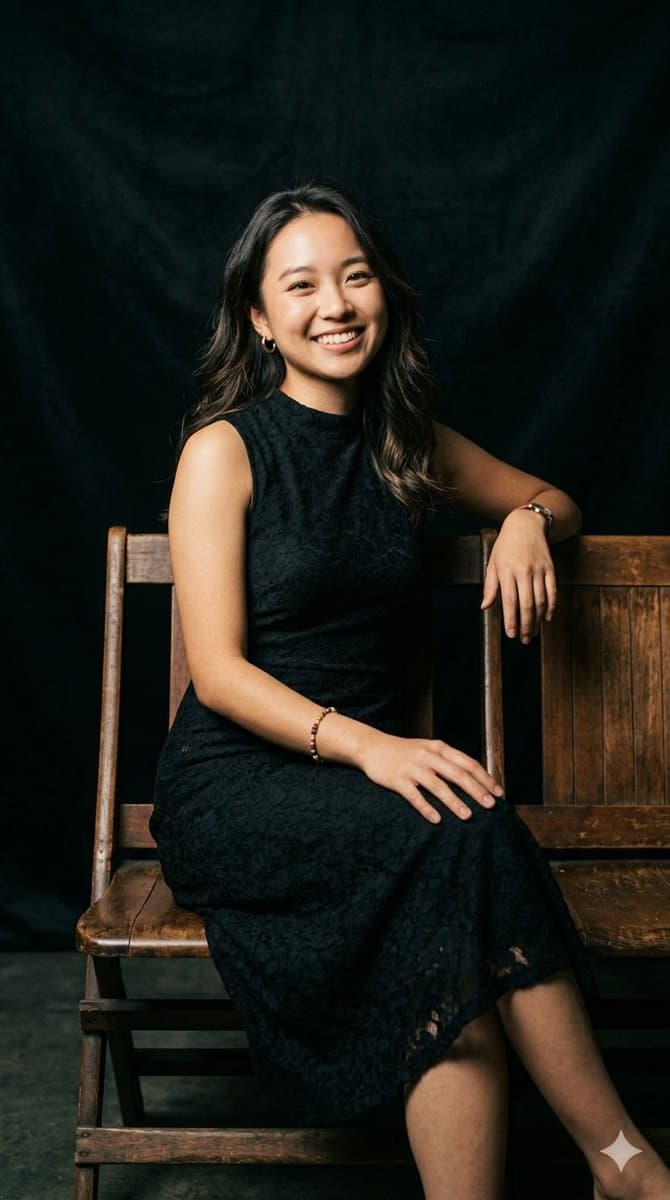
A series of professional, elegant studio portraits capturing a young East Asian woman with long, wavy dark hair. She is wearing a sleeveless, high-neck black lace dress, a delicate beaded bracelet, and a classic wristwatch. She sits comfortably on a rustic, vintage wooden bench against a deep, textured solid black fabric backdrop. The lighting is soft and directional, creating a warm and intimate fine art mood. The collection showcases a variety of natural expressions and poses: one image features her smiling warmly directly into the camera; another shows her looking off-camera to the right with a bright smile while lightly resting her chin on her hand; a third captures a gentle, thoughtful downcast smile with her chin resting on her fist; and the final portrait displays a subtle, serene expression as she glances off-camera to her right with her hands resting gently on her lap.

Reference to result

Three steps forward, without starting from a blank canvas.

  1. 01

    Pick a reference

    Choose the frame closest to your goal in composition, color, and purpose.

  2. 02

    Adjust the details

    Change the subject, copy, style, and image ratio in the generator.

  3. 03

    Generate the image

    Keep the prefilled reference, generate, then refine from the result.

Nothing quite fits?

Start with a blank prompt and define the subject, composition, typography, and aspect ratio yourself.

Create from scratch
Working notes

Get closer to a finished image on the first pass.

01

About Expression prompts

Expression prompts help organize visual ideas around a specific style, subject, medium, or photography use case. Published examples may change as the collection grows.

02

How to write a stronger Expression prompt

Name the main subject first, then define composition, environment, lighting, palette, materials, camera or rendering technique, aspect ratio, and the intended output.

03

How to refine the generated result

Remove conflicting style instructions, keep one clear visual direction, and review anatomy, text, logos, perspective, and important category-specific details before publishing.

Common questions

A few things to know before you begin.

What are Expression AI image prompts?

They are reusable visual briefs grouped under the Expression category. Each brief can be adapted to a different subject, reference image, composition, or output size.

How are Expression examples selected for this collection?

Published prompts are assigned to this collection when their subject, style, or intended use matches the Expression category.

Can I customize these Expression prompts?

Yes. Replace the subject and context, then adjust the lighting, palette, materials, lens or rendering method, aspect ratio, and detail level for your project.