 01
01ai image promptsprompt librarymenswear
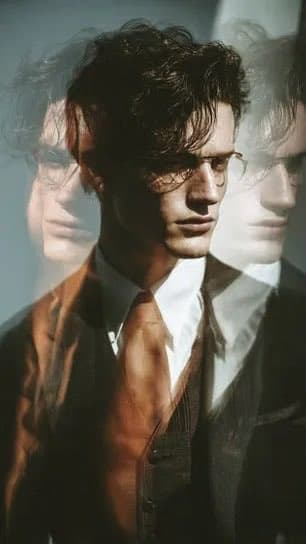
Cinematic menswear editorial, male model in tailored suit, triptych layered exposure, motion blur, soft daylight, quiet luxury, minimalist fashion, --s 250
Browse formal wear examples and reusable AI image prompts for composition, lighting, color, materials, and style.
Browse a focused formal wear category based on the PromptPlum taxonomy. Use the references as starting points, then rewrite each prompt for your own subject, format, and visual goal.
01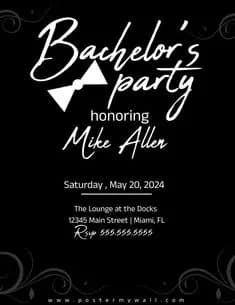 02
02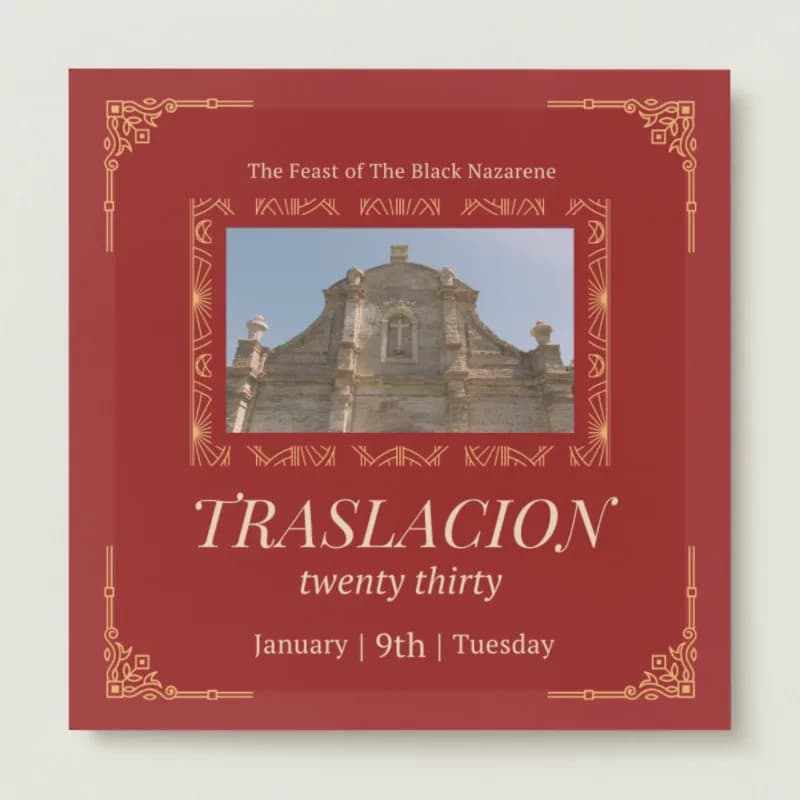 03
03Open any reference to inspect the full prompt, or take its image and aspect ratio straight into the generator.
3 public prompts01Cinematic menswear editorial, male model in tailored suit, triptych layered exposure, motion blur, soft daylight, quiet luxury, minimalist fashion, --s 250
02Formal bachelor party invitation, solid black background. White elegant script for main headings. Simple white bow tie icon. Centered sans-serif event details. Subtle grey corner flourishes. High contrast, minimalist composition.
03Elegant square invitation on deep red background. Features a central photo of a peaceful church interior with warm sunlight through stained glass and soft golden tones. Intricate gold geometric borders and ornate filigree corners. Elegant cream serif typography. Photorealistic, formal composition.
Choose the frame closest to your goal in composition, color, and purpose.
Change the subject, copy, style, and image ratio in the generator.
Keep the prefilled reference, generate, then refine from the result.
Start with a blank prompt and define the subject, composition, typography, and aspect ratio yourself.
Formal Wear prompts help organize visual ideas around a specific style, subject, medium, or photography use case. Published examples may change as the collection grows.
Name the main subject first, then define composition, environment, lighting, palette, materials, camera or rendering technique, aspect ratio, and the intended output.
Remove conflicting style instructions, keep one clear visual direction, and review anatomy, text, logos, perspective, and important category-specific details before publishing.
They are reusable visual briefs grouped under the Formal Wear category. Each brief can be adapted to a different subject, reference image, composition, or output size.
Published prompts are assigned to this collection when their subject, style, or intended use matches the Formal Wear category.
Yes. Replace the subject and context, then adjust the lighting, palette, materials, lens or rendering method, aspect ratio, and detail level for your project.