CGI Art prompt library

CGI Art AI Image Prompts

Browse cgi art examples and reusable AI image prompts for composition, lighting, color, materials, and style.

Browse a focused cgi art category based on the PromptPlum taxonomy. Use the references as starting points, then rewrite each prompt for your own subject, format, and visual goal.
Visual reference set
cgi art
Library size
4 public prompts
Visual reference set04 / REF
CGI Art AI Image Prompts reference 101
CGI Art AI Image Prompts reference 202
CGI Art AI Image Prompts reference 303
CGI Art AI Image Prompts reference 404
VEYVIA / CGI-ARTCURATED
Prompt library

Choose the closest frame to begin.

Open any reference to inspect the full prompt, or take its image and aspect ratio straight into the generator.

4 public prompts
CGI Art AI Image Prompts prompt 101
cgi-artgaming3d-render

3D render of [SUBJECT] as a stylized hand-painted game asset. Use chunky simplified geometry, broad readable shapes, softly beveled edges, matte painted wood and metal, and subtle hand-painted surface variation. Palette: deep plum and burgundy wood, dark teal and navy hardware, selective crimson and muted warm accents. Soft diffuse lighting, gentle ambient occlusion, simple directional shadow, solid black background, elevated isometric three-quarter view, centered compact game-ready silhouette, no dramatic effects or clutter.

CGI Art AI Image Prompts prompt 202
cgi-artpaper-cut-artminiature-diorama

GPT Image 2.0 on ChatGPT Prompt: A whimsical 3D paper-cut family portrait scene in a traditional Japanese village during cherry blossom season. Family of five smiling together near water canals and wooden homes, surrounded by tulips, butterflies, and lush greenery. Mount Fuji towering in the background beneath soft paper clouds and blue skies. Handmade craft aesthetic, layered cardstock textures, soft ambient lighting, miniature diorama composition, cute cartoon proportions, highly detailed, vertical poster format.

CGI Art AI Image Prompts prompt 303
cgi-artcgi artai image prompts

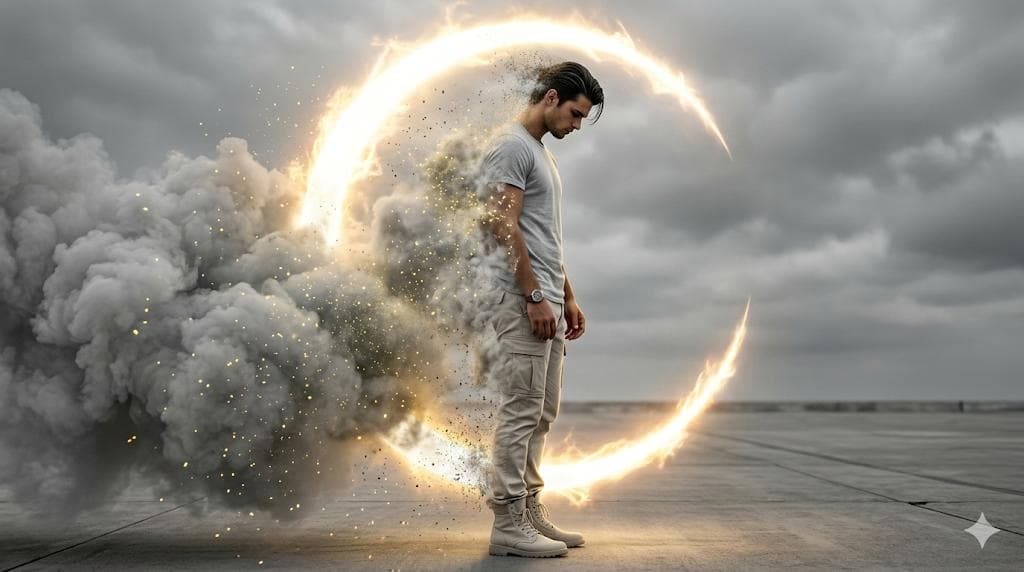
Create an ultra-realistic, cinematic 8K image with high-contrast dramatic lighting and a photo-real digital painting aesthetic-use face reference exactly. The man is shown in a full-body side profile facing right, his face and hairstyle copied perfectly with no alterations He wears modern casual streetwear; a light grey crewneck t-shirt, light neutral cargo pants, light-colored high-top boots, and a watch on his left wrist. His posture is slightly slumped, head bowed, eyes looking downward, hands relaxed at his sides, conveying deep introspection and sorrow. Nearly half of his body is dissolving into extremely thick, cloud-like grey smoke filled with glowing yellow dust particles. His left arm, shoulder, torso, legs, and part of his hair become transparent as they break into luminous particles, suggesting active disintegration Behind and partially surrounding him is a massive glowing crescent (C-shaped) energy aura, emitting fiery golden-white plasma light. This aura acts as a powerful rim and backlight, highlighting the smoke, dust, and silhouette. The setting is minimal and stark: a concrete or desolate paved surface meeting a heavily overcast sky. The color palette is nearly monochrome greys and whites, contrasted by intense amber-gold glow, Shallow depth of field, glow/bloom lighting, particle dispersion, cinematic composition, emotional and dramatic atmosphere.

CGI Art AI Image Prompts prompt 404
twittermacro-close-upcgi-art

I asked Nano Banana to give insects a copper wire makeover Prompt: Input = Garden Insect (e.g., Ladybug, Praying Mantis, Butterfly, Bee)Act as an electrician. For every insect, identify a wire type (e.g., Stranded Copper, Coaxial, Romex, Fiber Optic).Function Draw ($Insect, $ Wire) Anchor: [$Insect] :: [$Wire Type]::4Morphology: Conductive biology, [$Insect] constructed entirely from twisted wire, wings formed from fine mesh screens or fiber optic strands, joints soldered together, metallic shine::3Material Physics: Physical properties of Wire (rigid strands, metallic reflection, color coding of insulation) applied to exoskeletons, industrial sharpness::3Illumination: Workbench lighting, vise grips holding the bug, blueprints in background::2Render Stack: Industrial macro photography, metallic reflections, sharp focus, 8k::1Negative: [Chitin, wings, fuzz, green, natural, organic]:: -1Output: 2x2 grid, for each panel execute Draw Function the insect plus the wire type. Name of the insect underneath.

Reference to result

Three steps forward, without starting from a blank canvas.

  1. 01

    Pick a reference

    Choose the frame closest to your goal in composition, color, and purpose.

  2. 02

    Adjust the details

    Change the subject, copy, style, and image ratio in the generator.

  3. 03

    Generate the image

    Keep the prefilled reference, generate, then refine from the result.

Nothing quite fits?

Start with a blank prompt and define the subject, composition, typography, and aspect ratio yourself.

Create from scratch
Working notes

Get closer to a finished image on the first pass.

01

About CGI Art prompts

CGI Art prompts help organize visual ideas around a specific style, subject, medium, or photography use case. Published examples may change as the collection grows.

02

How to write a stronger CGI Art prompt

Name the main subject first, then define composition, environment, lighting, palette, materials, camera or rendering technique, aspect ratio, and the intended output.

03

How to refine the generated result

Remove conflicting style instructions, keep one clear visual direction, and review anatomy, text, logos, perspective, and important category-specific details before publishing.

Common questions

A few things to know before you begin.

What are CGI Art AI image prompts?

They are reusable visual briefs grouped under the CGI Art category. Each brief can be adapted to a different subject, reference image, composition, or output size.

How are CGI Art examples selected for this collection?

Published prompts are assigned to this collection when their subject, style, or intended use matches the CGI Art category.

Can I customize these CGI Art prompts?

Yes. Replace the subject and context, then adjust the lighting, palette, materials, lens or rendering method, aspect ratio, and detail level for your project.