Coding & Developer prompt library

Coding & Developer AI Image Prompts

Browse coding & developer examples and reusable AI image prompts for composition, lighting, color, materials, and style.

Browse a focused coding & developer category based on the PromptPlum taxonomy. Use the references as starting points, then rewrite each prompt for your own subject, format, and visual goal.
Visual reference set
coding developer
Library size
2 public prompts
Visual reference set03 / REF
Coding & Developer AI Image Prompts reference 101
Coding & Developer AI Image Prompts reference 202
Coding & Developer AI Image Prompts reference 303
VEYVIA / CODING-DEVELOPERCURATED
Prompt library

Choose the closest frame to begin.

Open any reference to inspect the full prompt, or take its image and aspect ratio straight into the generator.

2 public prompts
Coding & Developer AI Image Prompts prompt 101
coding-developercyberpunksci-fi

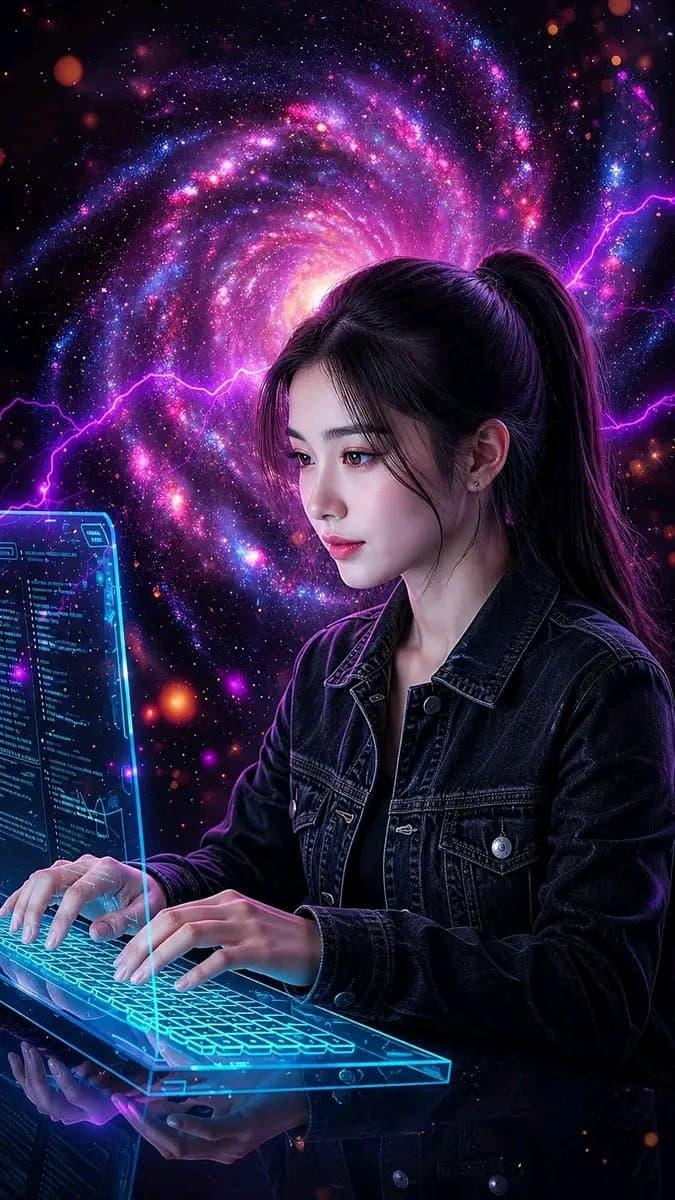
Ultra-realistic futuristic portrait of an adult female programmer at a premium workstation. She types on a modern mechanical keyboard before a transparent holographic monitor displaying believable programming code. Style her in a dark denim jacket over a black top, with a sleek high ponytail and natural makeup. Fill the environment with restrained electric energy, digital particles, circuit patterns, and a deep galaxy-like backdrop. Blue and violet rim light, realistic hands and keyboard, photorealistic skin, cinematic volumetric depth, sharp face focus, sophisticated technology aesthetic, no logos.

Coding & Developer AI Image Prompts prompt 202
twittersci-figraphic-design

Good Morning ☀️ Happy Thursday if you say it back 💙 Easy Copy/Paste Prompt Share 👇 (The Technical X-Ray HUD) Recommend - Gemini Nano Banana 🍌 or @grok “I used Grok for this one” Upload your Image + Prompt 🤝 You are a world-class director of industrial visualization and a futuristic interface designer specializing in advanced visual engineering diagnostic tools. Your task is to transform the downloaded product into a futuristic visualization of the technical scanning interface, similar to the product analyzed in a high-tech laboratory diagnostic system. input: uploaded product image style: • black background with a clear white grid of the drawing • the product is made in the form of a luminous translucent X-ray frame model • clear geometry of the technical grid • Ultra-sharp white lines and edges • Minimalistic HUD interface design in sci-fi style INTERFACE ELEMENTS: • thin white lettering-callouts with pointer lines describing the components of the product • Zoom analysis field, showing a product fragment in close-up • A colored layer of the heat map of the material (red/ orange/blue) is displayed inside the zoom field. • Scan indicators such as: “THE SCAN…” “MATERIAL ANALYSIS…” “98% DATA PROCESSING” • Small loading panels and user interface diagnostic modules • luminous markers in the form of angular frames around the image VISUAL LANGUAGE: • Advanced engineering drawing design • Futuristic laboratory scanning interface • Engineering visualization of the product at the Apple level • Ultra-pure composition • High-contrast black and white interface lighting: • subtle white glow around the frame • Volumetric light beam scanning • Technical sci-fi visualization composition: • in the center of the product • Grid-aligned interface layout • Scalable analysis panel in one corner • Minimalistic but highly technical exit: Futuristic product scanning interface , visualization of technical diagnostics , technical analysis screen , ultra clean, ultra clear, 8K

Reference to result

Three steps forward, without starting from a blank canvas.

  1. 01

    Pick a reference

    Choose the frame closest to your goal in composition, color, and purpose.

  2. 02

    Adjust the details

    Change the subject, copy, style, and image ratio in the generator.

  3. 03

    Generate the image

    Keep the prefilled reference, generate, then refine from the result.

Nothing quite fits?

Start with a blank prompt and define the subject, composition, typography, and aspect ratio yourself.

Create from scratch
Working notes

Get closer to a finished image on the first pass.

01

About Coding & Developer prompts

Coding & Developer prompts help organize visual ideas around a specific style, subject, medium, or photography use case. Published examples may change as the collection grows.

02

How to write a stronger Coding & Developer prompt

Name the main subject first, then define composition, environment, lighting, palette, materials, camera or rendering technique, aspect ratio, and the intended output.

03

How to refine the generated result

Remove conflicting style instructions, keep one clear visual direction, and review anatomy, text, logos, perspective, and important category-specific details before publishing.

Common questions

A few things to know before you begin.

What are Coding & Developer AI image prompts?

They are reusable visual briefs grouped under the Coding & Developer category. Each brief can be adapted to a different subject, reference image, composition, or output size.

How are Coding & Developer examples selected for this collection?

Published prompts are assigned to this collection when their subject, style, or intended use matches the Coding & Developer category.

Can I customize these Coding & Developer prompts?

Yes. Replace the subject and context, then adjust the lighting, palette, materials, lens or rendering method, aspect ratio, and detail level for your project.