Festival prompt library

Festival AI Image Prompts

Browse festival examples and reusable AI image prompts for composition, lighting, color, materials, and style.

Browse a focused festival category based on the PromptPlum taxonomy. Use the references as starting points, then rewrite each prompt for your own subject, format, and visual goal.
Visual reference set
festival
Library size
2 public prompts
Visual reference set02 / REF
Festival AI Image Prompts reference 101
Festival AI Image Prompts reference 202
VEYVIA / FESTIVALCURATED
Prompt library

Choose the closest frame to begin.

Open any reference to inspect the full prompt, or take its image and aspect ratio straight into the generator.

2 public prompts
Festival AI Image Prompts prompt 101
ai image promptsprompt libraryfestival

Ultra-realistic super cute chaotic Eid al-Adha selfie photograph in front of a dreamy pastel-toned grand mosque during bright sunny afternoon, featuring an adorable stylish young woman (face photo refference) taking a playful ultra-wide-angle smartphone selfie surrounded by funny wholesome animal chaos. The young woman wears a soft pastel cream oversized cardigan layered over a flowy white dress with cute ribbon details, paired with chunky pastel sneakers and tiny heart-shaped accessories. Her long dark hair flows softly in the wind with colorful mini hair clips and ribbon pins. She smiles brightly with sparkling eyes while making a tiny finger-heart pose toward the camera, giving soft bubbly “cute chaos” energy. Camera style: extreme fisheye selfie perspective, slight smartphone distortion, playful close-up framing, TikTok / Instagram selfie aesthetic, dynamic arm-reaching composition, candid chaotic energy. Surrounding her are adorable expressive farm animals: a fluffy baby goat wearing tiny pink sunglasses, a smiling cow with flower crown photobombing beside her, another baby goat jumping happily behind her, tiny chicks waddling around her feet, a sleepy sheep sitting adorably in foreground, and one goat trying to lick the camera lens. Background: beautiful giant mosque with glowing cream domes and tall white minarets, soft pastel blue sky, warm fluffy clouds, busy Eid celebration crowd, cute wholesome festival atmosphere, people laughing and reacting in the background. Add playful cute doodles everywhere: tiny pastel hearts, sparkles, comic stars, handwritten texts like: “CUTIE CHAOS 🐐✨” “HELP 😭” “EID BESTIE” “too cute to handle” “AAAAA” small arrows pointing at funny animals, sticker-style smiley faces, pastel flower doodles, soft glitter effects. Lighting: bright warm sunlight, soft dreamy glow, slightly overexposed highlights, cute pastel color grading, gentle lens flare, vibrant cheerful tones. Visual style: ultra-realistic but adorable social media chaos, Pinterest cute-core aesthetic, playful Gen Z selfie energy, wholesome meme realism, soft cinematic textures, high-detail smartphone HDR look, TikTok viral cute aesthetic, funny but heartwarming composition. Mood & keywords: cute Eid chaos, wholesome funny selfie, adorable animal madness, playful Muslim holiday vibe, bubbly internet energy, cozy pastel realism, dreamy social media aesthetic, chaotic but lovable happiness. Typography overlay: large handwritten pastel doodle text: “Selamat Hari Raya Idul Adha” Aspect ratio 9:16 vertical.

Festival AI Image Prompts prompt 202
ai image promptsprompt libraryfestival

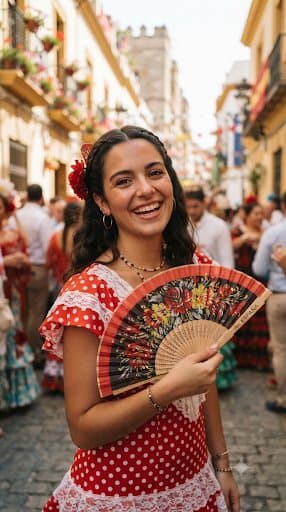
A lively and vibrant medium shot of a smiling young woman with dark wavy hair styled with braids and a red floral hair accessory, holding a decorative floral folding fan with red and black accents. She is wearing a traditional red-and-white polka-dot dress trimmed with delicate white lace, accessorized with hoop earrings and layered necklaces. The background is a sunlit, bustling historic European street paved with cobblestones, flanked by traditional buildings with flower boxes on balconies and a blurred crowd of festival-goers enjoying a sunny afternoon celebration.

Reference to result

Three steps forward, without starting from a blank canvas.

  1. 01

    Pick a reference

    Choose the frame closest to your goal in composition, color, and purpose.

  2. 02

    Adjust the details

    Change the subject, copy, style, and image ratio in the generator.

  3. 03

    Generate the image

    Keep the prefilled reference, generate, then refine from the result.

Nothing quite fits?

Start with a blank prompt and define the subject, composition, typography, and aspect ratio yourself.

Create from scratch
Working notes

Get closer to a finished image on the first pass.

01

About Festival prompts

Festival prompts help organize visual ideas around a specific style, subject, medium, or photography use case. Published examples may change as the collection grows.

02

How to write a stronger Festival prompt

Name the main subject first, then define composition, environment, lighting, palette, materials, camera or rendering technique, aspect ratio, and the intended output.

03

How to refine the generated result

Remove conflicting style instructions, keep one clear visual direction, and review anatomy, text, logos, perspective, and important category-specific details before publishing.

Common questions

A few things to know before you begin.

What are Festival AI image prompts?

They are reusable visual briefs grouped under the Festival category. Each brief can be adapted to a different subject, reference image, composition, or output size.

How are Festival examples selected for this collection?

Published prompts are assigned to this collection when their subject, style, or intended use matches the Festival category.

Can I customize these Festival prompts?

Yes. Replace the subject and context, then adjust the lighting, palette, materials, lens or rendering method, aspect ratio, and detail level for your project.