General prompt library

General AI Image Prompts

Browse general examples and reusable AI image prompts for composition, lighting, color, materials, and style.

Browse a focused general category based on the PromptPlum taxonomy. Use the references as starting points, then rewrite each prompt for your own subject, format, and visual goal.
Visual reference set
general
Library size
2 public prompts
Visual reference set02 / REF
General AI Image Prompts reference 101
General AI Image Prompts reference 202
VEYVIA / GENERALCURATED
Prompt library

Choose the closest frame to begin.

Open any reference to inspect the full prompt, or take its image and aspect ratio straight into the generator.

2 public prompts
General AI Image Prompts prompt 101
generalbranding-advertisingluxury-branding

UNIVERSAL LOGO IDENTITY MASTER PROMPT Use the uploaded logo EXACTLY as provided. Do NOT redesign, redraw, recolor, crop, distort, recreate, or modify it in any way. ASPECT RATIO: 5:7 Vertical LOGO PRESENTATION Remove any supporting surface completely. There must be: • No podium • No pedestal • No platform • No stage • No table • No floor stand • No display block • No base of any kind The logo must float naturally in mid-air as the single hero object with elegant cinematic depth. BACKGROUND Create a premium Apple-style luxury environment using the brand colors extracted from the uploaded logo. Include: • Soft brand-color to light grey gradient • Warm ivory highlights • Soft charcoal transitions • Golden hour lighting • Volumetric light rays • Atmospheric haze • HDR reflections • Cinematic glow • Soft bloom • Refined vignette • Elegant depth • Apple keynote minimalism The environment should feel clean, premium, bright, and sophisticated without becoming too dark. LOGO HERO Place the uploaded logo perfectly centered. The logo should float naturally with: • Soft rim lighting • Elegant glow • Glass reflections • Premium shadows • Cinematic depth • Balanced composition • No supporting surface underneath The uploaded logo remains completely untouched and is the unmistakable focal point. FLOATING BRAND ELEMENTS Automatically identify the brand's industry from the uploaded logo and generate premium floating elements that naturally represent that category. Examples include products, tools, materials, interface elements, symbols, packaging, abstract forms, or signature objects relevant to the brand. Arrange them naturally around the logo with generous spacing. Keep the composition elegant, balanced, and uncluttered. MATERIALS • Crystal Glass • Frosted Glass • Brushed Aluminium • Matte Metal • Chrome • Premium Acrylic • Ceramic • Transparent Glass • Luxury Polished Surfaces LIGHTING • Hollywood Commercial Lighting • Warm Key Light • Golden Hour Ambient Light • Luxury Rim Lighting • Soft Bounce Lighting • HDR Reflections • Ray Tracing • Global Illumination • Natural Highlights • Photorealistic Shadows COLOR PALETTE Extract the complete color palette directly from the uploaded logo. Extend it naturally into: • Premium gradients • Ambient glow • Reflections • Floating particles • Soft highlights Maintain perfect brand consistency throughout the composition. COMPOSITION • Swiss Grid • Golden Ratio • Apple-level Negative Space • Editorial Layout • Balanced Visual Hierarchy • Luxury Presentation • Minimal Yet Visually Rich TYPOGRAPHY PANEL Create a refined Swiss editorial information panel featuring: • Brand Name • Industry • Brand Personality • Brand Values • Primary Colors (HEX) • Typography Style • Target Audience • Brand Positioning • Brand Keywords • Visual Language Use clean white typography with premium spacing and alignment. CAMERA • 50mm Hero Lens • Eye-Level Perspective • Luxury Product Photography • Shallow Depth of Field • Ultra-Sharp Focus QUALITY • Apple Keynote • Pentagram • Landor • Luxury FMCG • Hollywood Commercial • IMAX • Octane Render • Unreal Engine 5 • Redshift • V-Ray • HDR • Ray Tracing • Global Illumination • 8K Ultra HD • Hyper-Realistic • Behance Featured • Red Dot Award • Awwwards • Cannes Lions FINAL OUTPUT Create a museum-quality luxury brand identity poster where: • The uploaded logo remains completely untouched. • The logo floats naturally in mid-air. • No podium, pedestal, platform, stage, table, display block, or base appears anywhere. • Premium floating elements intelligently reflect the brand's industry. • The background is clean, cinematic, luxurious, and Apple-inspired. • The composition is minimal, elegant, balanced, and award-winning.

General AI Image Prompts prompt 202
generalai image promptsprompt library

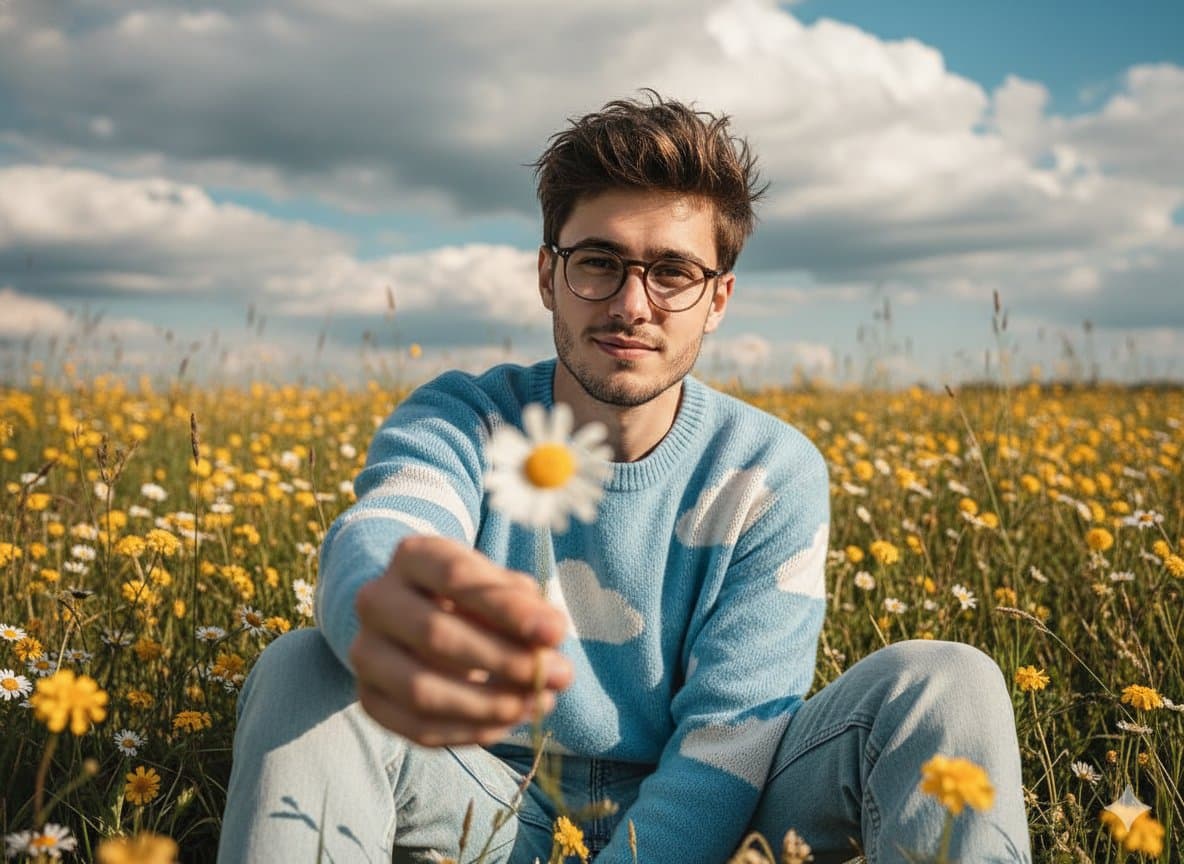
Gemini 2.5 Nano Banana on Google AI Studio. { "Objective": "Create a cinematic, wide-angle portrait prompt for an image generation model.", "Scene": { "Setting": "Wildflower field during the day", "Environment_Details": { "Flora": ["yellow wildflowers", "daisies"], "Sky": "dramatic, partly cloudy sky", "Lighting": "natural, soft lighting with warm, vibrant tones" } }, "Subject": { "Description": "Young man sitting in the wildflower field", "Pose": { "Body": "Sitting, leaning slightly forward", "Gesture": "Extending one arm to hold a daisy toward the camera", "Foreground_Effect": "Daisy held close to the lens, softly blurred" }, "Appearance": { "Expression": "Soft and charming", "Hair": "Messy, relaxed style", "Clothing": { "Top": "Sky-blue sweater with white cloud patterns", "Bottom": "Light-wash denim jeans" } } }, "Style": { "Aesthetic": "Cinematic, editorial, nostalgic, dreamy", "Color_Grade": "Warm, vibrant with vintage film tones", "Camera": { "Composition": "Wide-angle, editorial-style", "Depth_of_Field": "Shallow", "Mood": "Timeless, cinematic mood with dreamy atmosphere" } }, "Response_Format": "Image generation prompt" }

Reference to result

Three steps forward, without starting from a blank canvas.

  1. 01

    Pick a reference

    Choose the frame closest to your goal in composition, color, and purpose.

  2. 02

    Adjust the details

    Change the subject, copy, style, and image ratio in the generator.

  3. 03

    Generate the image

    Keep the prefilled reference, generate, then refine from the result.

Nothing quite fits?

Start with a blank prompt and define the subject, composition, typography, and aspect ratio yourself.

Create from scratch
Working notes

Get closer to a finished image on the first pass.

01

About General prompts

General prompts help organize visual ideas around a specific style, subject, medium, or photography use case. Published examples may change as the collection grows.

02

How to write a stronger General prompt

Name the main subject first, then define composition, environment, lighting, palette, materials, camera or rendering technique, aspect ratio, and the intended output.

03

How to refine the generated result

Remove conflicting style instructions, keep one clear visual direction, and review anatomy, text, logos, perspective, and important category-specific details before publishing.

Common questions

A few things to know before you begin.

What are General AI image prompts?

They are reusable visual briefs grouped under the General category. Each brief can be adapted to a different subject, reference image, composition, or output size.

How are General examples selected for this collection?

Published prompts are assigned to this collection when their subject, style, or intended use matches the General category.

Can I customize these General prompts?

Yes. Replace the subject and context, then adjust the lighting, palette, materials, lens or rendering method, aspect ratio, and detail level for your project.