Hollywood prompt library

Hollywood AI Image Prompts

Browse hollywood examples and reusable AI image prompts for composition, lighting, color, materials, and style.

Browse a focused hollywood category based on the PromptPlum taxonomy. Use the references as starting points, then rewrite each prompt for your own subject, format, and visual goal.
Visual reference set
hollywood
Library size
2 public prompts
Visual reference set02 / REF
Hollywood AI Image Prompts reference 101
Hollywood AI Image Prompts reference 202
VEYVIA / HOLLYWOODCURATED
Prompt library

Choose the closest frame to begin.

Open any reference to inspect the full prompt, or take its image and aspect ratio straight into the generator.

2 public prompts
Hollywood AI Image Prompts prompt 101
hollywoodai image promptsprompt library

A cinematic, high-fashion portrait of a stunning woman with voluminous, perfectly sculpted Hollywood waves in a rich brunette shade. She features striking, glamorous makeup with soft smoky eyeshadow, dramatic long eyelashes, sharply defined eyebrows, and full, matte nude lips. She is wearing an exquisite, sleeveless bright yellow gown adorned with intricate floral lace embroidery, delicate beadwork, and subtle sequins. The scene is framed by floating, ethereal layers of sheer yellow tulle fabric that create a sense of movement. The lighting is dramatic and moody, casting soft shadows on her features, with a dark background subtly illuminated by cool blue and purple ambient studio lights that make the warm yellow tones pop beautifully.

Hollywood AI Image Prompts prompt 202
ai image promptsprompt libraryhollywood

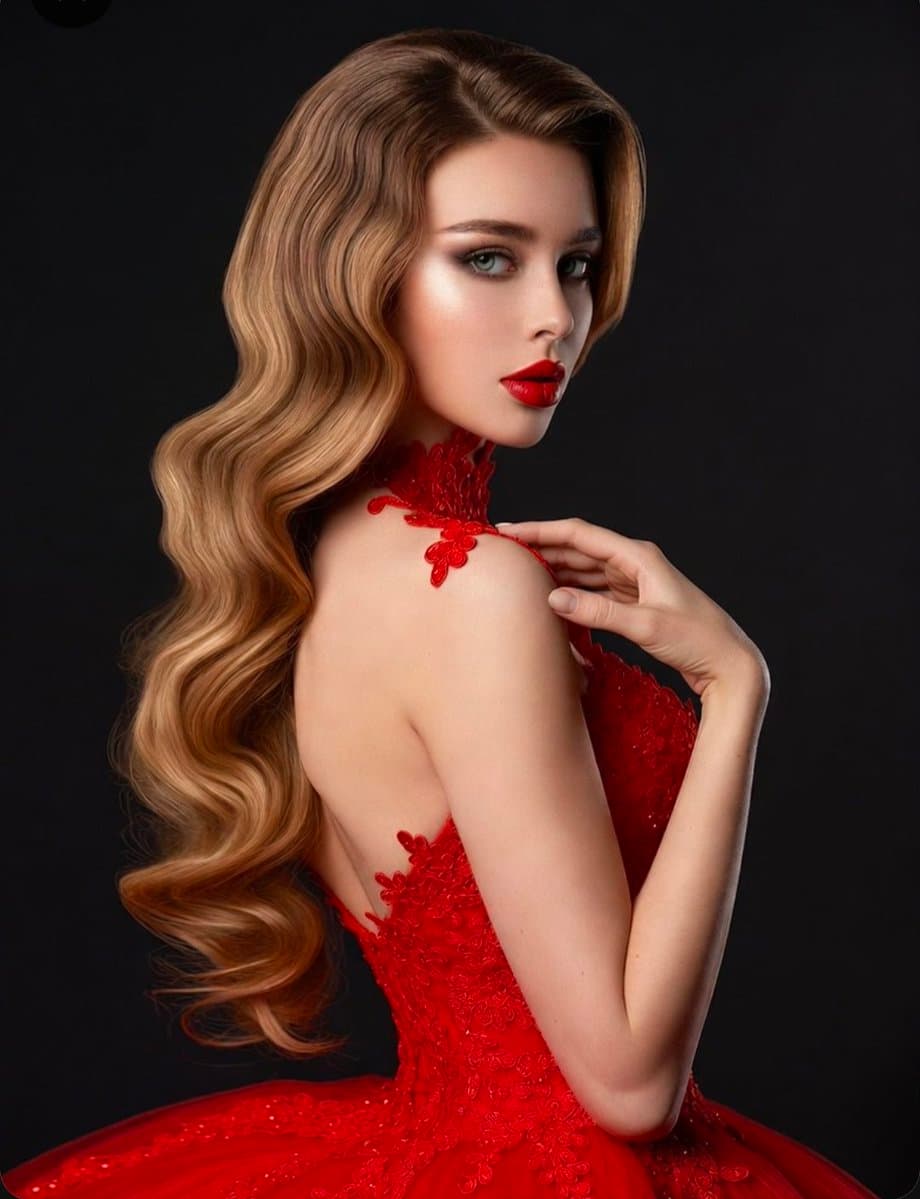
A professional studio portrait of a glamorous woman with long, voluminous blonde hair styled in flawless, glossy Old Hollywood waves. She is wearing a striking, vibrant red gown featuring intricate lace detailing along the neckline, bodice, and sheer mesh panels. Her makeup is dramatic and elegant, showcasing a classic bold red lip, perfectly sculpted eyebrows, and subtle smokey eye makeup with defined eyeliner. Set against a solid, dark black background, the lighting beautifully highlights the smooth texture of her hair, the rich red of her dress, and her refined features. The composition captures her in a sophisticated and elegant pose, creating a cohesive, high-fashion aesthetic.

Reference to result

Three steps forward, without starting from a blank canvas.

  1. 01

    Pick a reference

    Choose the frame closest to your goal in composition, color, and purpose.

  2. 02

    Adjust the details

    Change the subject, copy, style, and image ratio in the generator.

  3. 03

    Generate the image

    Keep the prefilled reference, generate, then refine from the result.

Nothing quite fits?

Start with a blank prompt and define the subject, composition, typography, and aspect ratio yourself.

Create from scratch
Working notes

Get closer to a finished image on the first pass.

01

About Hollywood prompts

Hollywood prompts help organize visual ideas around a specific style, subject, medium, or photography use case. Published examples may change as the collection grows.

02

How to write a stronger Hollywood prompt

Name the main subject first, then define composition, environment, lighting, palette, materials, camera or rendering technique, aspect ratio, and the intended output.

03

How to refine the generated result

Remove conflicting style instructions, keep one clear visual direction, and review anatomy, text, logos, perspective, and important category-specific details before publishing.

Common questions

A few things to know before you begin.

What are Hollywood AI image prompts?

They are reusable visual briefs grouped under the Hollywood category. Each brief can be adapted to a different subject, reference image, composition, or output size.

How are Hollywood examples selected for this collection?

Published prompts are assigned to this collection when their subject, style, or intended use matches the Hollywood category.

Can I customize these Hollywood prompts?

Yes. Replace the subject and context, then adjust the lighting, palette, materials, lens or rendering method, aspect ratio, and detail level for your project.