Illusion prompt library

Illusion AI Image Prompts

Browse illusion examples and reusable AI image prompts for composition, lighting, color, materials, and style.

Browse a focused illusion category based on the PromptPlum taxonomy. Use the references as starting points, then rewrite each prompt for your own subject, format, and visual goal.

Visual reference set
illusion
Library size
3 public prompts
Visual reference set03 / REF
Illusion AI Image Prompts reference 101
Illusion AI Image Prompts reference 202
Illusion AI Image Prompts reference 303
VEYVIA / ILLUSIONCURATED
Prompt library

Choose the closest frame to begin.

Open any reference to inspect the full prompt, or take its image and aspect ratio straight into the generator.

3 public prompts
Illusion AI Image Prompts prompt 101
illusionentertainment-musicstreetwear

Ultra-realistic top-down street-fashion composition showing an adult woman standing on a giant smartphone music-player interface embedded in a city sidewalk. Use convincing forced perspective so she appears tiny on the oversized album artwork. Style her in edgy Y2K streetwear with braids, bandana, round glasses, layered silver jewelry, dark cargo shorts, socks, and suede shoes; place a burgundy shoulder bag nearby. Include the photographer's shoes at the bottom edge to reinforce the illusion. Realistic concrete, soft overcast light, subtle shadows, crisp interface geometry without real app logos, editorial urban photography.

Illusion AI Image Prompts prompt 202
illusiondigital-manipulationsurrealism-photorealism

Surreal out-of-bounds scale-manipulation photograph, vertical 4:5, casual streetwear aesthetic, hyper-realistic composite, shot from a HIGH ANGLE looking down. **BASE LAYER:** The torso of a woman seen from above, wearing an oversized cropped brown-taupe washed cotton work jacket with a full-length zipper, a flap chest pocket and boxy sleeves, worn open over a white ribbed tank top, with wide-leg BLACK trousers filling the lower third of the frame and chunky black leather lug-sole loafers — only her torso, hands and legs are visible in foreshortening, her head out of frame. A black belt with a large oval polished silver buckle, and a small carabiner with keys clipped to the belt loop hanging over the black trousers. **MIDDLE LAYER:** She holds a smartphone in both open hands, fingers extended, palms relaxed as if presenting an offering; large hands in the foreground wearing several chunky silver rings. The phone screen displays the LIVE CAMERA APP interface — visible mode selector reading CINEMATIC / VIDEO / PHOTO / PORTRAIT / PANO, a circular shutter button and the bottom home bar — the fact that it is the live camera rather than a saved photo is what makes the illusion unsettling. **TOP LAYER — THE OUT-OF-BOUNDS EFFECT:** A MINIATURE version of the same woman (face of the reference person), about 1/4 scale, whose legs and black loafers are INSIDE the phone screen while the rest of her body emerges from the top edge of the phone and stands upright in real space above it. She stands smiling broadly, right hand raised touching her temple and sunglasses. Her outfit is IDENTICAL to the large subject’s — a black baseball cap worn backwards, black rectangular sunglasses with thick frames, the same brown-taupe cropped work jacket open over a white ribbed tank top, a thin silver chain necklace with a small red stone pendant, chunky silver rings, the same black belt with oval silver buckle, wide-leg black trousers and black lug-sole loafers — this exact garment continuity between the two scales is the key to the composite. **BACKGROUND:** Essentially absent; the large subject’s own body fills the entire frame with only a sliver of gray concrete ground visible in the upper right corner; this lack of spatial reference is deliberate and prevents the montage from being exposed. **LIGHTING:** Natural outdoor daylight from above, clear or lightly overcast, soft shadows, with excellent lighting consistency between the hands, the phone and the miniature figure — the single element holding the composite together. **Palette:** Restrained warm neutrals — dominant black trousers and cap against the brown-taupe jacket, with the white tank top as the brightest tonal separator and silver hardware as the only metallic accent; the brown jacket anchors the upper two thirds and keeps the frame from flattening into pure black. Shot on 28-35mm from a high angle, exaggerating the size of the hands in the foreground, deep depth of field with everything sharp.

Illusion AI Image Prompts prompt 303
ai image promptsprompt libraryillusion

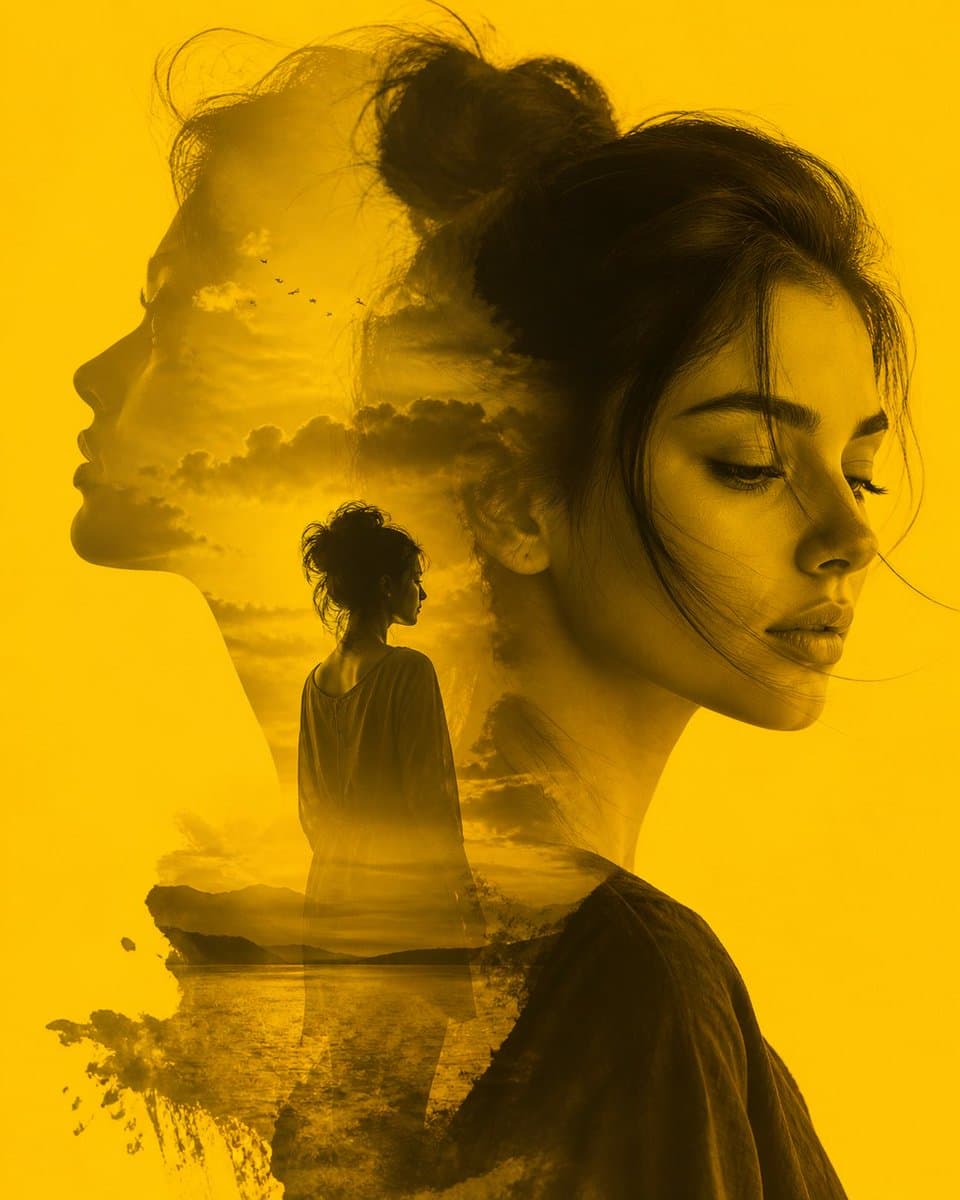
A striking double exposure composition in a monochromatic golden-yellow hue, blending the profiles of a woman with a serene landscape. The primary subject features a soft, detailed close-up of a woman's face in three-quarter view, her eyes downcast in a pensive or melancholic expression. Within her silhouette, a second profile gazes toward the horizon, revealing a dreamlike scene of a distant figure standing by a calm lake at sunset. The image is characterized by smooth transitions, atmospheric clouds, and a flock of birds, evoking a deep sense of introspection, memory, and longing.

Reference to result

Three steps forward, without starting from a blank canvas.

  1. 01

    Pick a reference

    Choose the frame closest to your goal in composition, color, and purpose.

  2. 02

    Adjust the details

    Change the subject, copy, style, and image ratio in the generator.

  3. 03

    Generate the image

    Keep the prefilled reference, generate, then refine from the result.

Nothing quite fits?

Start with a blank prompt and define the subject, composition, typography, and aspect ratio yourself.

Create from scratch
Working notes

Get closer to a finished image on the first pass.

01

About Illusion prompts

Illusion prompts help organize visual ideas around a specific style, subject, medium, or photography use case. Published examples may change as the collection grows.

02

How to write a stronger Illusion prompt

Name the main subject first, then define composition, environment, lighting, palette, materials, camera or rendering technique, aspect ratio, and the intended output.

03

How to refine the generated result

Remove conflicting style instructions, keep one clear visual direction, and review anatomy, text, logos, perspective, and important category-specific details before publishing.

Common questions

A few things to know before you begin.

What are Illusion AI image prompts?

They are reusable visual briefs grouped under the Illusion category. Each brief can be adapted to a different subject, reference image, composition, or output size.

How are Illusion examples selected for this collection?

Published prompts are assigned to this collection when their subject, style, or intended use matches the Illusion category.

Can I customize these Illusion prompts?

Yes. Replace the subject and context, then adjust the lighting, palette, materials, lens or rendering method, aspect ratio, and detail level for your project.