Media & Entertainment prompt library

Media & Entertainment AI Image Prompts

Browse media & entertainment examples and reusable AI image prompts for composition, lighting, color, materials, and style.

Browse a focused media & entertainment category based on the PromptPlum taxonomy. Use the references as starting points, then rewrite each prompt for your own subject, format, and visual goal.
Visual reference set
media entertainment
Library size
2 public prompts
Visual reference set02 / REF
Media & Entertainment AI Image Prompts reference 101
Media & Entertainment AI Image Prompts reference 202
VEYVIA / MEDIA-ENTERTAINMENTCURATED
Prompt library

Choose the closest frame to begin.

Open any reference to inspect the full prompt, or take its image and aspect ratio straight into the generator.

2 public prompts
Media & Entertainment AI Image Prompts prompt 101
media & entertainmentmedia-entertainmentmovies

Prompt Studio: Cinema Ticket with Nano Banana Pro in Firefly Boards Epic 3D macro scene: a torn cinema ticket filling the entire frame, shot from a low dramatic angle just centimeters above the surface. The ticket occupies 80% of the composition, every fiber of aged paper visible, every ink groove tactile. [FILM TITLE] erupts upward from the printed text in massive scale relative to the stub. [KEY SCENE] frozen at its most cinematic moment dominates the upper half of the frame. [CHARACTER] towering mid-action, their silhouette breaking above the ticket's top edge into the cinema darkness. [LOCATION FROM FILM] sprawls across the full width of the stub's surface in extraordinary miniature relief, each building and landmark rendered in obsessive detail, close enough to read street signs. The seat number is carved deep into the paper, visible in the ghost-cinema behind, one amber light among dark rows, bokeh-soft but unmistakable. The date stamp radiates weather directly, moisture in the air, cold breath, summer haze rising off the surface. The perforated tear edge, now monumental, becomes a cliff face / shoreline / fault line running the full right side of frame. The barcode looms large, each bar a skyscraper in silhouette. The projector beam enters hard from upper left, raking across the ticket surface and sculpting every texture. Extreme macro tilt-shift, f/1.4 depth of field, front edge sharp / back edge dissolving into cinema black. 8K. The ticket is not a world in miniature, it IS the world, seen from inside it. Check ALTs for ideas 👇 @AdobeFirefly

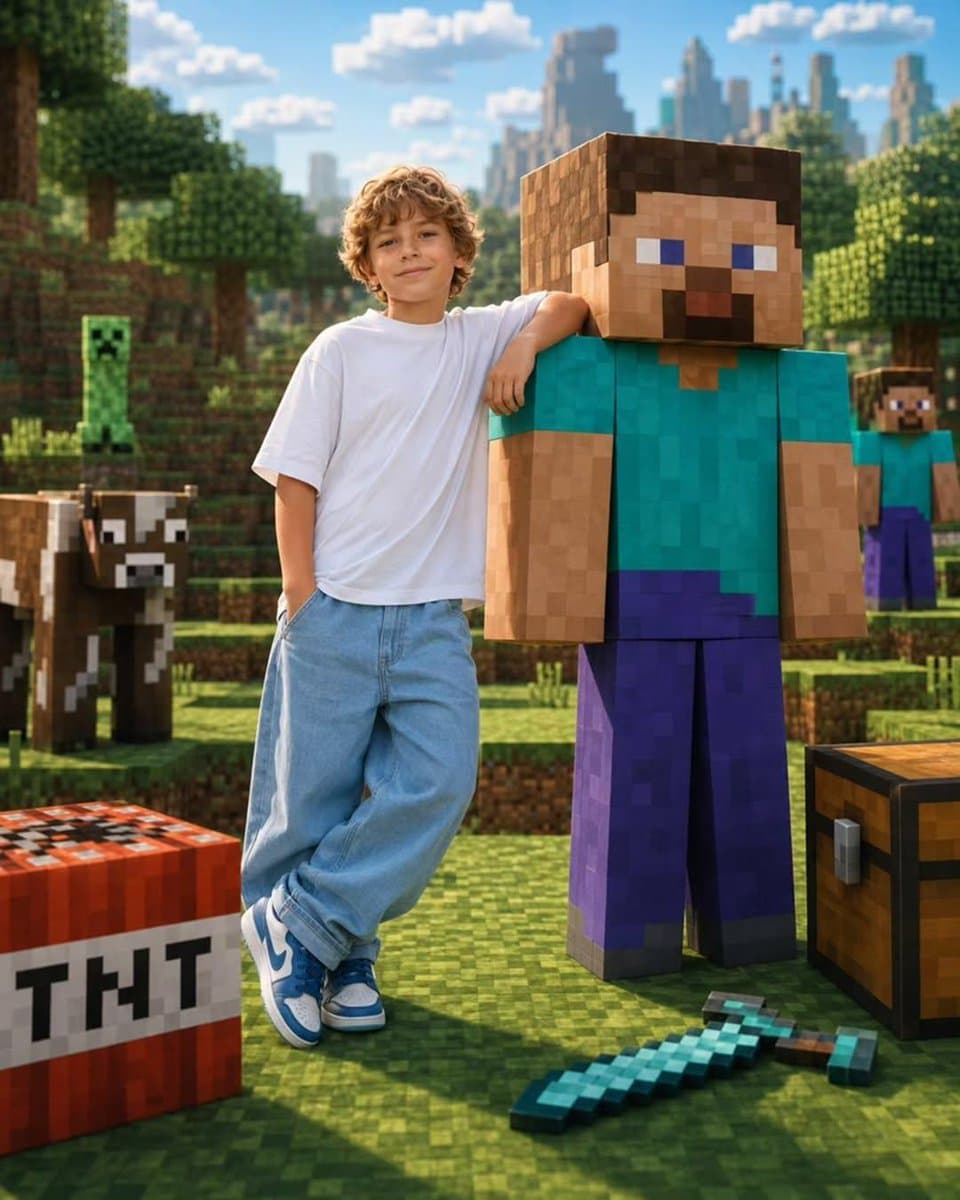
Media & Entertainment AI Image Prompts prompt 202
media & entertainmentai image promptsprompt library

Create a highly realistic portrait of a real person standing naturally beside a life-sized version of their favorite fictional character, toy, game avatar, mascot, or animated icon. The real person casually rests one arm over the character's shoulder while both face the camera with relaxed smiles, creating the feeling of lifelong best friends. The character retains its original iconic appearance and proportions, while the human remains fully photorealistic with natural skin textures and realistic clothing. The environment should automatically transform into the character's authentic universe. For example, if the character is Minecraft Steve, place them in a realistic Minecraft overworld with pixelated grass blocks, trees, mountains, creepers, cows, TNT, diamond tools, chests, villages, and cinematic sunlight. If the character is Barbie, place them inside a luxurious pink Barbie Dreamhouse boutique filled with pastel décor, fashion racks, balloons, neon Barbie signage, glamorous lighting, and premium lifestyle aesthetics. Adapt the background, props, lighting, and color palette to perfectly match whichever fictional universe is chosen. Ultra-photorealistic, seamless blend of reality and fantasy, cinematic composition, premium commercial photography, 35mm lens, HDR, 8K, shallow depth of field, soft natural lighting, vibrant colors, realistic shadows, ultra-detailed textures, luxury editorial style, playful atmosphere, viral social-media aesthetic.

Reference to result

Three steps forward, without starting from a blank canvas.

  1. 01

    Pick a reference

    Choose the frame closest to your goal in composition, color, and purpose.

  2. 02

    Adjust the details

    Change the subject, copy, style, and image ratio in the generator.

  3. 03

    Generate the image

    Keep the prefilled reference, generate, then refine from the result.

Nothing quite fits?

Start with a blank prompt and define the subject, composition, typography, and aspect ratio yourself.

Create from scratch
Working notes

Get closer to a finished image on the first pass.

01

About Media & Entertainment prompts

Media & Entertainment prompts help organize visual ideas around a specific style, subject, medium, or photography use case. Published examples may change as the collection grows.

02

How to write a stronger Media & Entertainment prompt

Name the main subject first, then define composition, environment, lighting, palette, materials, camera or rendering technique, aspect ratio, and the intended output.

03

How to refine the generated result

Remove conflicting style instructions, keep one clear visual direction, and review anatomy, text, logos, perspective, and important category-specific details before publishing.

Common questions

A few things to know before you begin.

What are Media & Entertainment AI image prompts?

They are reusable visual briefs grouped under the Media & Entertainment category. Each brief can be adapted to a different subject, reference image, composition, or output size.

How are Media & Entertainment examples selected for this collection?

Published prompts are assigned to this collection when their subject, style, or intended use matches the Media & Entertainment category.

Can I customize these Media & Entertainment prompts?

Yes. Replace the subject and context, then adjust the lighting, palette, materials, lens or rendering method, aspect ratio, and detail level for your project.