Moody AI Image Prompts
Browse moody examples and reusable AI image prompts for composition, lighting, color, materials, and style.
Browse a focused moody category based on the PromptPlum taxonomy. Use the references as starting points, then rewrite each prompt for your own subject, format, and visual goal.
Create a moody image


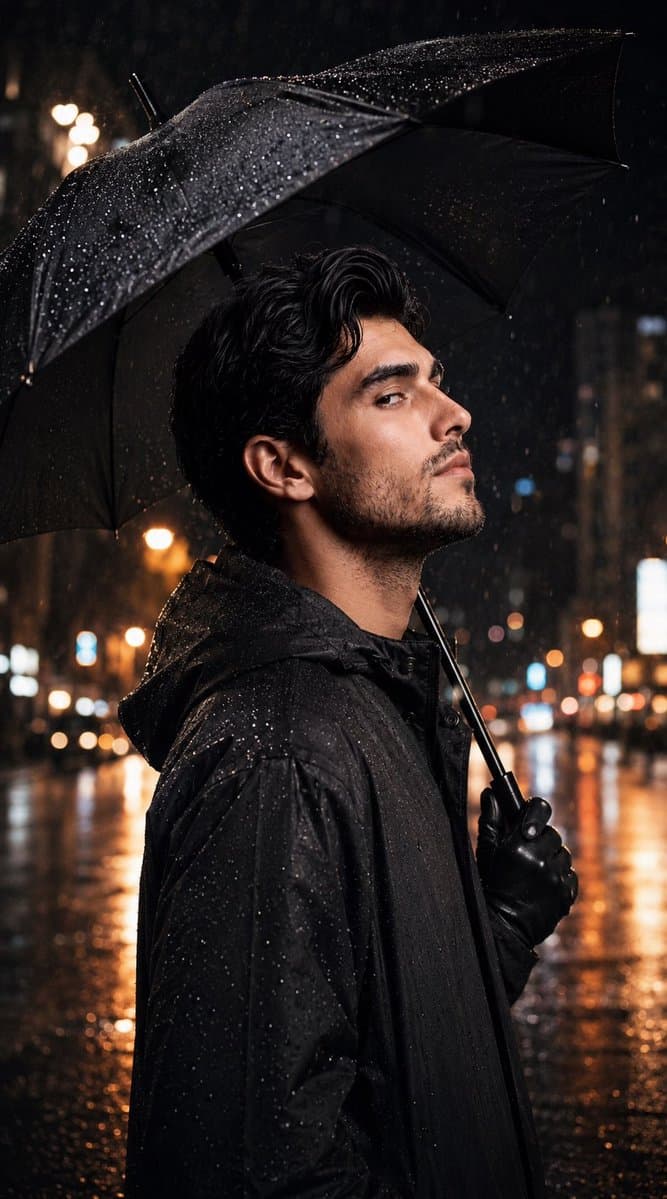
Ultra-realistic cinematic night portrait of the person from the uploaded photo, preserving the exact facial features, hairstyle, skin tone, and identity. He is wearing a premium black waterproof raincoat with black leather gloves. In one hand, he holds a large open black umbrella, tilted slightly backward to cover his head and shoulders while keeping his entire face fully visible. His face is illuminated by a soft, bright directional key light that enhances his facial structure, sharp jawline, and natural skin texture. Expression is calm, confident, and slightly thoughtful, looking directly at the camera. The background features a blurred nighttime metropolitan street with glowing streetlights, cinematic bokeh, wet asphalt reflecting warm city lights, and subtle rainfall. Raindrops are barely visible, creating a moody, atmospheric ambience. Warm orange and golden highlights contrast with cool blue shadows, giving a premium neo-noir cinematic look. Professional editorial photography, shallow depth of field, ultra-detailed, HDR, 85mm lens, f/1.4, realistic skin texture, natural proportions, dramatic lighting, 8K, masterpiece, photorealistic.

Dark shoujo anime style, [subject] with delicate features, emotional expression, flowing hair, symbolic [details], muted [color1] and [color2] palette, soft glow, ornate composition, elegant linework, melancholic beauty, dreamlike atmosphere, romantic gothic aesthetic, detailed eyes, floating elements, cinematic illustration.

A professional fashion studio photoshoot featuring a sophisticated woman with a sleek, straight blonde bob haircut. She wears an elegant, form-fitting, long-sleeved midnight blue gown completely adorned with shimmering sequins, featuring a high leg slit and an attached matching draped scarf or cape element. Her look is accessorized with diamond drop earrings, glittering bracelets, rings, and sparkly silver stiletto heeled sandals. The setting is a moody studio with a dark background, accented by a dramatic overhead spotlight casting a soft glow. In the full-length shots, she poses gracefully next to a stack of high-end fashion coffee table books including Vogue, Chanel, and Architectural Digest. The collection includes close-up portraits, seated poses on a black leather bench, and elegant full-body standing shots, showcasing a luxurious, high-fashion aesthetic.

Extreme close-up cinematic portrait of a freckled woman with long dark hair emerging from near darkness, a narrow band of warm directional light crossing her lower face and cheek, eyes looking slightly upward, deep surrounding shadows, glossy natural lips, visible pores and skin texture, moody low-key photography, shallow depth of field, rich black and amber tones.
How to generate Moody AI Image Prompts in three steps in seconds
Use our finely tuned templates to spark your AI creativity instantly
Choose template & click AI
Browse the templates below, select a suitable style, and click the 'AI' button.
Enter relevant information
Customize the pre-filled prompt by entering relevant design details.
Generate and wait
Click generate and wait; usually, your creation finishes in just a few seconds.
Or, create your own Moody AI Image Prompts
Can't find the perfect template? You can customize your own prompt from scratch, defining your own styles and settings.
FAQ
What are Moody AI image prompts?
They are reusable visual briefs grouped under the Moody category. Each brief can be adapted to a different subject, reference image, composition, or output size.
How are Moody examples selected for this collection?
Published prompts are assigned to this collection when their subject, style, or intended use matches the Moody category.
Can I customize these Moody prompts?
Yes. Replace the subject and context, then adjust the lighting, palette, materials, lens or rendering method, aspect ratio, and detail level for your project.