Outfit Transfer prompt library

Outfit Transfer AI Image Prompts

Browse outfit transfer examples and reusable AI image prompts for composition, lighting, color, materials, and style.

Browse a focused outfit transfer category based on the PromptPlum taxonomy. Use the references as starting points, then rewrite each prompt for your own subject, format, and visual goal.
Visual reference set
outfit transfer
Library size
2 public prompts
Visual reference set02 / REF
Outfit Transfer AI Image Prompts reference 101
Outfit Transfer AI Image Prompts reference 202
VEYVIA / OUTFIT-TRANSFERCURATED
Prompt library

Choose the closest frame to begin.

Open any reference to inspect the full prompt, or take its image and aspect ratio straight into the generator.

2 public prompts
Outfit Transfer AI Image Prompts prompt 101
outfit transferoutfit-transfersaree

Built on a ChatGPT AI prompt, brought to life with Gemini Nano Banana Pro 🍌 The level of detail and realism here is seriously next level. Prompt ⤵️ { "type": "image_generation", "model_style": "ultra_photorealistic", "aspect_ratio": "9:16", "resolution": "8K", "quality": "high_detail_realism", "identity_reference": { "use_reference_image": true, "face_preservation": "exact", "body_preservation": "exact", "no_facial_changes": true, "no_body_modification": true }, "subject": { "gender": "female", "age": "young adult", "expression": "soft confident gaze, natural lips slightly parted", "pose": "slightly angled mirror selfie pose, relaxed shoulders, natural posture", "hair": { "color": "dark brown", "style": "loose, natural volume, middle part", "texture": "smooth and realistic" }, "skin": { "tone": "warm natural complexion", "detail": "visible skin texture, realistic highlights, no plastic look" } }, "outfit": { "style": "black saree with modern blouse", "blouse": "black sleeveless blouse with subtle shimmer embroidery", "saree": "black draped saree with soft fabric folds and realistic fabric physics", "accessories": [ "delicate waist chain", "minimal jewelry" ] }, "environment": { "location": "indoor modern bedroom or dressing area", "background": "clean white wardrobe cabinets", "lighting": { "type": "soft indoor lighting", "source": "overhead ceiling light", "effect": "natural shadows, balanced highlights" } }, "camera": { "device": "smartphone", "lens": "natural portrait lens", "angle": "slightly above eye level", "focus": "sharp focus on subject, mild background softness", "depth_of_field": "realistic" }, "rendering_rules": { "no_cartoon": true, "no_ai_artifacts": true, "no_over_smoothing": true, "no_extra_limbs": true, "no_distorted_hands": true, "no_text_or_watermark": true }, "final_look": "looks like a real candid photo, ultra-realistic, editorial yet natural" }

Outfit Transfer AI Image Prompts prompt 202
outfit transferai image promptsprompt library

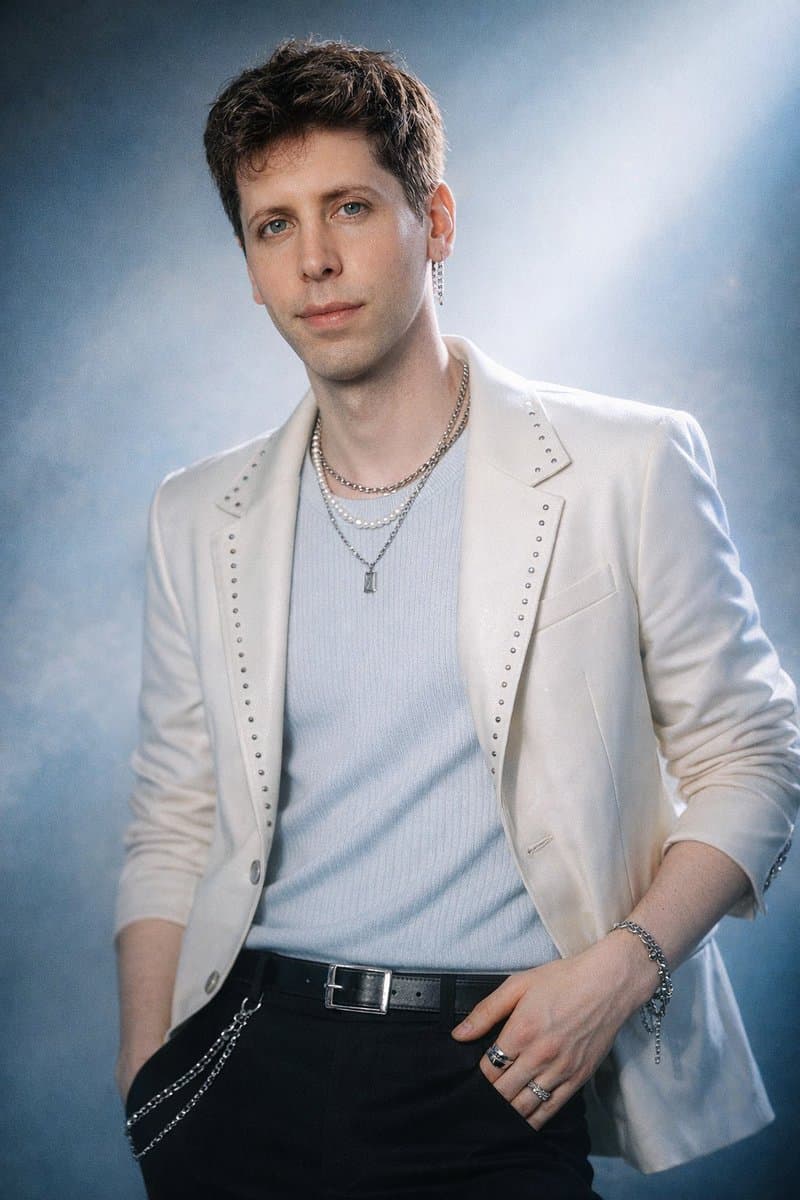
Using the provided image of the subject as reference, transform them into a K-pop idol–style version of themselves, fully preserving their natural facial features, skin tone, ethnicity, and identity. Style the subject with a polished, high-fashion idol aesthetic inspired by contemporary K-pop concept photoshoots, featuring editorial studio lighting with soft glow and clean highlights, a flawless but natural dewy skin finish, and subtle enhancement of the eyes, lips, and hair for a camera-ready look. The subject poses confidently with expressive yet controlled body language, styled in fashion-forward outfits influenced by modern K-pop trends such as elevated streetwear, Y2K accents, chic tailoring, glam punk, or soft ethereal looks, adapted to complement their original clothing style. The atmosphere resembles a professional idol photoshoot, using bold colored backdrops or moody dramatic environments, studio or concert-style lighting, cinematic shadows, and refined color grading, with optional tasteful details like layered jewelry, belts, or statement accessories kept cohesive and restrained. The final image should feel like an authentic K-pop concept photo—crisp, stylish, and aspirational—projecting polished charisma and star presence while clearly remaining the same person.

Reference to result

Three steps forward, without starting from a blank canvas.

  1. 01

    Pick a reference

    Choose the frame closest to your goal in composition, color, and purpose.

  2. 02

    Adjust the details

    Change the subject, copy, style, and image ratio in the generator.

  3. 03

    Generate the image

    Keep the prefilled reference, generate, then refine from the result.

Nothing quite fits?

Start with a blank prompt and define the subject, composition, typography, and aspect ratio yourself.

Create from scratch
Working notes

Get closer to a finished image on the first pass.

01

About Outfit Transfer prompts

Outfit Transfer prompts help organize visual ideas around a specific style, subject, medium, or photography use case. Published examples may change as the collection grows.

02

How to write a stronger Outfit Transfer prompt

Name the main subject first, then define composition, environment, lighting, palette, materials, camera or rendering technique, aspect ratio, and the intended output.

03

How to refine the generated result

Remove conflicting style instructions, keep one clear visual direction, and review anatomy, text, logos, perspective, and important category-specific details before publishing.

Common questions

A few things to know before you begin.

What are Outfit Transfer AI image prompts?

They are reusable visual briefs grouped under the Outfit Transfer category. Each brief can be adapted to a different subject, reference image, composition, or output size.

How are Outfit Transfer examples selected for this collection?

Published prompts are assigned to this collection when their subject, style, or intended use matches the Outfit Transfer category.

Can I customize these Outfit Transfer prompts?

Yes. Replace the subject and context, then adjust the lighting, palette, materials, lens or rendering method, aspect ratio, and detail level for your project.