Photoshoot prompt library

Photoshoot AI Image Prompts

Browse photoshoot examples and reusable AI image prompts for composition, lighting, color, materials, and style.

Browse a focused photoshoot category based on the PromptPlum taxonomy. Use the references as starting points, then rewrite each prompt for your own subject, format, and visual goal.
Visual reference set
photogrphy
Library size
3 public prompts
Visual reference set03 / REF
Photoshoot AI Image Prompts reference 101
Photoshoot AI Image Prompts reference 202
Photoshoot AI Image Prompts reference 303
VEYVIA / PHOTOGRPHYCURATED
Prompt library

Choose the closest frame to begin.

Open any reference to inspect the full prompt, or take its image and aspect ratio straight into the generator.

3 public prompts
Photoshoot AI Image Prompts prompt 101
photoshootai image promptsprompt library

Cinematic fashion studio scene of a woman positioning lights around a miniature version of herself posed for a photoshoot. She adjusts tiny reflectors and diffusers, refining shadows and highlights. The miniature model wears a fully detailed outfit with realistic seams, folds, and fabric sheen. Studio setup includes miniature softboxes, cameras, tripods, and backdrop stands. Cinematic lighting reveals skin pores, fabric weave, and polished metal. Macro depth of field, luxury fashion editorial look, ultra-photoreal 8K. Style: cinematic miniature fashion photography, no cartoon, no CGI. 1:1.

Photoshoot AI Image Prompts prompt 202
modeling & posingai image promptsprompt library

A professional fashion studio photoshoot featuring a young woman with long, voluminous, wavy brunette hair styling a vibrant yellow pant suit. The outfit consists of a tailored, structured blazer with clean lapels and matching fitted trousers. The background is a clean, bright white studio setting, occasionally showing subtle hints of photography equipment or backdrops. She displays a variety of confident and elegant poses, including a side-profile walking stance, standing with a hand in her pocket, posing with a hand on her hip, and sitting with her arms crossed, all while delivering a warm, smiling, and expressive look directly toward the camera.

Photoshoot AI Image Prompts prompt 303
photoshootai image promptsprompt library

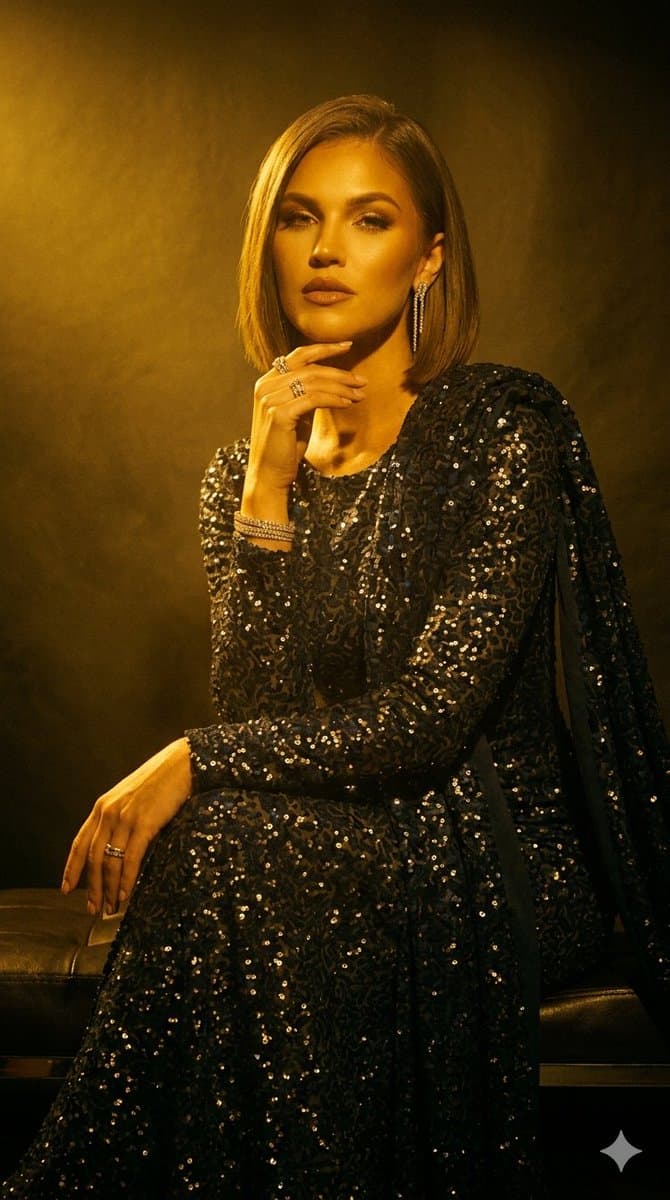
A professional fashion studio photoshoot featuring a sophisticated woman with a sleek, straight blonde bob haircut. She wears an elegant, form-fitting, long-sleeved midnight blue gown completely adorned with shimmering sequins, featuring a high leg slit and an attached matching draped scarf or cape element. Her look is accessorized with diamond drop earrings, glittering bracelets, rings, and sparkly silver stiletto heeled sandals. The setting is a moody studio with a dark background, accented by a dramatic overhead spotlight casting a soft glow. In the full-length shots, she poses gracefully next to a stack of high-end fashion coffee table books including Vogue, Chanel, and Architectural Digest. The collection includes close-up portraits, seated poses on a black leather bench, and elegant full-body standing shots, showcasing a luxurious, high-fashion aesthetic.

Reference to result

Three steps forward, without starting from a blank canvas.

  1. 01

    Pick a reference

    Choose the frame closest to your goal in composition, color, and purpose.

  2. 02

    Adjust the details

    Change the subject, copy, style, and image ratio in the generator.

  3. 03

    Generate the image

    Keep the prefilled reference, generate, then refine from the result.

Nothing quite fits?

Start with a blank prompt and define the subject, composition, typography, and aspect ratio yourself.

Create from scratch
Working notes

Get closer to a finished image on the first pass.

01

About Photoshoot prompts

Photoshoot prompts help organize visual ideas around a specific style, subject, medium, or photography use case. Published examples may change as the collection grows.

02

How to write a stronger Photoshoot prompt

Name the main subject first, then define composition, environment, lighting, palette, materials, camera or rendering technique, aspect ratio, and the intended output.

03

How to refine the generated result

Remove conflicting style instructions, keep one clear visual direction, and review anatomy, text, logos, perspective, and important category-specific details before publishing.

Common questions

A few things to know before you begin.

What are Photoshoot AI image prompts?

They are reusable visual briefs grouped under the Photoshoot category. Each brief can be adapted to a different subject, reference image, composition, or output size.

How are Photoshoot examples selected for this collection?

Published prompts are assigned to this collection when their subject, style, or intended use matches the Photoshoot category.

Can I customize these Photoshoot prompts?

Yes. Replace the subject and context, then adjust the lighting, palette, materials, lens or rendering method, aspect ratio, and detail level for your project.