Pixar-style Art prompt library

Pixar-style Art AI Image Prompts

Browse pixar-style art examples and reusable AI image prompts for composition, lighting, color, materials, and style.

Browse a focused pixar-style art category based on the PromptPlum taxonomy. Use the references as starting points, then rewrite each prompt for your own subject, format, and visual goal.
Visual reference set
pixar style art
Library size
3 public prompts
Visual reference set04 / REF
Pixar-style Art AI Image Prompts reference 101
Pixar-style Art AI Image Prompts reference 202
Pixar-style Art AI Image Prompts reference 303
Pixar-style Art AI Image Prompts reference 404
VEYVIA / PIXAR-STYLE-ARTCURATED
Prompt library

Choose the closest frame to begin.

Open any reference to inspect the full prompt, or take its image and aspect ratio straight into the generator.

3 public prompts
Pixar-style Art AI Image Prompts prompt 101
esportsgaming3d-render

Cute stylized 3D collectible figurine inspired by a football star, with stylized hair and a sporty outfit, sitting casually on a tiny gaming chair holding a game controller. A small gaming setup with RGB keyboard, monitor, and headphones sits beside him. The scene is arranged on a wooden desk with warm ambient lighting, shallow depth of field, cozy gamer room background with blurred neon lights, Pixar-style 3D render, glossy collectible toy finish, cinematic lighting, ultra-detailed designer toy photography.

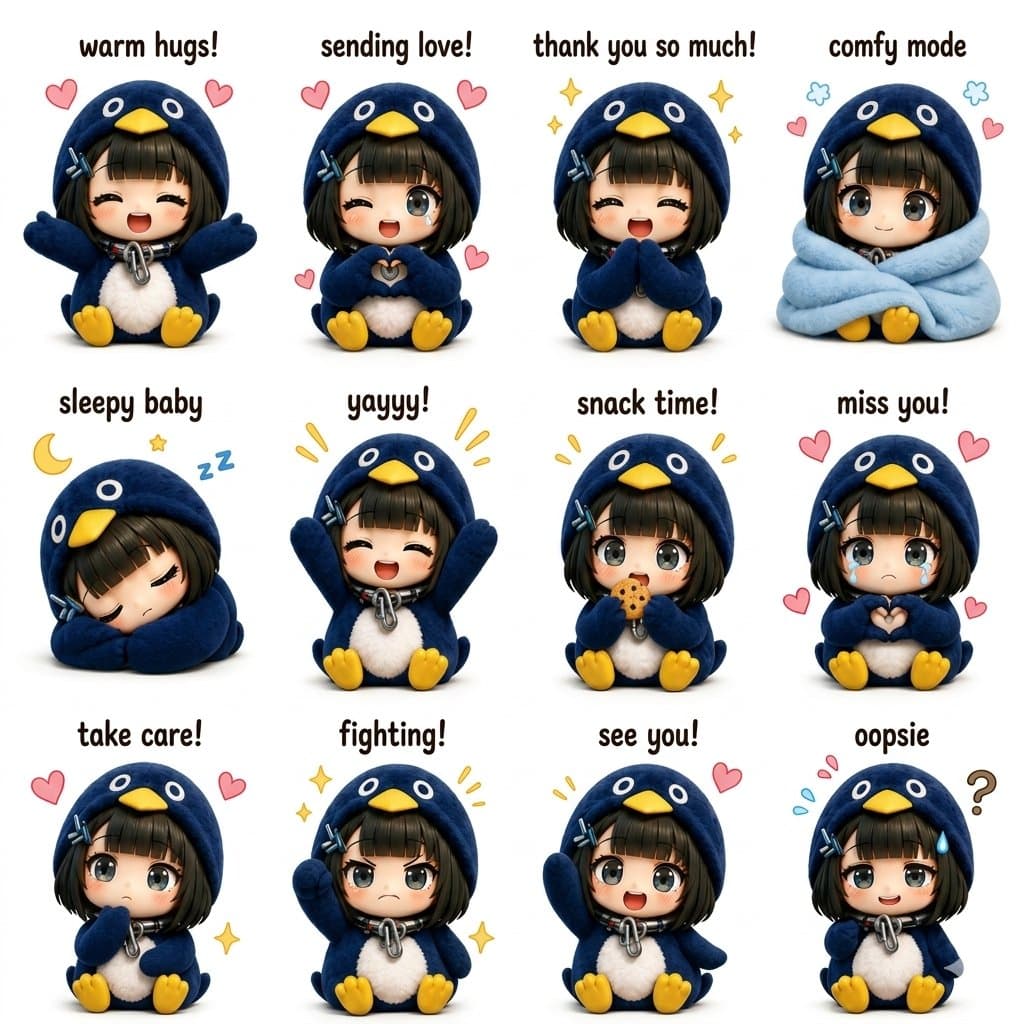
Pixar-style Art AI Image Prompts prompt 202
pixar-style artai image promptsprompt library

Ultra-cute kawaii chibi sticker sheet featuring a tiny anime girl in an oversized fluffy blue penguin hoodie costume with yellow penguin beak hood, soft plush texture, tiny yellow feet, short black bob haircut with bangs and blue hairclips, huge sparkling anime eyes, sitting pose, pastel aesthetic, clean white background, adorable emotional expressions, 3D toy-like rendering, ultra detailed fur fabric, glossy eyes, soft studio lighting, Instagram sticker pack style. Create a 4x3 grid of different poses and emotions with cute handwritten captions above each character such as “warm hugs!”, “sending love!”, “sleepy baby”, “yayyy!”, “snack time!”, “miss you!”, “comfy mode”, “aww!”, “take care!”, “fighting!”, “see you!”, “thank you!”. Each panel should have: Different hand gestures and facial expressions Tiny floating hearts, stars, sparkles, sleepy symbols, or cute doodles Chibi proportions with oversized head and tiny body Plush penguin hoodie with fluffy white belly texture Soft pastel kawaii color palette Consistent character design across all panels Highly polished 3D cartoon render style similar to premium kawaii Instagram sticker packs Symmetrical layout with clean spacing Cute rounded typography above every pose Cozy wholesome mood, collectible sticker aesthetic Style references: kawaii Japanese mascot stickers, Sanrio-inspired, ultra detailed 3D chibi art, Pixar-quality shading, soft shadows, toy-like textures, social media viral sticker sheet aesthetic, high resolution, centered composition.

Pixar-style Art AI Image Prompts prompt 303
twitter3d-renderpixar-style-art

GPT image 2 on Chatgpt Prompt: Adorable 3D food advertisement scene featuring a delicious oversized sandwich / cheesy snack placed on a clean pastel platform, surrounded by tiny chibi-style children interacting with the food (climbing ladders, sitting on top, eating, celebrating). Soft rounded design, playful storytelling composition. Creamy melted cheese, fresh ingredients, glossy textures, ultra-detailed food realism. Mini characters with Pixar-style proportions, expressive faces, soft 3D rendering. Pastel green and warm beige background with smooth gradients, minimal aesthetic props (balls, shapes). Floating speech bubbles with cute text. Big soft 3D typography headline at the top in a rounded, inflated style. Soft studio lighting, subtle shadows, cozy and cheerful mood, high-end commercial food poster, ultra-clean, 4K.

Reference to result

Three steps forward, without starting from a blank canvas.

  1. 01

    Pick a reference

    Choose the frame closest to your goal in composition, color, and purpose.

  2. 02

    Adjust the details

    Change the subject, copy, style, and image ratio in the generator.

  3. 03

    Generate the image

    Keep the prefilled reference, generate, then refine from the result.

Nothing quite fits?

Start with a blank prompt and define the subject, composition, typography, and aspect ratio yourself.

Create from scratch
Working notes

Get closer to a finished image on the first pass.

01

About Pixar-style Art prompts

Pixar-style Art prompts help organize visual ideas around a specific style, subject, medium, or photography use case. Published examples may change as the collection grows.

02

How to write a stronger Pixar-style Art prompt

Name the main subject first, then define composition, environment, lighting, palette, materials, camera or rendering technique, aspect ratio, and the intended output.

03

How to refine the generated result

Remove conflicting style instructions, keep one clear visual direction, and review anatomy, text, logos, perspective, and important category-specific details before publishing.

Common questions

A few things to know before you begin.

What are Pixar-style Art AI image prompts?

They are reusable visual briefs grouped under the Pixar-style Art category. Each brief can be adapted to a different subject, reference image, composition, or output size.

How are Pixar-style Art examples selected for this collection?

Published prompts are assigned to this collection when their subject, style, or intended use matches the Pixar-style Art category.

Can I customize these Pixar-style Art prompts?

Yes. Replace the subject and context, then adjust the lighting, palette, materials, lens or rendering method, aspect ratio, and detail level for your project.