Professional Portraiture prompt library

Professional Portraiture AI Image Prompts

Browse professional portraiture examples and reusable AI image prompts for composition, lighting, color, materials, and style.

Browse a focused professional portraiture category based on the PromptPlum taxonomy. Use the references as starting points, then rewrite each prompt for your own subject, format, and visual goal.
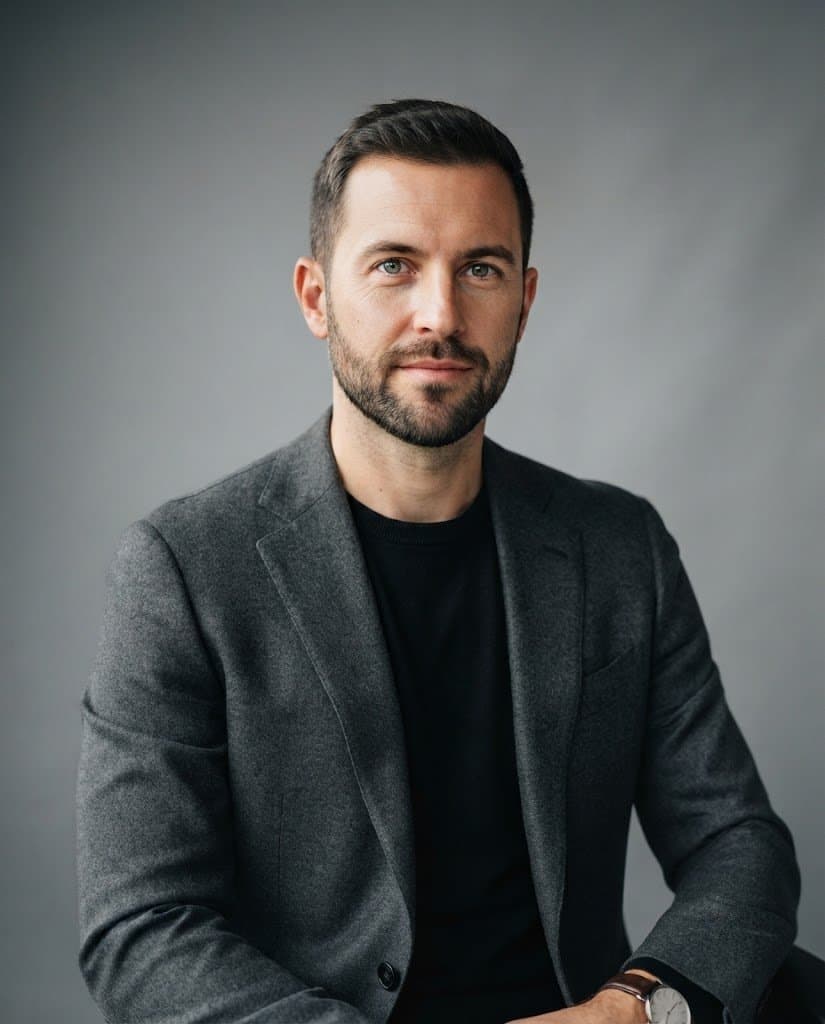
Create a professional portraiture image
Prompt visualization 1
825 × 1024

Ultra-realistic professional studio portrait of a handsome adult man in his early-to-mid 30s, with short neatly styled dark brown hair, subtle natural texture, well-groomed short beard and mustache, light skin with realistic pores and fine facial details, calm confident expression, looking directly into the camera. He is wearing a sophisticated charcoal-gray textured wool blazer with structured shoulders and a black crew-neck knit sweater underneath, creating a refined modern business-casual aesthetic. A classic wristwatch is subtly visible on his left wrist. Medium portrait composition, seated comfortably with his arms naturally positioned, body slightly angled while his face remains directed toward the camera. Eye-level camera angle, centered framing, upper-body portrait, realistic natural proportions. Minimal premium studio environment with a smooth neutral gray background, subtle tonal gradient and gentle depth separation. Soft large diffused key light positioned slightly above and to the side of the face, subtle fill light, delicate natural shadowing, soft highlights across the cheekbones and forehead, realistic catchlights in the eyes, gentle rim separation around the hair and shoulders. Shot on a professional full-frame portrait camera, 85mm portrait lens, approximately f/2.0, shallow depth of field, sharp focus on the eyes and face, smooth natural background bokeh, realistic lens compression. Luxury corporate editorial photography, modern executive portrait, understated elegance, authentic skin texture, natural facial asymmetry, realistic fabric texture, cinematic but neutral color grading, soft contrast, premium magazine-quality photography, photorealistic, highly detailed, natural lighting, no excessive retouching. Vertical 4:5 composition, subject occupying approximately 70% of the frame, generous clean negative space around the head and shoulders, polished professional headshot aesthetic. Negative prompt : cartoon, illustration, CGI, 3D render, anime, plastic skin, waxy face, excessive skin smoothing, beauty filter, over-retouched skin, artificial eyes, distorted face, asymmetrical eyes, extra fingers, deformed hands, malformed arms, duplicated limbs, bad anatomy, unnatural pose, exaggerated muscles, oversaturated colors, harsh lighting, blown highlights, crushed shadows, excessive sharpening, fake bokeh, busy background, distracting objects, text, logo, watermark

Prompt visualization 1
1024 × 1434

Clean minimalist corporate invitation layout. White background with pale blue border frame. Centered bold navy blue sans-serif typography. Small black abstract logo at top. Vertical text alignment for event details. Professional, high-contrast graphic design.

How to generate Professional Portraiture AI Image Prompts in three steps in seconds

Use our finely tuned templates to spark your AI creativity instantly

01

Choose template & click AI

Browse the templates below, select a suitable style, and click the 'AI' button.

02

Enter relevant information

Customize the pre-filled prompt by entering relevant design details.

03

Generate and wait

Click generate and wait; usually, your creation finishes in just a few seconds.

+

Or, create your own Professional Portraiture AI Image Prompts

Can't find the perfect template? You can customize your own prompt from scratch, defining your own styles and settings.

FAQ

What are Professional Portraiture AI image prompts?

They are reusable visual briefs grouped under the Professional Portraiture category. Each brief can be adapted to a different subject, reference image, composition, or output size.

How are Professional Portraiture examples selected for this collection?

Published prompts are assigned to this collection when their subject, style, or intended use matches the Professional Portraiture category.

Can I customize these Professional Portraiture prompts?

Yes. Replace the subject and context, then adjust the lighting, palette, materials, lens or rendering method, aspect ratio, and detail level for your project.