Professional Studio Setup prompt library

Professional Studio Setup AI Image Prompts

Browse professional studio setup examples and reusable AI image prompts for composition, lighting, color, materials, and style.

Browse a focused professional studio setup category based on the PromptPlum taxonomy. Use the references as starting points, then rewrite each prompt for your own subject, format, and visual goal.
Visual reference set
professional studio setup
Library size
2 public prompts
Visual reference set02 / REF
Professional Studio Setup AI Image Prompts reference 101
Professional Studio Setup AI Image Prompts reference 202
VEYVIA / PROFESSIONAL-STUDIO-SETUPCURATED
Prompt library

Choose the closest frame to begin.

Open any reference to inspect the full prompt, or take its image and aspect ratio straight into the generator.

2 public prompts
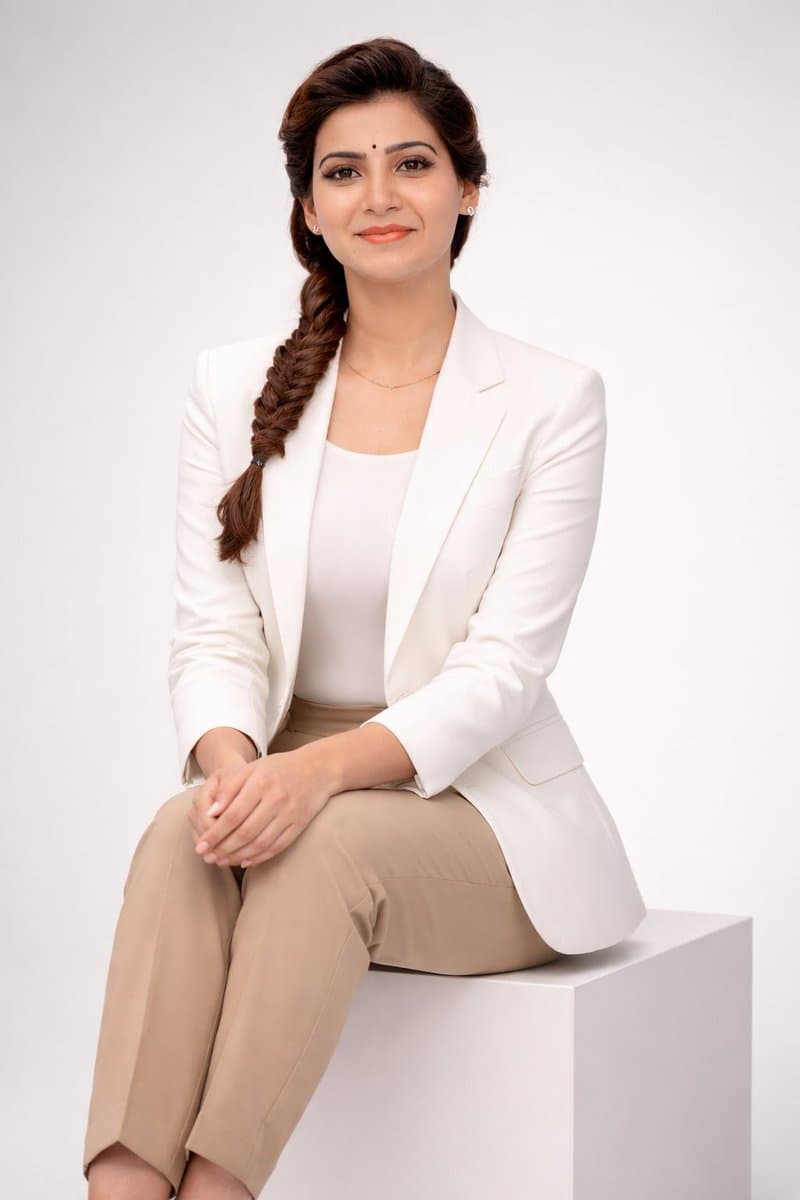
Professional Studio Setup AI Image Prompts prompt 101
professional-studio-setupprofessional studio setupai image prompts

1. Open ChatGPT / Grok / Gemini 2. Upload your photo 3. Prompt: ULTRA-REALISTIC STUDIO PORTRAIT PROMPT (Absolute Identity Lock · Multi-Angle Stable · Photorealistic · Full Body · Vertical) Create an ultra-realistic, high-end professional studio portrait of one adult subject, styled in a clean, modern, executive fashion aesthetic. The subject is seated on a simple white cube, body slightly angled toward the camera, posture upright yet relaxed. Hands gently clasped together, resting naturally on the lap. Expression is confident, warm, and composed, with a subtle professional smile. Overall mood: polished, elegant, modern, trustworthy — pure realism only. No stylization, no cinematic effects, no beauty filters, no exaggeration. WARDROBE & STYLING • Crisp white tailored blazer (matte fabric, no logos) • Minimal white inner top / high-neck tee • Neutral beige or tan tailored trousers • Minimal gold jewelry only (thin chain, bracelet, ring — subtle and realistic) • Clean, natural grooming • Hair styled neatly and naturally, exactly matching the uploaded reference face ENVIRONMENT & LIGHTING • Seamless neutral grey studio background • Soft, even studio lighting with natural falloff • No harsh shadows, no dramatic contrast • True-to-life skin texture and fabric detail • Professional fashion/editorial realism 🔐 IDENTITY REFERENCE — ABSOLUTE (NON-NEGOTIABLE) Use my uploaded face image as the ONLY facial identity reference Maintain 100% facial accuracy at all times, including: • Bone structure • Jawline and chin • Eye shape, eyelids, iris placement • Eyebrow thickness and curvature • Nose bridge, width, and tip • Lip shape and proportions • Cheek volume and facial symmetry • Hairline and facial proportions Face must remain perfectly consistent from every angle (front view, ¾ view, side profile, seated pose, slight head tilt, full-body framing) ❌ No face blending ❌ No morphing ❌ No swapping ❌ No idealization or beautification ❌ No change in facial proportions Exact facial match required. Identity accuracy is the highest priority. Create image

Professional Studio Setup AI Image Prompts prompt 202
twitterartistic-portraitureprofessional-studio-setup

Gemini Nano Banana pro 🍌 Prompt: {"scene": "bright sunlit indoor artist studio", "subject": { "type": "man", "identity": "must match reference exactly, no facial changes", "pose": "standing at easel, slightly leaning forward, painting Ana da armas portrait", "expression": "calm, focused, introspective, looking at portrait" }, "environment": { "elements": ["wooden easel", "canvas", "paint brushes", "palette", "paint tubes", "minimal textured wall"], "lighting": "soft natural daylight from large windows, warm tone, gentle shadows" }, "outfit": { "style": "modern artist, practical yet stylish", "details": "linen shirt or fitted t-shirt with overshirt, trousers or denim, optional apron, neutral tones" }, "composition": { "focus": "man is primary subject, canvas secondary", "framing": "medium to full body, slight angle", "depth_of_field": "shallow, soft background blur" }, "style": ["photorealistic", "editorial", "high detail", "85mm lens", "clean composition"] }

Reference to result

Three steps forward, without starting from a blank canvas.

  1. 01

    Pick a reference

    Choose the frame closest to your goal in composition, color, and purpose.

  2. 02

    Adjust the details

    Change the subject, copy, style, and image ratio in the generator.

  3. 03

    Generate the image

    Keep the prefilled reference, generate, then refine from the result.

Nothing quite fits?

Start with a blank prompt and define the subject, composition, typography, and aspect ratio yourself.

Create from scratch
Working notes

Get closer to a finished image on the first pass.

01

About Professional Studio Setup prompts

Professional Studio Setup prompts help organize visual ideas around a specific style, subject, medium, or photography use case. Published examples may change as the collection grows.

02

How to write a stronger Professional Studio Setup prompt

Name the main subject first, then define composition, environment, lighting, palette, materials, camera or rendering technique, aspect ratio, and the intended output.

03

How to refine the generated result

Remove conflicting style instructions, keep one clear visual direction, and review anatomy, text, logos, perspective, and important category-specific details before publishing.

Common questions

A few things to know before you begin.

What are Professional Studio Setup AI image prompts?

They are reusable visual briefs grouped under the Professional Studio Setup category. Each brief can be adapted to a different subject, reference image, composition, or output size.

How are Professional Studio Setup examples selected for this collection?

Published prompts are assigned to this collection when their subject, style, or intended use matches the Professional Studio Setup category.

Can I customize these Professional Studio Setup prompts?

Yes. Replace the subject and context, then adjust the lighting, palette, materials, lens or rendering method, aspect ratio, and detail level for your project.