Trending prompt library

Trending AI Image Prompts

Browse trending examples and reusable AI image prompts for composition, lighting, color, materials, and style.

Browse a focused trending category based on the PromptPlum taxonomy. Use the references as starting points, then rewrite each prompt for your own subject, format, and visual goal.
Visual reference set
trending
Library size
2 public prompts
Visual reference set02 / REF
Trending AI Image Prompts reference 101
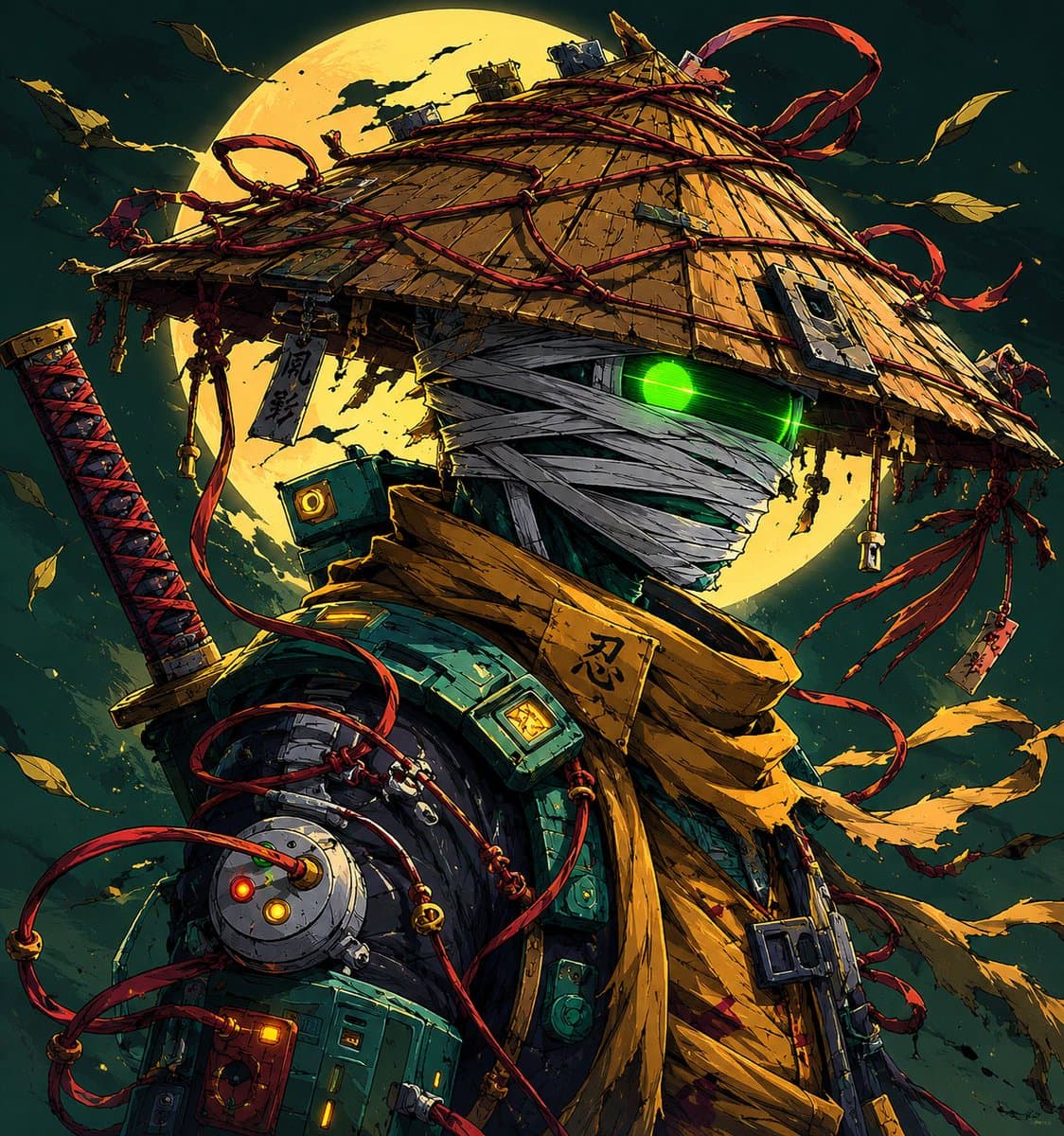
Trending AI Image Prompts reference 202
VEYVIA / TRENDINGCURATED
Prompt library

Choose the closest frame to begin.

Open any reference to inspect the full prompt, or take its image and aspect ratio straight into the generator.

2 public prompts
Trending AI Image Prompts prompt 101
trendingai image promptsprompt library

Ultra-detailed mixed-media sports poster featuring the SAME woman from the reference image, wearing a Royal Challengers Bengaluru (RCB) jersey, holding the IPL trophy beside her. Dynamic fusion of realistic portrait photography, sketch art, watercolor splashes, paint strokes, ink scribbles, and digital painting effects. Explosive red, black, gold, and white color palette. Dramatic championship atmosphere with confetti, fireworks, cheering stadium crowd, RCB flags waving in the background, paint splatter textures, hand-drawn line art accents, and energetic brushwork. The woman has a confident expression, bold red lipstick, flawless skin, short black bob haircut, cinematic lighting, ultra-sharp blue eyes, premium sports-fashion styling. RCB face paint on cheek, luxury gold jewelry accents, highly detailed jersey fabric. Large typography on the right side reading: RCB IPL CHAMPIONS 2026 Handwritten slogan at bottom left: Ee Sala Cup Namde! Premium championship poster design, trending Behance artwork, sports magazine cover aesthetic, layered paint textures, realistic trophy reflections, high contrast, ultra-detailed, 8K, masterpiece, award-winning digital art, vibrant colors, cinematic composition, splash art, sketch effect, watercolor effect, paint explosion effect, mixed-media illustration, poster-worthy design.

Trending AI Image Prompts prompt 202
ai image promptsprompt librarytrending

Ultra detailed cyberpunk samurai ninja warrior standing under a massive glowing full moon, mysterious futuristic ronin aesthetic, face fully wrapped in white bandages with only one neon green glowing eye visible, giant traditional Japanese kasa hat made of worn wood and straw, wrapped with chaotic red ropes and hanging talismans with Japanese kanji symbols like “忍”, “影”, “死神”, cinematic anime illustration style, highly detailed mechanical armor mixed with ancient samurai clothing, glowing tech parts and wires across body, katana on back with red-black handle, flowing scarf and ribbons in the wind, dark teal and gold color palette, dramatic moonlight, floating leaves, gritty texture, insane linework, epic manga poster composition, futuristic Edo Japan vibes, Studio Trigger + Ghost of Tsushima + cyberpunk anime fusion, ultra sharp details, volumetric lighting, dynamic perspective, atmospheric particles, masterpiece quality, japanese text glowing in background saying “闇の忍者”, “月光”, “復讐”, aesthetic Japanese typography for viral X artwork, trending anime art style, 8k. Final overlay text in stylish Japanese aesthetic typography: “#今週のアニワン 月光の忍者” “ブルック 復讐の影” “ジェズス 闇の侍” Image 2 Prompt: Minimalist anime ninja portrait under glowing green moon, mysterious Japanese shinobi character with emotionless face and glowing white eyes, wearing dark purple conical kasa hat with red wave patterns, black face covering and traditional ninja robe, hanging red tassels with Japanese words like “忍者”, “夜”, “影”, soft cinematic moonlight, bamboo silhouettes in foreground, dark misty atmosphere, clean anime lineart, calm but intimidating mood, Japanese folklore inspired character design, aesthetic neon green moon background, smooth cel shading, trending anime profile picture style, ultra clean composition, modern anime illustration, inspired by Japanese mythology and samurai culture, dramatic lighting, high contrast shadows, japanese calligraphy glowing subtly around character saying “静寂”, “侍”, “闇”, perfect for viral X anime audience, high quality digital art, 4k anime wallpaper style. Final overlay text in elegant anime poster typography: “#ラプ様生誕祭2026 静かな影” “日村さん 夜の忍者” “乃木坂工事中 月下の侍”

Reference to result

Three steps forward, without starting from a blank canvas.

  1. 01

    Pick a reference

    Choose the frame closest to your goal in composition, color, and purpose.

  2. 02

    Adjust the details

    Change the subject, copy, style, and image ratio in the generator.

  3. 03

    Generate the image

    Keep the prefilled reference, generate, then refine from the result.

Nothing quite fits?

Start with a blank prompt and define the subject, composition, typography, and aspect ratio yourself.

Create from scratch
Working notes

Get closer to a finished image on the first pass.

01

About Trending prompts

Trending prompts help organize visual ideas around a specific style, subject, medium, or photography use case. Published examples may change as the collection grows.

02

How to write a stronger Trending prompt

Name the main subject first, then define composition, environment, lighting, palette, materials, camera or rendering technique, aspect ratio, and the intended output.

03

How to refine the generated result

Remove conflicting style instructions, keep one clear visual direction, and review anatomy, text, logos, perspective, and important category-specific details before publishing.

Common questions

A few things to know before you begin.

What are Trending AI image prompts?

They are reusable visual briefs grouped under the Trending category. Each brief can be adapted to a different subject, reference image, composition, or output size.

How are Trending examples selected for this collection?

Published prompts are assigned to this collection when their subject, style, or intended use matches the Trending category.

Can I customize these Trending prompts?

Yes. Replace the subject and context, then adjust the lighting, palette, materials, lens or rendering method, aspect ratio, and detail level for your project.