Viral prompt library

Viral AI Image Prompts

Browse viral examples and reusable AI image prompts for composition, lighting, color, materials, and style.

Browse a focused viral category based on the PromptPlum taxonomy. Use the references as starting points, then rewrite each prompt for your own subject, format, and visual goal.
Visual reference set
viral
Library size
2 public prompts
Visual reference set02 / REF
Viral AI Image Prompts reference 101
Viral AI Image Prompts reference 202
VEYVIA / VIRALCURATED
Prompt library

Choose the closest frame to begin.

Open any reference to inspect the full prompt, or take its image and aspect ratio straight into the generator.

2 public prompts
Viral AI Image Prompts prompt 101
viralai image promptsprompt library

Ultra-realistic cinematic photography, 3:4 ratio. A young woman wearing a yellow oversized cardigan, white T-shirt, relaxed-fit jeans, and canvas sneakers bursts into laughter while holding an iced latte. Beside her, several tiny cartoon versions of herself are riding sugar cubes like skateboards, jumping across coffee cups, and accidentally launching whipped cream everywhere. Theme: surrealism, coffee with your own cartoon twins. Mood: funny, chaotic, energetic. Eye-level shot, colorful modern café, dramatic splash effects, playful motion blur, cinematic lighting, highly detailed, photorealistic.

Viral AI Image Prompts prompt 202
ai image promptsprompt libraryviral

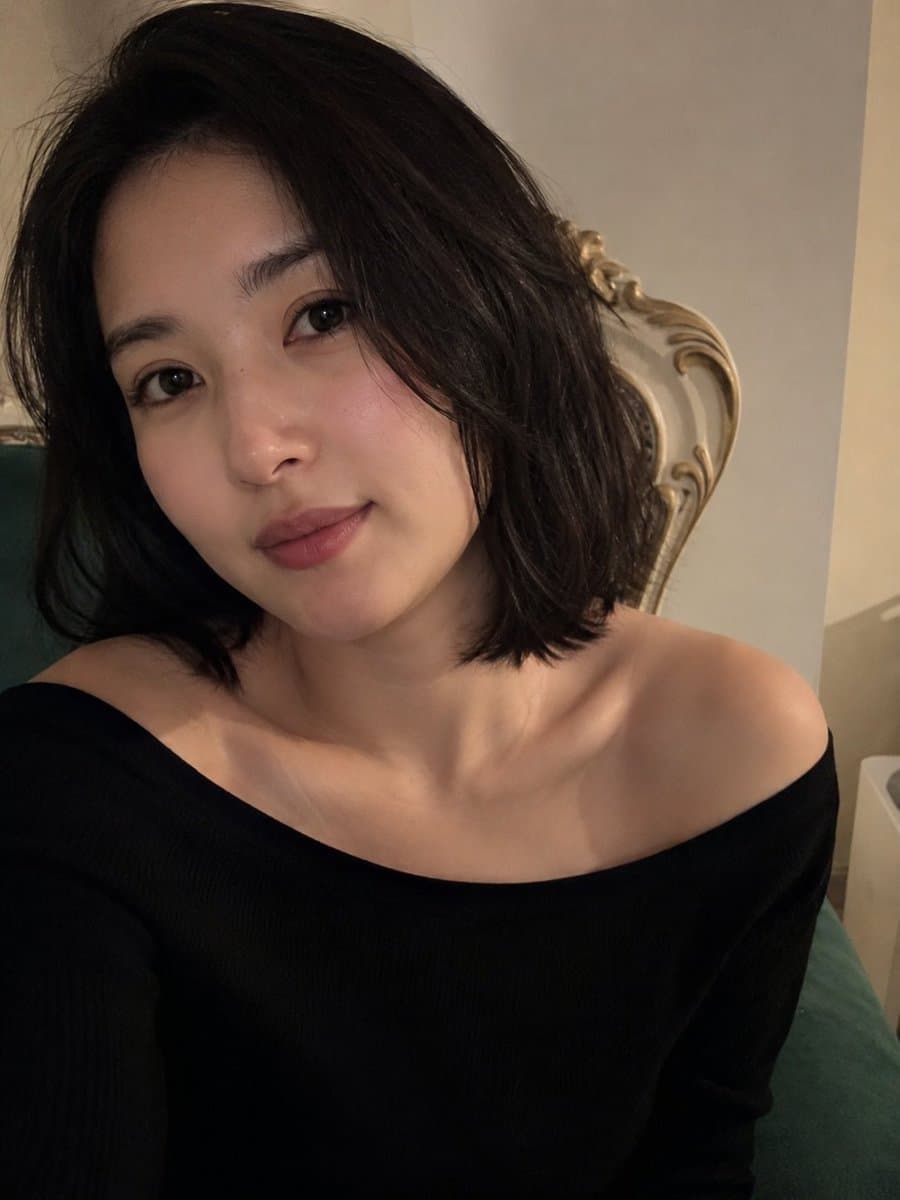
Ultra-realistic, irresistibly eye-catching close-up smartphone portrait of a beautiful young woman in a quiet intimate indoor setting, designed to instantly capture attention while scrolling on X. She has a naturally beautiful face with luminous smooth skin, subtle rosy cheeks, expressive dark almond-shaped eyes with detailed natural catchlights, softly defined eyebrows, a delicate nose, and naturally full soft-pink lips forming a barely noticeable, charming smile. Her short, silky dark-brown bob frames her face perfectly, with a few naturally loose strands falling around her cheeks for an effortlessly attractive look. She wears an elegant minimalist black off-the-shoulder top, beautifully contrasting against her luminous complexion and emphasizing her graceful shoulders and collarbones. Her head is slightly tilted toward the camera, creating a subtle sense of intimacy and direct connection, as though the viewer has just caught a genuine unplanned moment. Cinematic warm indoor lighting softly illuminates one side of her face while creating delicate natural shadows on the other, producing beautiful facial depth and mesmerizing eye highlights. The background features a sophisticated cream-colored wall and an elegant vintage upholstered chair, softly blurred into creamy bokeh so the woman's face remains the unmistakable focal point. Composition: extremely flattering close-up framing, face occupying the upper-center of the frame, slightly above-eye-level camera angle, natural perspective, strong visual hierarchy, clean negative space, authentic smartphone photography aesthetic. Mood: effortlessly beautiful, intimate, mysterious, elegant, warm, authentic, “caught at the perfect moment.” Visual quality: photorealistic skin texture, realistic pores and fine facial details, natural hair strands, physically accurate lighting, subtle lens depth, realistic smartphone dynamic range, gentle cinematic contrast, soft background bokeh, premium editorial photography feel, no plastic skin, no excessive makeup, no artificial beauty filter, no distorted facial features. Final image: highly captivating yet natural, emotionally engaging at first glance, sophisticated and believable, vertical 9:16 composition optimized for maximum visual impact on X/Twitter feeds, ultra-detailed, 4K photographic realism.

Reference to result

Three steps forward, without starting from a blank canvas.

  1. 01

    Pick a reference

    Choose the frame closest to your goal in composition, color, and purpose.

  2. 02

    Adjust the details

    Change the subject, copy, style, and image ratio in the generator.

  3. 03

    Generate the image

    Keep the prefilled reference, generate, then refine from the result.

Nothing quite fits?

Start with a blank prompt and define the subject, composition, typography, and aspect ratio yourself.

Create from scratch
Working notes

Get closer to a finished image on the first pass.

01

About Viral prompts

Viral prompts help organize visual ideas around a specific style, subject, medium, or photography use case. Published examples may change as the collection grows.

02

How to write a stronger Viral prompt

Name the main subject first, then define composition, environment, lighting, palette, materials, camera or rendering technique, aspect ratio, and the intended output.

03

How to refine the generated result

Remove conflicting style instructions, keep one clear visual direction, and review anatomy, text, logos, perspective, and important category-specific details before publishing.

Common questions

A few things to know before you begin.

What are Viral AI image prompts?

They are reusable visual briefs grouped under the Viral category. Each brief can be adapted to a different subject, reference image, composition, or output size.

How are Viral examples selected for this collection?

Published prompts are assigned to this collection when their subject, style, or intended use matches the Viral category.

Can I customize these Viral prompts?

Yes. Replace the subject and context, then adjust the lighting, palette, materials, lens or rendering method, aspect ratio, and detail level for your project.